
Table of Contents
For fashion e-commerce designers and creative professionals, showcasing models in diverse jacket styles is vital for boosting product appeal and sales. Yet traditional jacket replacement comes with frustrating pain points: reshoots involve coordinating models, booking studios, and bearing high costs, while basic photo editing often results in unnatural fabric textures, ill-fitted silhouettes, or mismatched lighting—slowing down workflows and limiting the ability to keep up with fast-changing fashion trends.
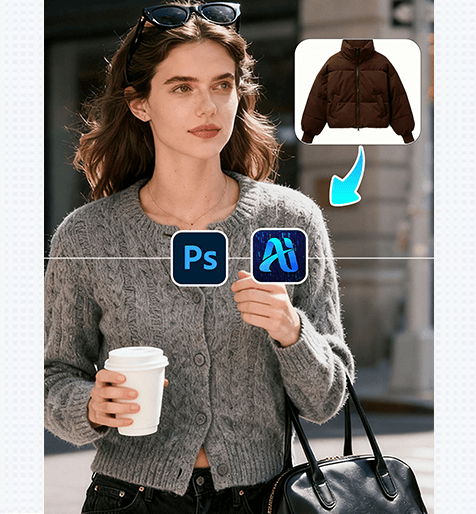
Fortunately, Nano Banana retouching technology, seamlessly integrated with the PSAide Plugin, delivers a precise and efficient solution for jacket replacement in model photos, with “nano banana” at the core of streamlining creative processes.
PS Tutorial Quick Tip
To enhance selection accuracy for jacket replacement: Use the Object Selection Tool + Refine Edge Brush to outline the existing jacket. Zoom in to 100-150%, set the Refine Edge radius to 1-2px to capture details like zippers, cuffs, or stitching, and duplicate the original layer (Ctrl+J) to safeguard the source image—ensuring Nano Banana can focus on the exact area needing replacement without affecting other elements.
1、PSAide Plugin with Built-in Nano Banana Retouching: Smooth Jacket Replacement
(1) Nano Banana Retouching Function: Jacket Replacement Example
Nano Banana’s real-world performance is impressive. A model originally wearing a simple solid-color cotton jacket was transformed with a trendy denim jacket using this tool. Nano Banana preserved the model’s pose, facial expression, and body proportions flawlessly, while accurately replicating the denim’s texture, stitching details, and subtle wash effects. The final result looks indistinguishable from a professional photoshoot, with no traces of editing.
2、Key Advantages of Nano Banana’s Jacket Replacement Function
① Cuts Costs and Saves Time
No more reshoots! Nano Banana eliminates expenses for model bookings, studio rentals, and styling, reducing a 2-4 day process to just 2-3 minutes—accelerating design iterations and helping meet tight marketing deadlines.
② Superior Detail Accuracy
Nano Banana’s advanced algorithm excels at capturing the unique characteristics of various jacket fabrics, from denim and leather to corduroy and windbreaker material. It precisely reproduces texture details (such as fabric weave, grain, or thickness) and aligns the new jacket with the model’s body shape and posture for a natural fit, avoiding stiff draping or disproportional issues.
③ Seamless Lighting and Shadow Harmony
A common hassle in jacket replacement is mismatched lighting. Nano Banana solves this by automatically adjusting the new jacket’s light and shadow to match the original image’s environment. Whether the model is shot in natural outdoor light or warm studio lighting, the jacket’s tones and reflections blend seamlessly, ensuring a cohesive and professional look without extra manual edits.
3、PSAide + Nano Banana: 3-Step Workflow for Beginners
① Import the Image
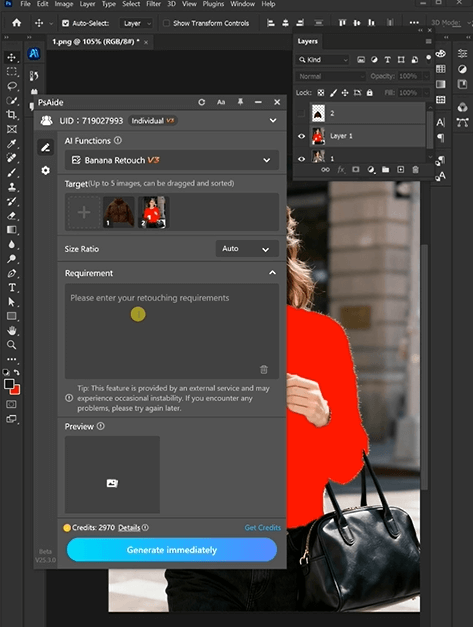
Import your model’s image into Photoshop. Use the Object Selection Tool to mark the area of the existing jacket.
② Input Precise Prompts
In the PSAide Plugin panel, enter detailed prompts to guide Nano Banana,
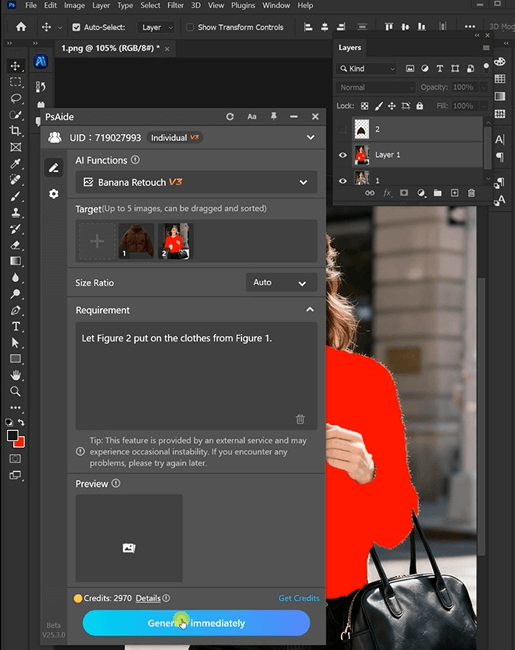
With PSAide’s built-in Nano Banana retouching, designers can skip the tedious and costly traditional jacket replacement process. By leveraging “nano banana”’s speed, precision, and texture replication capabilities, you can effortlessly create stunning, photorealistic model imagery, test multiple jacket styles, and enhance your fashion brand’s competitiveness.
4、Plugin Download Information
Nano Banana + PSAide addresses the core pain points of traditional jacket replacement: high costs, inefficiency, and unnatural results. No professional design skills are needed—achieve studio-quality jacket replacements in 3 simple steps, with perfect textures, natural fits, and seamless lighting.

Download Link: https://psaide.com/?sfrom=ZfhxUKInvitation Code: ZfhxUK

