
Table of Contents
For fashion e-commerce managers, designers, and marketers, on-model sweater displays are pivotal—they let consumers judge fit, fabric texture, and style, directly driving purchases. Yet creating these visuals has long been plagued by inefficiencies, especially without advanced AI Photo Editing tools. PsAide’s built-in Product Transfer feature, powered by AI-assisted framing, solves this pain point. This guide explores how it streamlines sweater replacement for high-quality, consistent results.
Traditional Sweater On-Model Shoots: Costly & Inconsistent
Before AI Photo Editing, crafting on-model sweater images was a hassle. Brands had to hire models matching the sweater’s vibe, rent studios, and coordinate photographers—costing hundreds per style and taking 3–5 days. Worse, AI-assisted framing was absent: different shoots had varying lighting, poses, or camera settings, leading to disjointed visuals that weakened brand identity. Manual edits fared worse—sweaters looked misaligned, fabric details distorted, and shadows clashed with the model, eroding consumer trust.
PsAide’s Product Transfer: AI-Powered Sweater Replacement
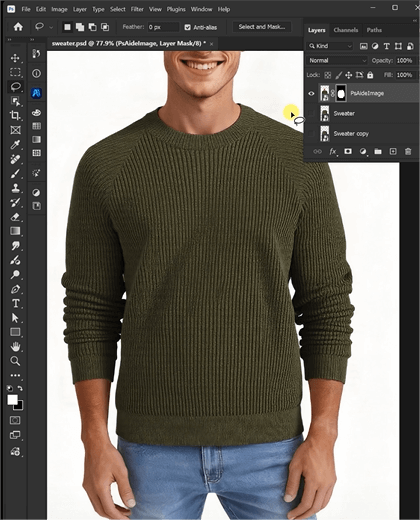
PsAide’s Product Transfer redefines this process with AI Photo Editing and AI-assisted framing. A recent test—replacing a model’s plain cotton sweater with a cable-knit wool design—proved its power: the new sweater’s texture was crisp, its fit aligned perfectly with the model’s torso, and shadows matched the original studio lighting. The result looked naturally shot, with no AI traces.
Core Advantages for Sweater Displays
- Cost & Time Savings: Skip reshoots—replace sweaters in 5 minutes. Cut model, studio, and styling costs by 60%+ for multi-style collections.
- Precise Detail & Framing: AI-assisted framing adapts the sweater to the model’s posture, while AI Photo Editing preserves knit patterns, ribbing, and fabric sheen (cashmere softness, wool texture).
- Seamless Lighting: AI analyzes original light sources, adjusting the sweater’s shadows and highlights to blend with the model and background.
- Versatility: Works for e-commerce pages, lookbooks, or social posts—supports crewnecks, turtlenecks, and outdoor/indoor shoots.
3-Step Guide to Sweater Replacement
- Install PsAide (Photoshop 2015+) and open Product Transfer. Upload Image A (model with old sweater) and Image B (new sweater product photo). Mark the old sweater with the brush to guide AI.
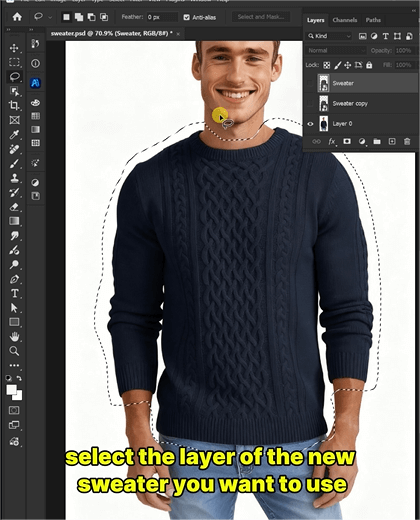
- Enter a prompt: “Replace the sweater in Image A with Image B’s cable-knit sweater. Keep model posture/background; retain fabric texture and fit naturally.”
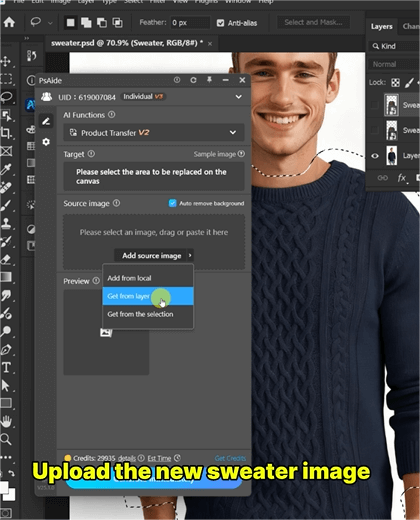
- Click “Generate”—get the final image in 3–5 seconds. Use “Fine-Tune” for minor adjustments (e.g., sleeve length) if needed.
Final Thoughts
PsAide’s Product Transfer leverages AI Photo Editing and AI-assisted framing to fix traditional sweater visual pain points. It delivers fast, authentic results that boost brand consistency and sales. For fashion teams, it’s not just a tool—it’s a shortcut to standout sweater displays. Download PsAide and elevate your visuals today!

