
Table of Contents
For electronics e-commerce sellers, audio brand marketers, and tech designers, on-model headphone images are crucial. They showcase fit, design, and usage vibe—key factors for buyers choosing between wired, wireless, or over-ear styles. Traditional ways to update these images are costly and slow, but AI Photo Editing changes this. PsAide’s built-in Product Transfer feature simplifies headphone replacement, outperforming manual Photo Retouching in precision and efficiency.
Pain Points of Traditional Headphone On-Model Updates
Before AI Photo Editing, updating headphone styles on models was problematic. Reshooting needed models, studio setups, and audio props—costing $400+ per style and taking 3–5 days. Manual Photo Retouching failed too: headphones often misaligned with the model’s ears, plastic/metal textures distorted, and band curves clashed with head contours. Consistency across multiple headphone models was hard to achieve, weakening brand credibility.
PsAide’s Product Transfer: AI-Powered Headphone Replacement
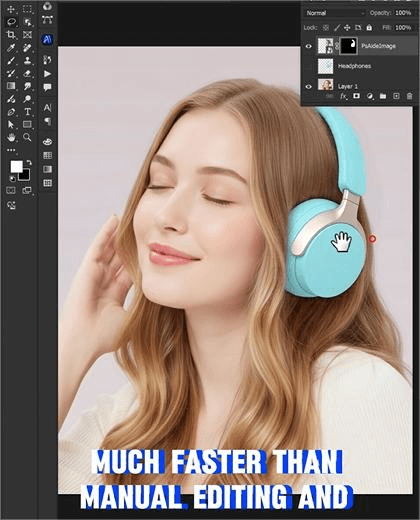
PsAide’s Product Transfer uses advanced AI Photo Editing to solve these issues. A test replacing a model’s wired headphones with wireless over-ear ones proved its value: the new headphones fit the head curve perfectly, metal grille details stayed crisp, and shadows matched studio lighting. The result looked naturally shot—something manual Photo Retouching rarely delivers.
3-Step Guide to Headphone Replacement
- Launch & Upload: Install PsAide (Photoshop 2020+), open the plugin, and select Product Transfer. Upload two images: Image A (model with old headphones) and Image B (new headphone product photo).
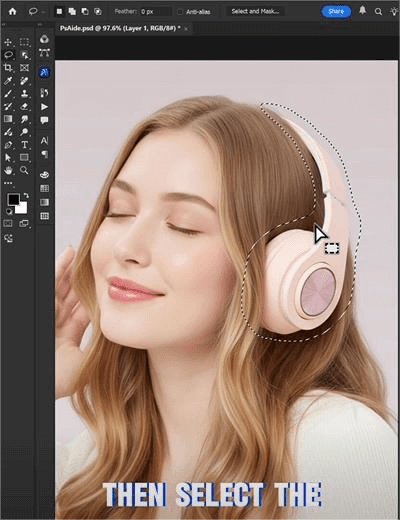
- Mark & Prompt: Use the brush to mark the old headphones in Image A. Enter a prompt: “Replace Image A’s headphones with Image B’s wireless over-ear ones. Align with ears, keep grille details, and match studio shadows.”
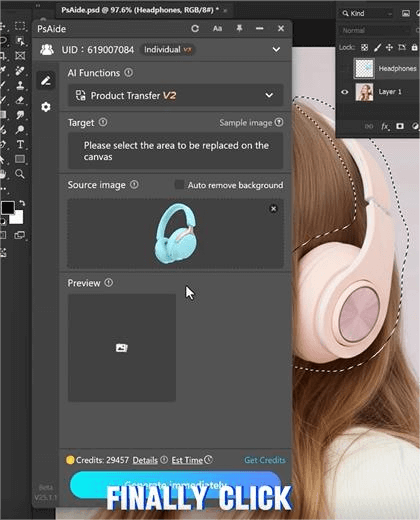
- Generate & Refine: Click “Transfer Now” for results in 3–5 seconds. Use “Fine-Tune” to adjust fit or texture shine, then export the final image.
Key Advantages for Tech Marketers
It cuts costs by 60% by skipping reshoots and reduces editing time from hours to minutes. AI Photo Editing preserves headphone details (buttons, grilles) and ensures natural fit. It works for all types (in-ear, over-ear) and scenarios (e-commerce, ads, catalogs). No advanced Photo Retouching skills are required.
Download PsAide today to streamline your headphone on-model updates and boost sales!a today to boost your home decor marketing!

