
Table of Contents
For fashion e-commerce sellers, brand marketers, and content creators, showcasing apparel on models in versatile styles is key to driving conversions. Yet swapping a model’s jacket in photos traditionally spells frustration—manual editing in Photoshop demands hours of work: using Layer Masks to cut out the new jacket, Warp Tool to match the model’s pose, and tedious adjustments to lighting and fabric texture. The result? A stiff, unrealistic “cut-and-paste” look: the jacket doesn’t follow the model’s body contours, fabric sheen clashes with the scene, or wrinkles feel forced. This is where Nano Banana, the AI-powered feature in the PsAide plugin, transforms AI Photo Editing for apparel swaps.
Nano Banana redefines how to edit photos for jacket swaps by leveraging advanced AI to understand 3D body shapes, fabric dynamics, and lighting. Unlike manual edits that treat the jacket as a flat layer, it analyzes the model’s posture, the original coat’s fit, and the new jacket’s material—ensuring the swap looks like the model actually wore the garment. Whether it’s a leather jacket, denim coat, or puffer, Nano Banana blends the new piece seamlessly with the model’s movements and the photo’s lighting, outperforming traditional editing by miles.
Tutorial materials that can be used for practice
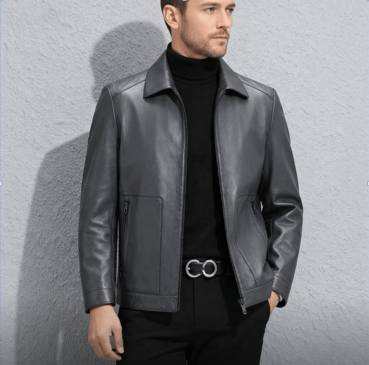
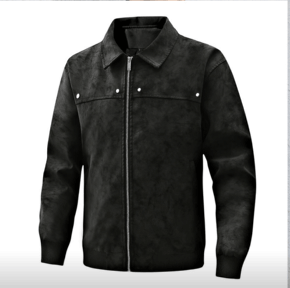
Before:
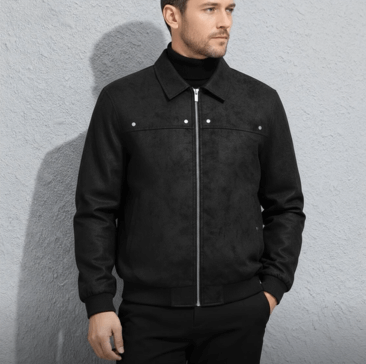
After:
3 Simple Steps to Swap Model’s Jacket with Nano Banana
No advanced Photoshop skills needed—Nano Banana simplifies the process into three intuitive steps:
Step 1: Prepare Images and Launch Nano Banana Open two images in Photoshop (compatible with 2015+ versions): Figure 1 (the new jacket product photo, preferably on a plain background) and Figure 2 (the model wearing the original coat). Install the PsAide plugin, then launch Nano Banana from the plugin menu. Upload both images to the Nano Banana workspace.
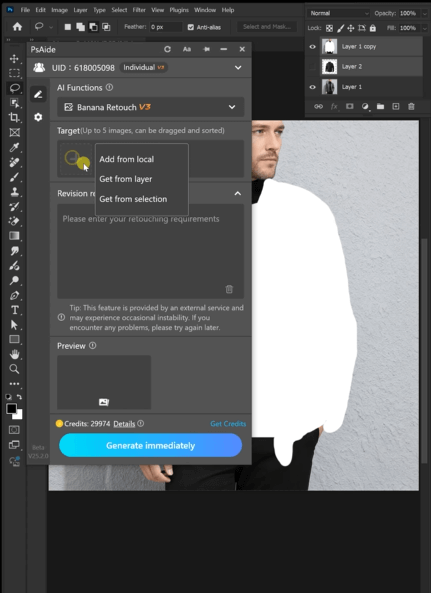
Step 2: Enter the Precise AI Photo Editing Prompt Locate the prompt box and type: “Have the model in Figure 2 remove the coat and put on the coat from Figure 1 naturally and realistically.” This clear instruction guides Nano Banana’s AI to prioritize fit, fabric movement, and lighting harmony—key to a convincing swap.
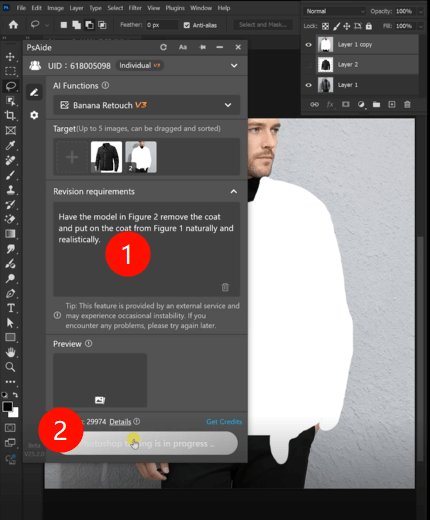
Step 3: Preview and Finalize the Edit Click the “Swap Now” button. Nano Banana processes the AI Photo Editing request in 3–5 seconds, generating a preview where the model wears the new jacket naturally. The jacket will follow the model’s shoulders, sleeves will align with arm positions, and fabric wrinkles will match the pose. Save the edited image directly to your Photoshop project.
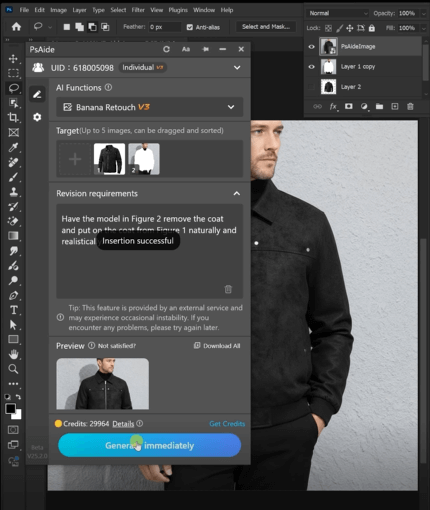
Core Advantages of NanoBanana for Jacket Swaps
- Time-Efficient: Cuts editing time from hours to seconds, perfect for bulk product shoots.
- Realistic Blending: AI analyzes body contours and fabric texture to avoid stiff, unnatural results.
- Lighting Harmony: Automatically matches the new jacket’s shadows and highlights to the photo’s light source.
- User-Friendly: Simple prompts and one-click operation make it accessible to beginners and pros.
Who Benefits from NanoBanana?
- Fashion E-commerce Sellers: Rapidly showcase multiple jackets on the same model without res hoots.
- Brand Marketers: Test jacket styles in different scenes to optimize marketing visuals.
- Content Creators: Polish fashion content for social media with professional-looking jacket swaps.
FAQ
Q: Does NanoBanana work for all jacket styles and model poses?
A: Yes—whether it’s a slim-fit blazer or over sized parka, and poses from standing to sitting, Nano Banana adapts to fabric type and body movement.
Q: Can I adjust the jacket’s fit after swapping?
A: The edited image returns as a separate Photoshop layer, allowing minor tweaks to size or position.
Q: How does it handle complex fabrics like leather or knit?
A: Nano Banana’s AI recognizes fabric textures, preserving sheen for leather and softness for knits.
If you’ve wondered how to edit photo on Nano Banana for seamless jacket swaps, Nano Banana is your solution. It eliminates the hassle of manual editing, delivers professional AI Photo Editing results, and saves valuable time. Download PsAide today to unlock Nano Banana—elevate your fashion visuals with effortless, realistic jacket swaps!ts, and saves valuable time. Download PsAide today to unlock Nano Banana—and turn cluttered photos into polished masterpieces!

