
Table of Contents
Nano banana retouching now provides an efficient and precise solution to replacing shoes in footwear photos.
For footwear e-commerce designers, how feet are displayed with different shoe styles directly impacts footwear product sales conversion. In the traditional workflow, changing the shoe style in an image required reselecting foot models, setting up photoshoots, and adjusting lighting. This process consumed significant manpower, time, and financial resources.
Fortunately, the rapid development of nano banana retouching technology, combined with professional PS plugins, now provides an efficient and precise solution to the challenge of replacing shoes in footwear photos.
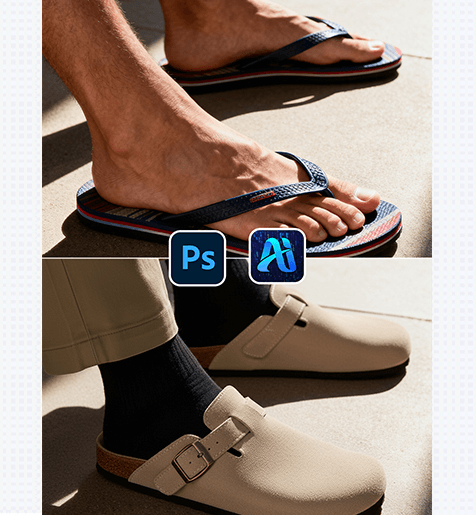
1、Psaide Plugin with Built-in Nano Banana Retouching for Easy and Accurate Shoe Replacement
(1) Nano Banana Retouching Function: Example of Shoe Replacement
The practical application results far exceed expectations. For instance, in a case study, a basic canvas shoe on a foot in an image was accurately replaced with a stylish leather sneaker. This not only completely preserved the foot’s shape, skin texture, and posture but also perfectly replicated the shoe’s texture, including the stitching, laces, and sole details.
2、Key Advantages of the Shoe Replacement Function
①Significantly Reduces Cost and Time:
No reshoots needed. Replacing the shoe via nano banana retouching eliminates costs for model selection, scene setup, and photography, slashing a process that originally took days down to just minutes. This greatly boosts footwear e-commerce designers’ productivity.
②Extremely High Detail Accuracy:
Precisely matches material characteristics of different shoes – whether leather, canvas, suede, or rubber – clearly presenting texture details during replacement. It generates natural placement based on the foot’s size and surroundings, avoiding stiff styling or disproportional results (e.g., a shoe that is too big/small for the foot or misaligned with the ankle).
3、PSAide + Nano Banana: 3-Step Workflow for Beginners
①Place image in PS
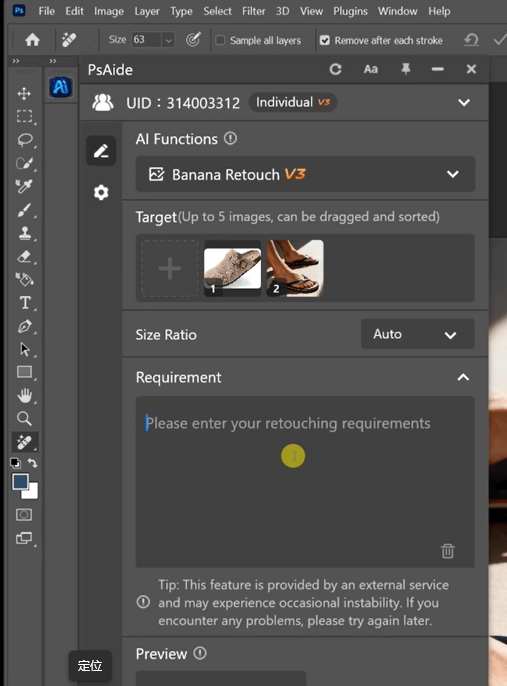
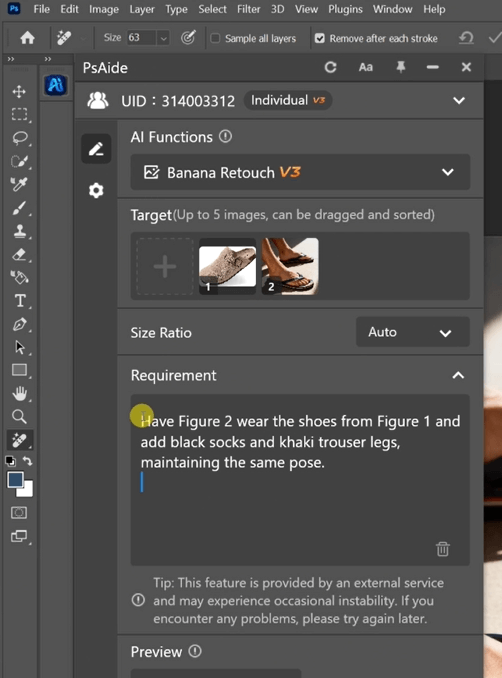
②Fill in the prompt
③Click the Generate button and wait a few seconds to get the perfectly replaced result image.
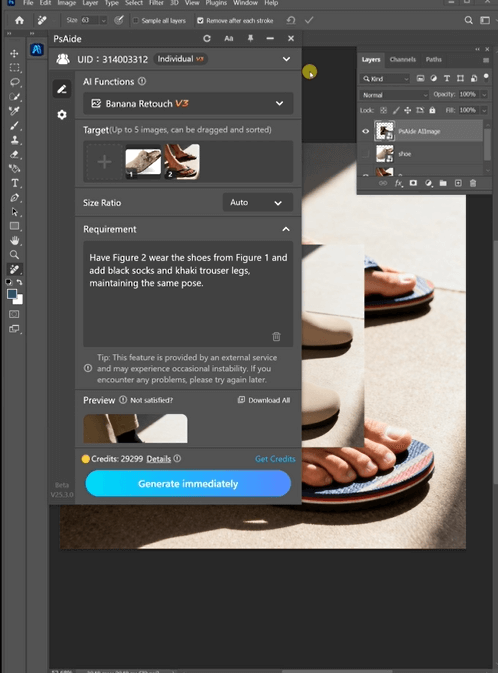
With this tool, footwear e-commerce designers are no longer troubled by the tedious process of replacing shoes. Leveraging the efficiency and precision of nano banana retouching, they can complete footwear product display and promotional material creation faster and better, helping footwear brands enhance product competitiveness.
4、Plugin Download Information
Nano Banana with PSAide plugin solves the core challenges of traditional shoe replacement—high costs and low efficiency. Without professional skills, achieve photorealistic results with perfect materials, natural fit, and matched lighting in 3 steps.

Download Link: https://psaide.com/?sfrom=ZfhxUK
Invitation Code: ZfhxUK

