
Table of Contents
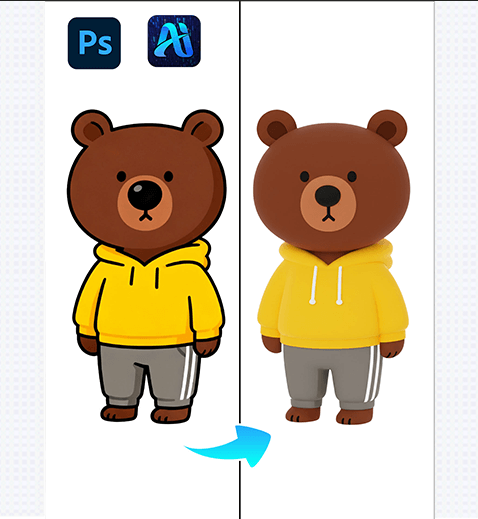
For graphic designers, brand creators, and IP developers, transforming 2D flat IP characters into vivid 3D effects is crucial for enhancing brand interactivity and market appeal. Yet traditional 2D-to-3D workflows are plagued with pain points: professional 3D modeling requires specialized software skills and hours of meticulous adjustment;
Thankfully, Nano Banana retouching technology, seamlessly integrated with the PSAide Plugin, offers a breakthrough solution for converting 2D flat IP characters to 3D—with “nano banana” at the core of streamlining fast, high-fidelity creative processes.
1、PS Tutorial Quick Tip (Dry Goods!)
To optimize 2D IP characters for Nano Banana 3D conversion: First, use the Magic Wand Tool (tolerance set to 10-15) to isolate the 2D character from its background. Then, go to Image > Adjustments > Curves to enhance contrast by 10-15%—this sharpens the character’s outlines and details, helping Nano Banana recognize key features.
Duplicate the character layer (Ctrl+J) and lock the layer’s transparency to preserve the original design—ensuring the 3D conversion stays true to the IP’s core style.
2、Key Advantages of Nano Banana’s 2D-to-3D IP Conversion Function
① Cuts Time and Lowers Skill Barriers
No professional 3D modeling skills needed! Nano Banana eliminates the need for complex software (e.g., Blender, Maya) and tedious manual adjustments, reducing a 4-8 hour 3D modeling process to just 5 minutes—speeding up IP content creation and helping brands launch 3D assets faster.
② Superior Style Consistency and Detail Preservation
Nano Banana’s advanced algorithm analyzes the 2D character’s lines, colors, and design language to ensure the 3D effect stays true to the original style. Whether it’s a minimalist vector IP or a detailed hand-drawn character, the tool retains every key detail (e.g., unique patterns, facial expressions, clothing folds) while adding natural 3D depth—avoiding the “generic 3D look” that plagues basic conversion tools.
3、PSAide + Nano Banana: 3-Step Workflow for Beginners
① Import the 2D IP Character
Import the flat 2D IP character image into Photoshop.
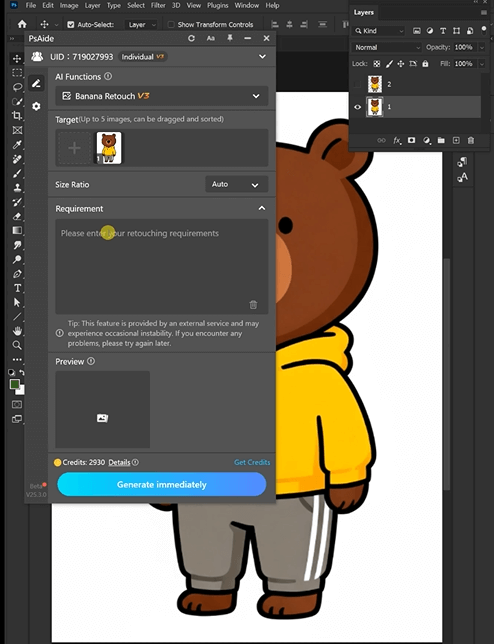
② Input Precise 3D Style Prompts
In the PSAide Plugin panel, enter detailed prompts to guide Nano Banana, The more specific the style and lighting details, the more accurate the 3D result—leveraging “nano banana”’s ability to interpret design nuances.

③ Generate and Refine
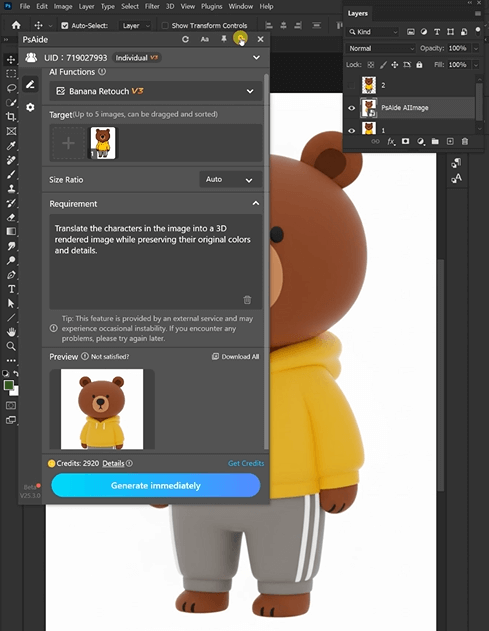
Click the “Generate” button, wait 20-30 seconds, and preview the 3D effect. If adjustments are needed (e.g., increasing depth, adjusting lighting direction), refine the prompt and regenerate—no advanced 3D or PS skills required.
With PSAide’s built-in Nano Banana retouching, designers and IP creators can skip the tedious, skill-intensive traditional 2D-to-3D process. By leveraging “nano banana”’s speed, style consistency, and detail preservation capabilities, you can effortlessly create vivid 3D IP characters, expand your brand’s visual assets, and boost audience engagement.
Plugin Download Information
Nano Banana + PSAide addresses the core pain points of traditional 2D-to-3D conversion: high skill barriers, time-consuming workflows, and style distortion. No professional 3D modeling experience needed—achieve high-fidelity 3D IP characters in 3 simple steps, with perfect style consistency, natural depth, and seamless lighting.

Download Link: https://psaide.com/?sfrom=ZfhxUKI
nvitation Code: ZfhxUK

