
Table of Contents
For content creators, brand marketers, and social media enthusiasts, Q-version emoji packs have become a powerful tool for engaging audiences—whether for personal communication, brand storytelling, or campaign promotion. Yet crafting a cohesive 3×3 emoji set traditionally involves a tedious, multi-step process: hiring illustrators to redraw characters in different poses, using complex design software to maintain style consistency, and spending hours aligning elements into a grid. Even with AI tools, many produce disjointed results—characters lose their original features, styles clash across emojis, or expressions feel unnatural. This is where Nano Banana, the AI-powered feature in the PsAide plugin, transforms AI Photo Editing for emoji creation, making the process fast, consistent, and beginner-friendly.
Nano Banana solves the core pain points of emoji pack creation by leveraging advanced generative AI with strong style consistency. Unlike generic AI tools that struggle to preserve character integrity across multiple outputs, Nano Banana deeply analyzes the reference image’s key features—facial details, color palette, and design style—to generate 9 cohesive Q-version emojis. It maintains the protagonist’s unique traits while adding diverse expressions and poses, and automatically arranges them into a 3×3 grid—eliminating the need for post-production cropping or layout adjustments. Whether the reference is a pet photo, brand mascot, or original character, Nano Banana ensures every emoji feels part of a unified set, all powered by AI Photo Editing that outperforms manual methods in efficiency and consistency .

3 Simple Steps to Create 3×3 Q-Version Emoji Packs with Nano Banana
Even users with basic Photoshop skills can craft professional emoji packs in minutes using Nano Banana. Follow these three straightforward steps:
Step 1: Prepare Reference Image and Launch Nano Banana
Open your reference image (e.g., a pet photo, character illustration, or brand mascot) in Photoshop (compatible with versions 2015 and above). Install the PsAide plugin, launch the Nano Banana feature from the plugin menu, and upload the reference image to the Nano Banana workspace—no pre-editing (like background removal) is needed, as the AI automatically isolates the protagonist.
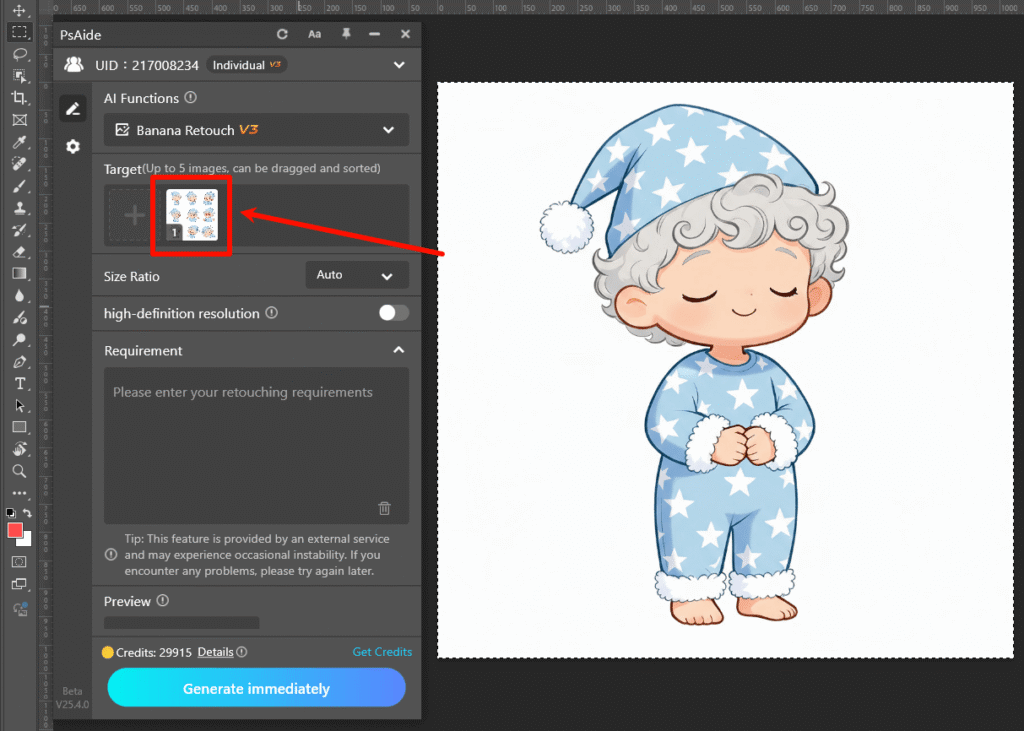
Step 2: Enter the Precise AI Photo Editing Prompt
Locate the prompt box in the Nano Banana interface and type the clear instruction: “Please create a set of Q-version emoticons featuring the character in the reference image as the protagonist, consisting of 9 pieces arranged in a 3×3 grid.” This prompt guides the AI Photo Editing engine to prioritize Q-version styling, character consistency, and grid layout—ensuring the output meets your exact needs .
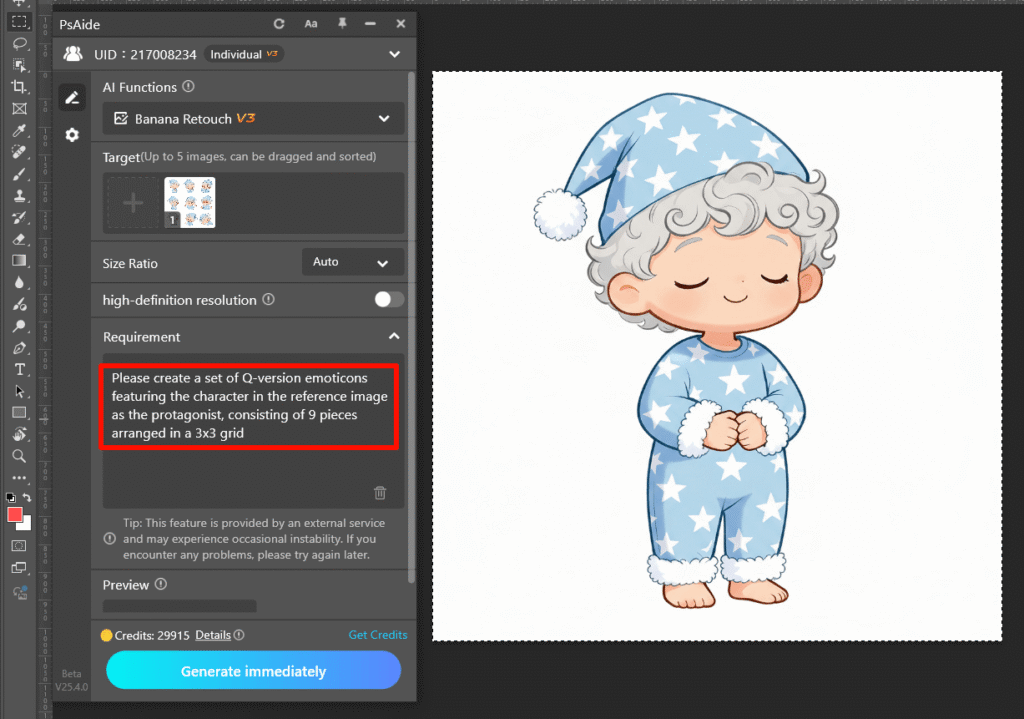
Step 3: Preview and Finalize the Emoji Pack
Click the “Generate Emojis” button. Nano Banana processes the request in 8–12 seconds, generating a preview of the 3×3 emoji grid. Each emoji will feature the Q-version character in distinct, expressive poses (e.g., happy, sleepy, excited) while retaining the original image’s style and details. Save the entire grid directly to your Photoshop project, or export individual emojis as transparent PNGs for immediate use in social apps.
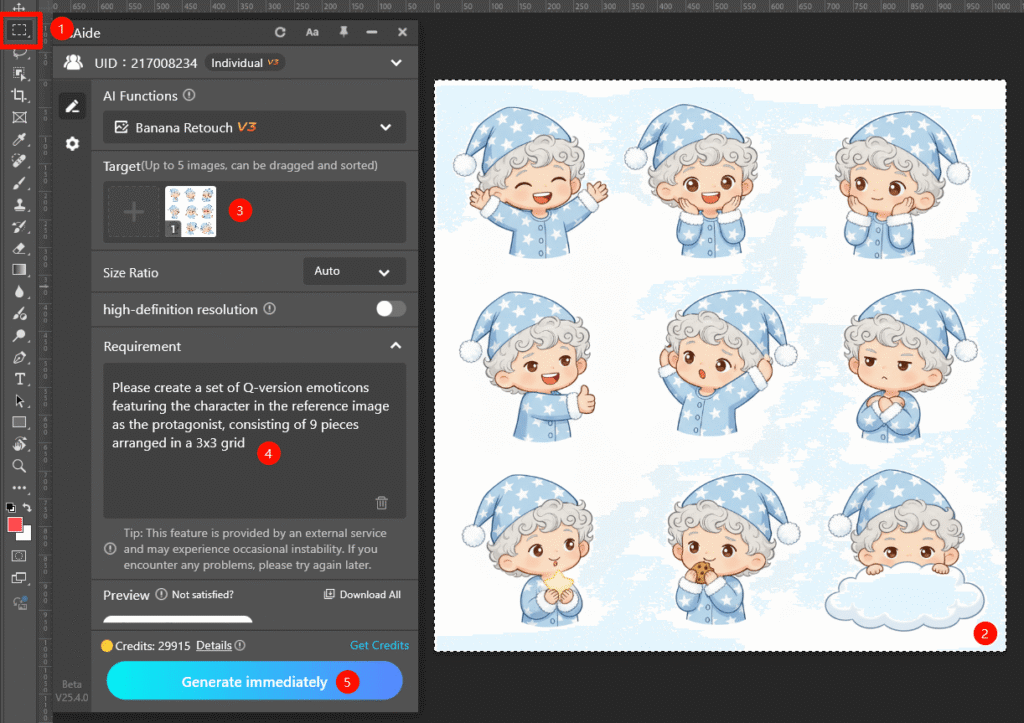
Core Advantages of Nano Banana for Emoji Pack Creation
Compared to traditional methods and generic AI tools, Nano Banana offers unmatched benefits. First, it saves time: cutting emoji creation from hours (or days) to seconds, ideal for rapid content production . Second, it ensures consistency: the AI preserves the protagonist’s features and style across all 9 emojis, avoiding the “AI 味” (artificial look) common in other tools . Third, it delivers creativity: automatically generating diverse expressions and poses without requiring detailed prompts. Finally, it’s user-friendly—no advanced AI Photo Editing or design skills are needed, making it accessible to creators of all levels.
Industry Application Value
Nano Banana is a game-changer across use cases. Content creators can craft personalized emoji packs for social media, boosting audience engagement. Brands can generate Q-version mascot emojis for campaigns, enhancing brand personality. Small businesses can create custom emojis for customer communication, adding a friendly touch . Even individuals can turn pets or personal characters into unique emojis for daily chats—all with minimal effort.
If you’ve wondered how to edit photo on Nano Banana to create stunning 3×3 Q-version emoji packs, Nano Banana is the solution. It harnesses the power of AI Photo Editing to eliminate traditional frustrations, preserve character integrity, and turn simple images into engaging emoji sets. Download PsAide today to unlock Nano Banana—experience effortless, consistent emoji creation for all your needs!o life!

