
Table of Contents
For furniture e-commerce sellers, interior designers, and home lifestyle marketers, showcasing sofas in fitting scenes—like a cozy living room, modern apartment, or minimalist lounge—is crucial to helping consumers visualize the product in their own spaces. Yet traditional sofa scene replacement is a tedious, error-prone process: manual Photoshop editing requires carefully cutting out the sofa (struggling with soft upholstery edges), adjusting its scale to match the new scene’s perspective, and spending hours refining lighting to avoid a “disconnected” look. Even skilled designers face issues like mismatched spatial proportions (the sofa looks too big/small for the room), clashing color palettes, or unnatural shadows—resulting in unconvincing visuals that fail to highlight the sofa’s design and comfort. This is where Nano Banana, the AI-powered feature in the PsAide plugin, revolutionizes AI Photo Editing for seamless sofa scene replacement.
Nano Banana solves the core pain points of manual scene replacement through advanced spatial recognition and contextual blending technology. Unlike basic editing tools that simply overlay the sofa on a new background, Nano Banana intelligently analyzes both the sofa (from Figure 1) and the target scene (from Figure 2): it maps the scene’s room dimensions, floor layout, and light source to ensure the sofa fits naturally, preserves the sofa’s original details (e.g., fabric texture, color, stitching, armrest shape), and syncs the sofa’s shadows and highlights with the scene’s lighting. Whether the sofa is a plush L-shaped model or a sleek minimalist design, Nano Banana maintains its authentic appearance while making it look like it was always part of the scene—avoiding the “cut-and-paste” stiffness of generic AI tools. All this is powered by AI Photo Editing that turns hours of work into seconds.
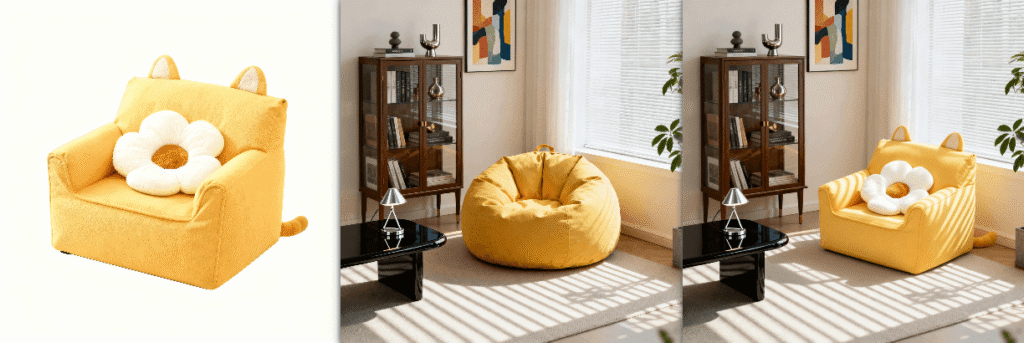
3 Simple Steps to Replace Sofa with Suitable Scenes with Nano Banana
Even users with basic Photoshop skills can master professional sofa scene replacement in minutes using Nano Banana. Follow these three straightforward steps:
Step 1: Prepare Images and Launch Nano Banana
Open two images in Photoshop (compatible with versions 2015 and above): Image 1 (the sofa product photo, with clear details of its shape and fabric) and Image 2 (the target scene image, e.g., an empty living room or styled lounge). Install the PsAide plugin, launch the Nano Banana feature from the plugin menu, and upload both images to the Nano Banana workspace—no pre-editing (like background removal for the sofa) is needed, as the AI automatically isolates the product.
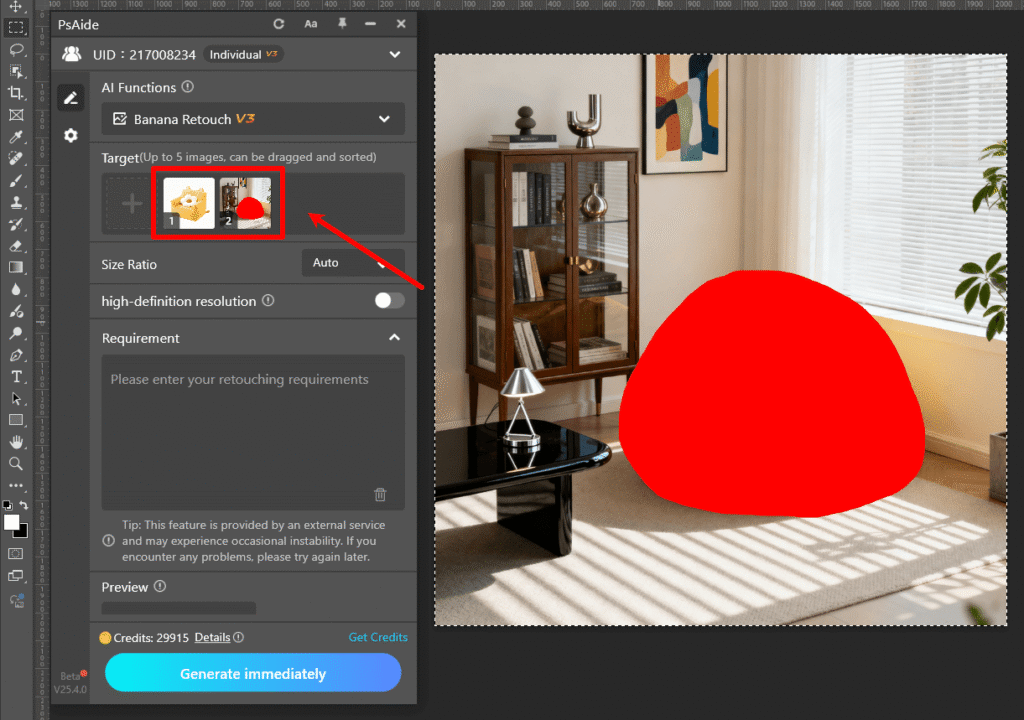
Step 2: Enter the Precise AI Photo Editing Prompt
Locate the prompt box in the Nano Banana interface and type the clear instruction: “Place the sofa in Figure 1 against the background of Figure 2, keeping it consistent with Figure 1.” This prompt guides the AI Photo Editing engine to prioritize sofa detail preservation, natural spatial fit, and lighting harmony with the target scene.
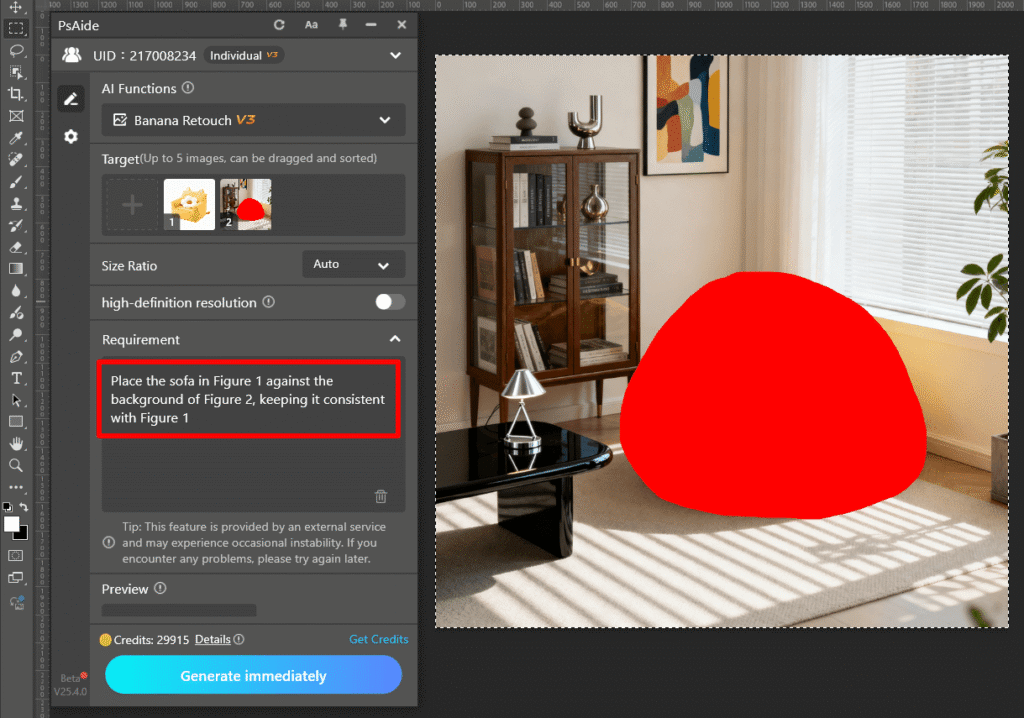
Step 3: Preview and Finalize the Composite Image
Click the “Generate immediately” button. Nano Banana processes the request in 6–9 seconds, generating a preview where the sofa sits perfectly in the target scene. The sofa will match the scene’s perspective (e.g., angled to fit the room’s layout), cast natural shadows on the floor, and reflect light consistently with the scene’s windows or lamps. Save the composite image directly to your Photoshop project—minor tweaks to the sofa’s brightness or position are optional for further refinement.
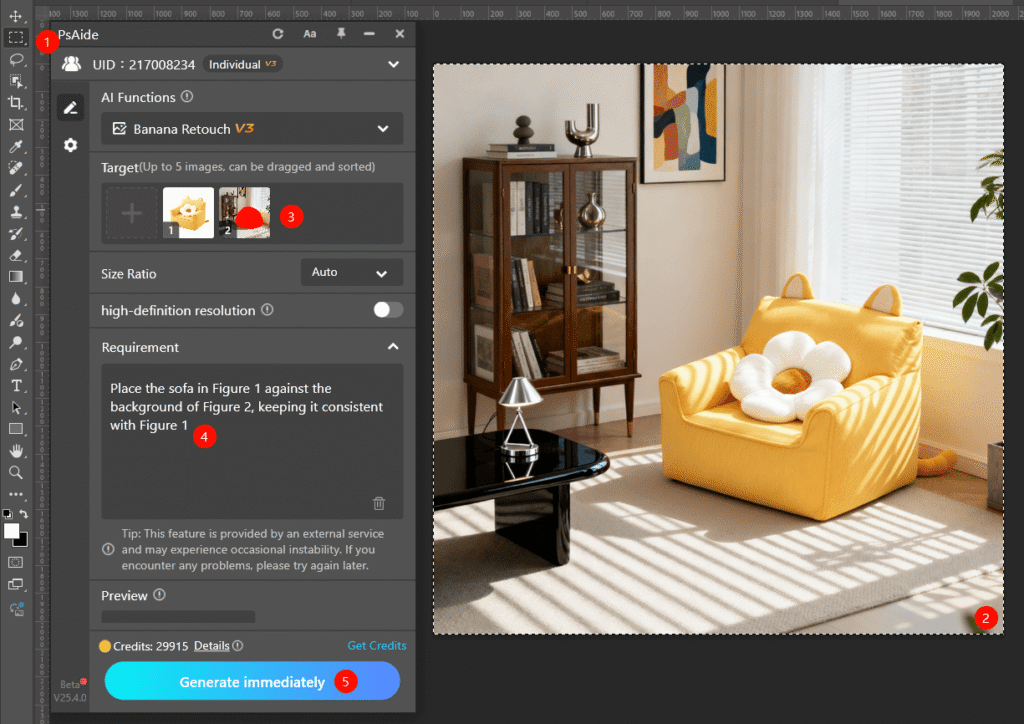
Core Advantages of Nano Banana for Sofa Scene Replacement
Compared to traditional methods, Nano Banana offers unmatched benefits for furniture and home industry professionals. First, it saves time: what takes hours of manual editing is done in seconds, ideal for bulk visuals (e.g., one sofa style in multiple room scenes). Second, it ensures consistency: the AI preserves the sofa’s original design and fabric texture, avoiding distortion common in basic tools. Third, it delivers realism: spatial mapping and lighting sync eliminate the “floating sofa” effect, making the product look authentic in the new scene. Finally, it’s user-friendly—no advanced AI Photo Editing skills required, empowering even beginners to create professional results.
Industry Application Value
Nano Banana is a game-changer for furniture e-commerce and interior design. E-commerce sellers can quickly create diverse listings (e.g., the same sofa in modern, rustic, and Scandinavian scenes) to cater to different consumer tastes. Interior designers can test sofa placements in client room mockups without physical rearrangements. Home lifestyle marketers can produce engaging content (e.g., “sofa transformations for small spaces”) to boost audience engagement. All use cases leverage Nano Banana’s ability to deliver high-quality, scene-cohesive composites with minimal effort.
If you’ve wondered how to edit photo on Nano Banana to replace sofas with suitable scenes seamlessly, Nano Banana is the solution. It harnesses AI Photo Editing to eliminate traditional frustrations, highlight the sofa’s design appeal, and help consumers imagine the product in their homes. Download PsAide today to unlock Nano Banana—transform your furniture marketing with effortless, professional scene replacement!g old memories back to life!

