
Table of Contents

1. PS Tutorial Quick Tip
To optimize background expansion accuracy: First, duplicate the original layer (Ctrl+J) to protect the source file. Use the Rectangular Marquee Tool to roughly select the area you want to expand

— this helps Nano Banana focus on the target region while keeping the subject intact. Zoom in to 100% to preview the subject’s edges before processing.
2. Key Advantages of Nano Banana’s Background Expansion Function
① Saves Studio Setup TimeSkip repositioning backdrops or adjusting lighting in the studio! Nano Banana eliminates the need for physical background resizing, turning a 30+ minute setup process into a 2-3 minute edit — ideal for quickly refining studio shots without re-shooting.
② Maintains Visual CohesionNano Banana’s algorithm analyzes the existing background to generate a seamless extension. It preserves the subject’s position and matches the original background’s tone, avoiding disjointed or artificial-looking edges.
3. PSAide + Nano Banana: 3-Step Workflow for Background Expansion
① Import the Image Import your studio/image file into Photoshop
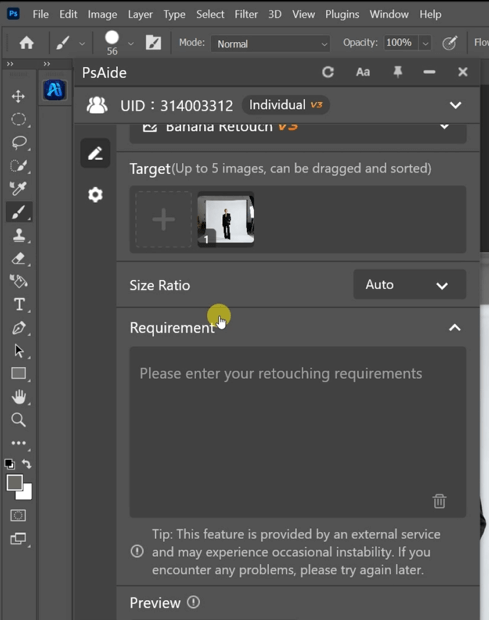
② Input Precise PromptsIn the PSAide Plugin panel, enter clear instructions for background expansion.
Expand the studio background so that the white backdrop fills the entire frame, keeping the subject centered in the middle of the image.
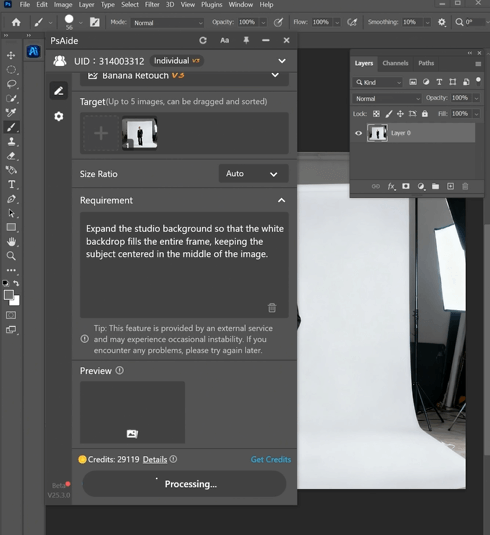
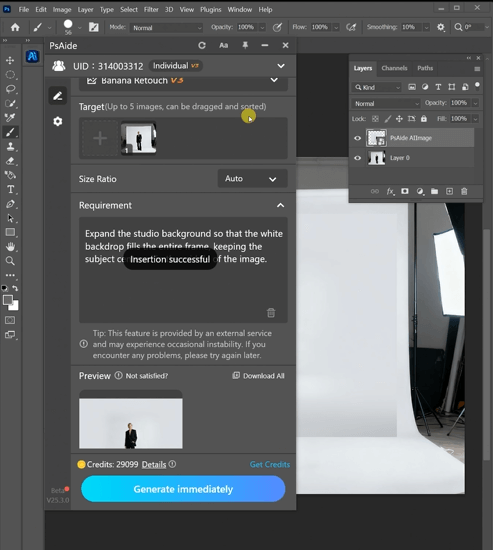
③ Generate and Refine Click “Generate immediately” in the PSAide Plugin. Nano Banana will process the request and extend the background.
4. Plugin Download Information
Nano Banana + PSAide solves the pain points of manual background edits: inconsistency, time-consuming adjustments, and artificial edges.
No advanced design skills are needed — achieve studio-quality background expansion in 3 simple steps, with seamless texture, balanced lighting, and perfect subject positioning.

Download Link: https://psaide.com/?sfrom=ZfhxUK
Invitation Code: ZfhxUK

