
Table of Contents
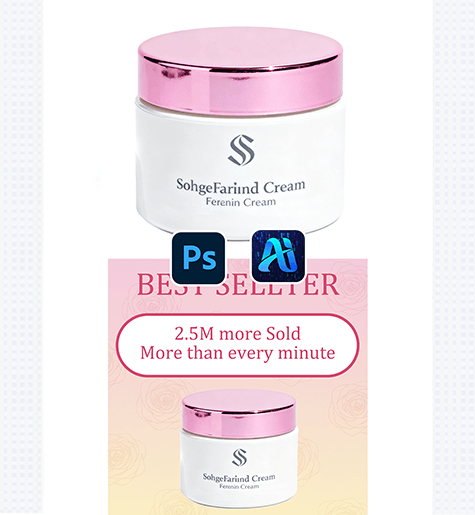
Nano Banana simplifies skincare marketing design by generating polished, on-brand posters for products — no manual background or pattern design required. Here’s how to craft professional posters quickly:
1. Pro Tip for Cohesive Poster Branding
Before editing: Align your prompt with the skincare product’s vibe. For the cream jar demo, a “light pink-to-yellow gradient + rose pattern” matches a feminine, calming product identity.
2. Key Benefits of Nano Banana for Skincare Posters
① Matches Product & Background Style Seamlessly: Unlike generic background templates, Nano Banana generates a design that complements the product — avoiding clashing colors or mismatched aesthetics.
② Cuts Design Time Dramatically: Creating a custom skincare poster used to take hours of layout, color testing, and pattern sourcing. With Nano Banana, you can generate a polished background in 2-3 minutes, ideal for fast campaign iterations.
3. 3-Step Workflow: Nano Banana + Photoshop
① Import the Product Image: Open your skincare product file in Photoshop.

② Define the Poster Background: In the plugin panel, upload the product as the “Target” asset. Enter a prompt:
“Add a light pink-to-yellow gradient background with a simple rose pattern..”
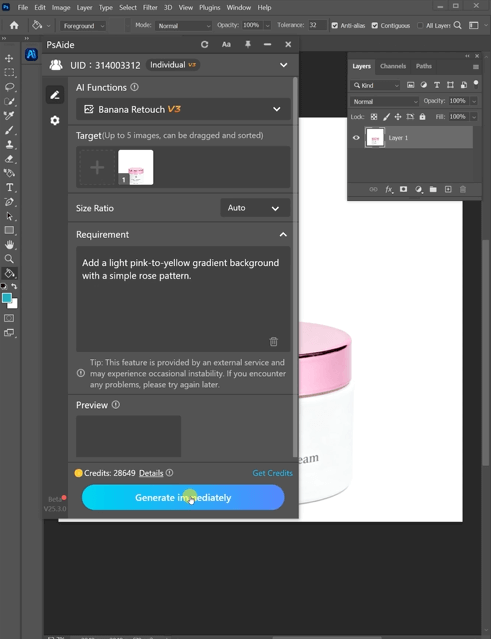
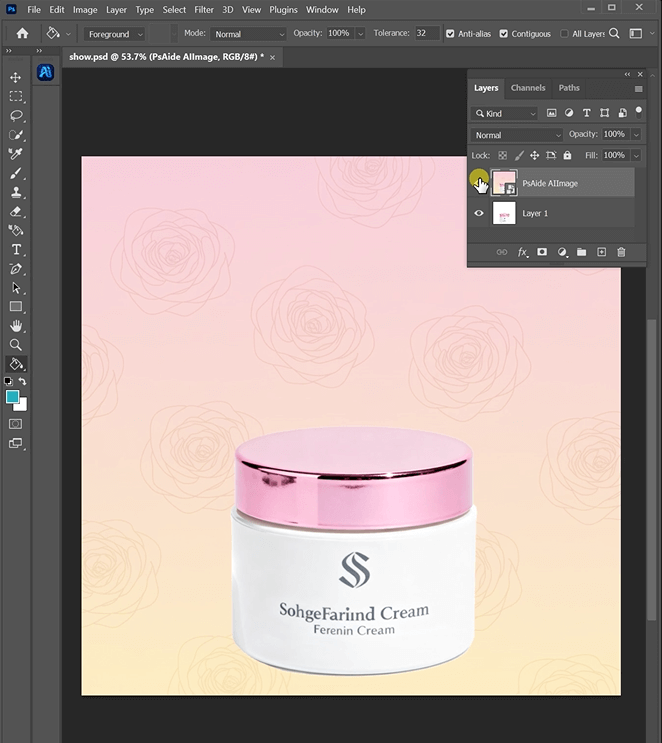
③ Generate & Finalize: Click “Generate Immediately” in Nano Banana. Preview the completed poster
4. Tool Access & Download
Nano Banana is a must-have for skincare brands, marketers, and designers needing quick, on-brand product posters.
Download Link: https://psaide.com/?sfrom=ZfhxUK
Invitation Code: ZfhxUK

