
Table of Contents
Nano Banana (via the PSAide plugin) simplifies festive styling edits by letting you replace headbands on models—ensuring the new accessory matches the scene’s lighting, hair texture, and overall vibe. Here’s how to achieve realistic holiday looks:
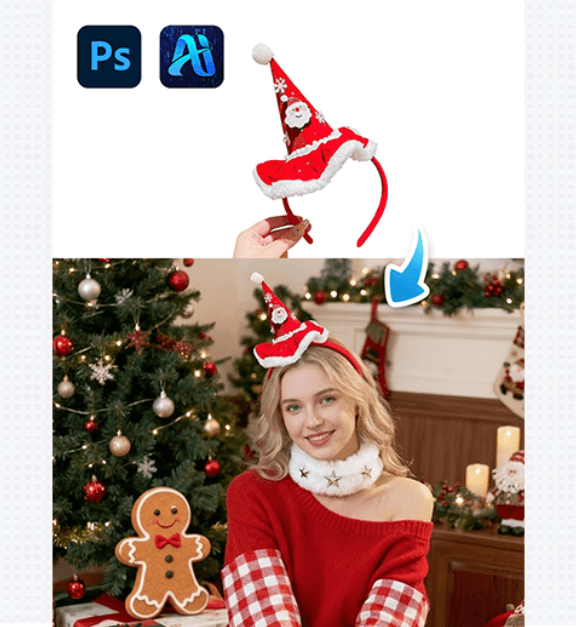
1. Key Benefits of Nano Banana for Festive Accessory Swaps
① Aligns with Hair & Lighting: Unlike manual pasting , Nano Banana analyzes the model’s hair texture and the scene’s festive lighting to adjust the headband—making it look like it’s actually worn.
② Saves Styling Time: Re-shooting a model with 2+ holiday headbands takes hours of styling. With Nano Banana, you can swap accessories in 2–3 minutes, perfect for quick festive content iterations.
2. 3-Step Workflow: Nano Banana Christmas Headband Swap
① Import Assets: Open the model’s photo and the target headband image in Photoshop. Launch the PSAide plugin, then select the Banana Retouch V3 (Nano Banana) function.
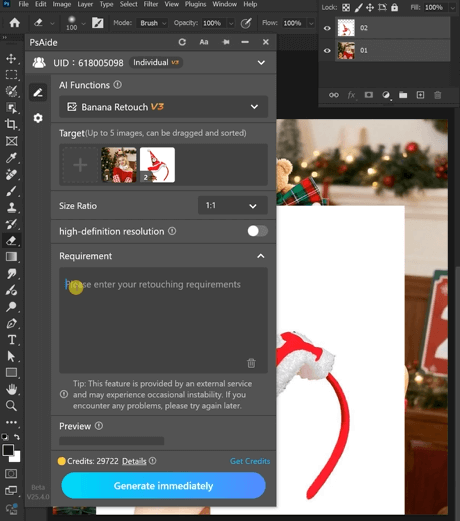
② Define the Swap: In the plugin panel, upload both assets as “Target” files. Enter a prompt:
“Remove the hairband from the person in the first image and realistically replace it with the hairband from the second image”
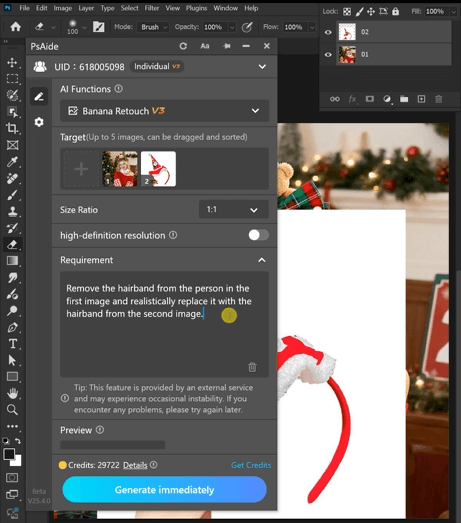
③ Generate & Finalize: Click “Generate immediately” to process. Preview the result.

3. Tool Access & Download
Nano Banana (via PSAide) is a must-have for creating quick, realistic holiday styling edits.

Download Link: https://psaide.com/?sfrom=ZfhxUK
Invitation Code: ZfhxUK

