
Table of Contents
If you’re looking to streamline your photo editing process and enhance your Photoshop workflow, the Nano Banana Pro feature is a game-changing tool. With AI-powered capabilities, it allows you to perform complex edits, like swapping outfits on models, with minimal effort. Here’s a simple guide on how to use Nano Banana Pro to change a model’s clothing in Photoshop.
Step 1: Open Your Image in Photoshop
Start by launching Adobe Photoshop and opening the image of the model you want to edit. This could be a fashion photo or any portrait where you want to change the outfit. Ensure that the model’s image is high-quality and clear, as the tool works best with well-defined subjects.
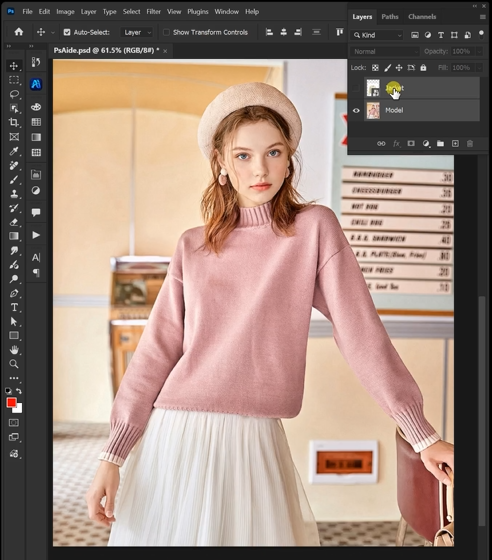
Step 2: Activate Nano Banana Pro in PsAide
After opening your image, navigate to the PsAide plugin within Photoshop. If you don’t have PsAide installed, you can download and install it from their official website. Once installed, select the Nano Banana Pro feature, which offers advanced AI processing over the standard version.

In the Nano Banana Pro interface, upload the image of the model and the reference image for the outfit you want to use. This could be an image of a jacket, dress, or any piece of clothing you want the model to wear. In the Prompt Box, type the following instructions:
“Make the model in image 2 wear the jacket from image 1.”
This simple prompt leverages Nano Banana Pro’s superior semantic understanding to ensure that the AI interprets your request correctly. The Pro version is designed to provide more precise and realistic results compared to the basic version.
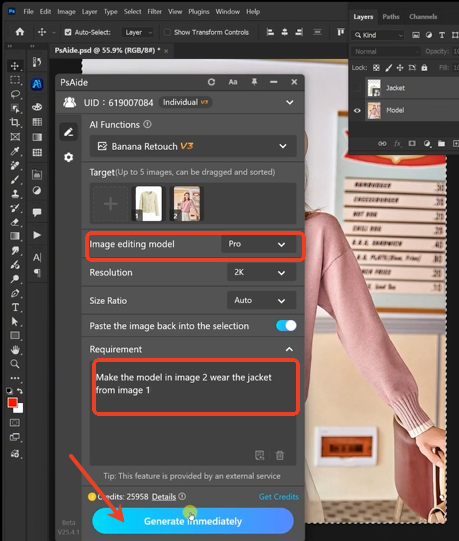
Step 3: Generate the Edited Image
Once your prompt is ready, click Generate, and the AI will begin processing the request. Nano Banana Pro will intelligently combine the model’s image with the clothing from the reference image, ensuring the jacket or outfit fits naturally on the model. The AI handles everything from adjusting the fit to ensuring proper lighting and shadows for a realistic final output.
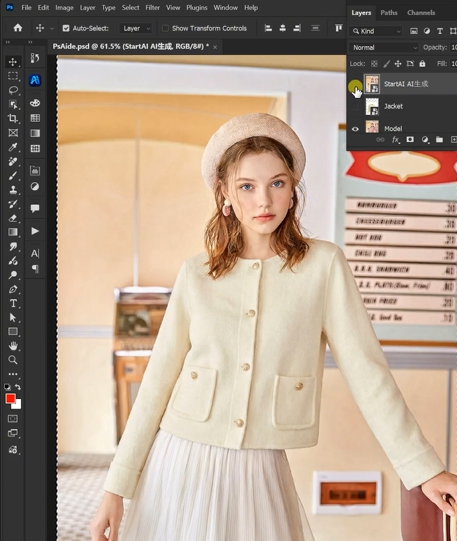
Once the process is complete, you’ll have a flawless image of the model wearing the new jacket without the need for tedious manual masking or complex photo manipulation.
Conclusion
With Nano Banana Pro in PsAide, Photoshop users can now easily swap outfits on models, saving valuable time while delivering professional results. Whether you’re a fashion photographer, designer, or content creator, this tool can simplify your workflow and help you achieve stunning results in no time.
FAQs
Q: Can I use Nano Banana Pro to change any outfit on a model?
A: Yes! Nano Banana Pro works with various types of clothing, as long as the reference image has clear details and the model’s image is of high quality.
Q: Is Nano Banana Pro suitable for beginners in Photoshop?
A: Absolutely! While the Pro version offers advanced features, the tool is designed to be user-friendly, allowing even beginners to create professional edits with ease.
Download link
https://psaide.com/?sfrom=A86R4u
Invitation Code: A86R4u
Click here to discover more usage tips and in-depth information on Nano Banana Pro!

