
Table of Contents
Traditional methods often fall short in preserving fine details, but with AI technology, achieving HD quality restoration is easier and faster than ever. PsAide offers a powerful solution with its AI-powered HD restoration tool in Photoshop, helping users restore image clarity without the hassle of manual adjustments. In this guide, we’ll show you how to use PsAide for effortless HD restoration.
1.Why Choose PsAide for HD Restoration?
PsAide is an advanced AI-powered plugin for Photoshop designed to enhance image quality with minimal effort. It provides automatic HD restoration by leveraging intelligent algorithms that focus on context-aware sharpening and noise reduction. Unlike manual methods that can be time-consuming and require precision, PsAide uses AI to intelligently analyze and enhance the image, restoring lost details while maintaining a natural look.
2.Key Benefits of PsAide for HD Restoration
- Speed: Restore images in just a few clicks without manually editing pixels.
- Accuracy: AI analyzes the image context, enhancing details without introducing artifacts or over-processing.
- Versatility: Works with a variety of image types, including old photographs, portraits, and product images.
3.Step-by-Step Guide: How to Use HD Restoration in Photoshop
Step 1: Install PsAide and Open Your Image
Before using PsAide’s HD restoration tool, make sure you have the plugin installed in Photoshop. Once installed, open the image you want to restore.

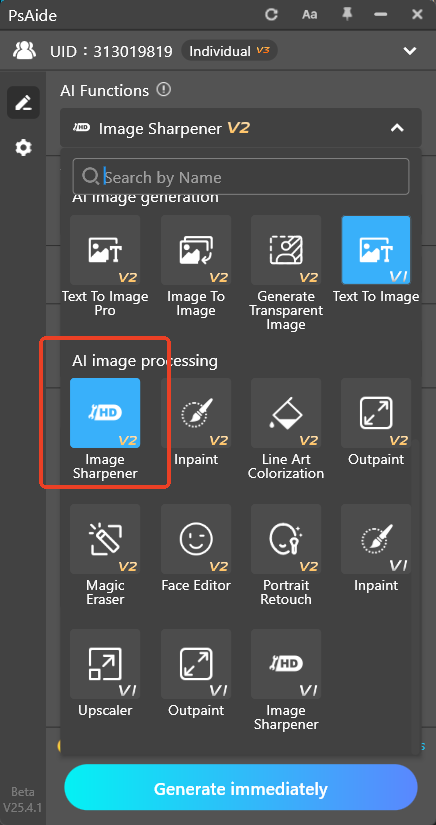
Step 2: Activate the PsAide Plugin and Select Image Sharpener
Navigate to the PsAide panel within Photoshop. From the available tools, select the Image Sharpener option. This tool is designed specifically to enhance the clarity of your images by sharpening the details and improving the overall resolution. If the image is soft or has slight noise, this tool will provide an immediate fix.
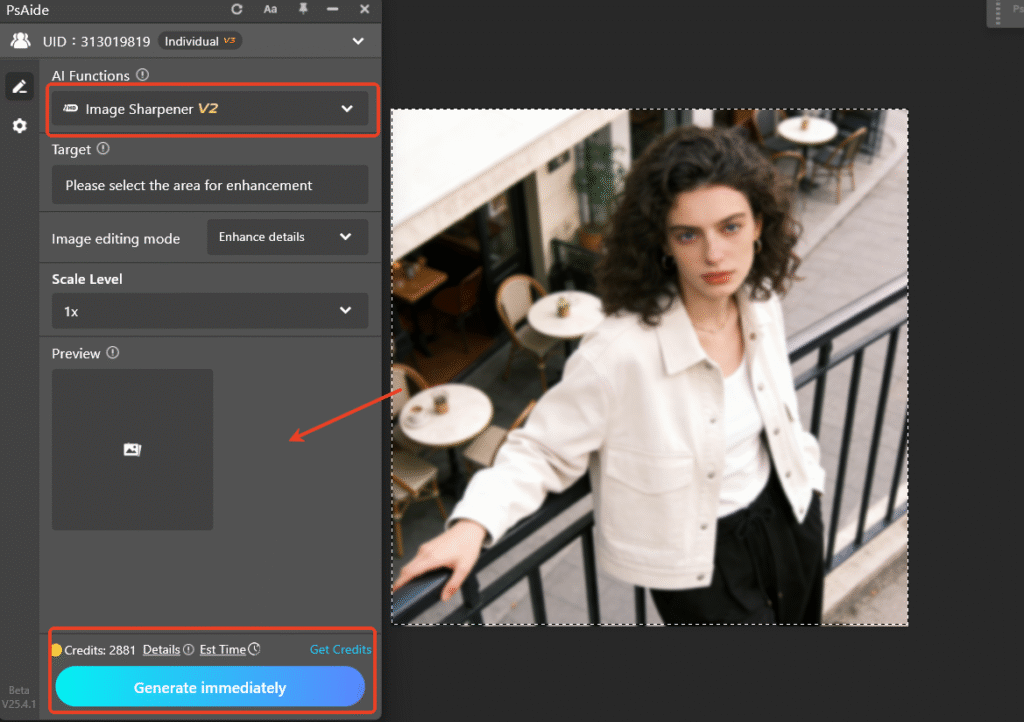
Step 3: Apply the Image Sharpener Tool
Click the Generate button to activate the HD restoration process. PsAide will automatically process the image, applying AI-driven adjustments to improve sharpness, enhance textures, and remove any noise or pixelation.

Download link
Download PsAide today and start restoring your images with the power of AI! results—especially when working with detailed subjects like hair or fur. Its AI-driven edge optimization takes the hassle out of manual refinement, letting you produce professional cutouts in minutes.
https://psaide.com/?sfrom=A86R4u
Invitation Code: A86R4u

