
Table of Contents
1. Introduction: Beyond the Flat Canvas
For concept artists, illustrators, and designers, bringing a 2D character or object to life with three-dimensional depth has always required a significant leap—either mastering complex 3D software or possessing advanced manual painting skills to simulate light, shadow, and volume convincingly. This gap between a flat sketch and a dimensional render can stall projects and limit how artwork is presented.
This tutorial demonstrates how to use Nano Banana Pro in Photoshop to bridge that gap instantly. We’ll cover the simple, three-step process to add realistic lighting, shadows, and form to your 2D artwork, unlocking new possibilities for presentations, client pitches, and portfolio pieces.
2. Step-by-Step: From 2D to 3D in 60 Seconds
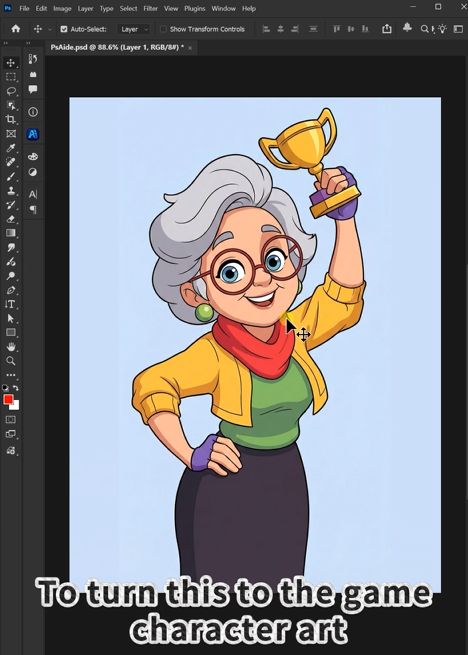
Step 1: Prepare Your 2D Artwork
Open your chosen 2D illustration in Photoshop. This could be a character design, a product sketch, or any line art. Ensure your file has a clear subject and decent resolution for the best results.
Step 2: Command the AI with Nano Banana Pro
In the PsAide panel, launch Nano Banana and select the Pro version. Upload your single image file. In the text prompt box, enter this direct command:

“Convert to 3D render with soft studio lighting and realistic shadows.”
This enhanced prompt guides the AI beyond a basic conversion, specifying a professional lighting setup for optimal results.
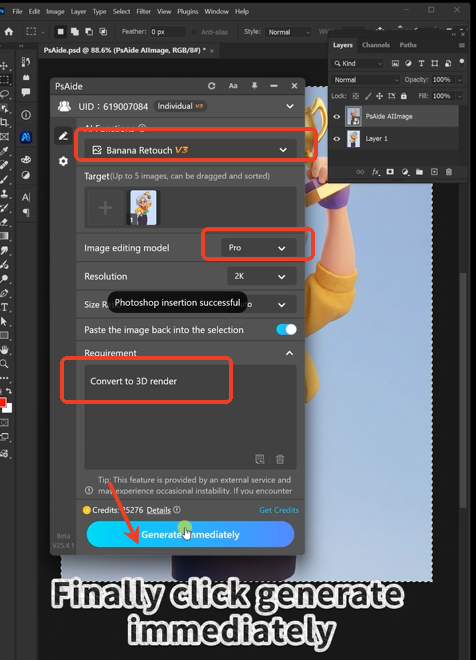
Step 3: Generate Your 3D Render
Click “Generate.” Within 30-60 seconds, the AI will process your image. It analyzes the shapes in your 2D artwork, intelligently extrapolates three-dimensional form, adds consistent directional lighting, generates grounded shadows, and renders a new image with palpable depth. The output retains your original design’s essence while transforming it into a realistic 3D presentation.

3. Why This Method Beats Manual Techniques
- Speed: Achieve in one minute what takes hours in 3D software or manual digital painting.
- Accessibility: No need to learn Blender, Maya, or complex shading techniques.
- Fidelity: Maintains the original artistic style and proportions of your 2D design.
- Iteration: Rapidly test different conceptual looks from the same base artwork.
4. Practical Applications for Creatives
- Concept Art & Character Design: Present turnarounds or key visuals with impressive depth.
- Storyboarding & Pre-Visualization: Create more immersive and dimensional scene mockups.
- Product Design: Visualize sketches as realistic prototypes.
- Social Media & Portfolio: Create standout content that showcases your designs dynamically.
Conclusion
The Nano Banana Pro function in Photoshop democratizes 3D visualization, making it an accessible tool for any 2D artist. By converting “Convert to 3D render” from a complex technical task into a simple AI command, it empowers designers to enhance their presentations and explore their creations in new dimensions with unprecedented ease and speed.rather than hours.
Download link
https://psaide.com/?sfrom=A86R4u
Invitation Code: A86R4u

