
Table of Contents
In winter fashion visuals, accessories like warm earmuffs play a crucial role in conveying seasonal style. However, reshooting models for different earmuff designs is costly and inefficient.
With PsAide powered by nano banana, you can seamlessly replace earmuffs on models while preserving facial proportions, hair details, and lighting consistency—perfect for eCommerce and commercial use.
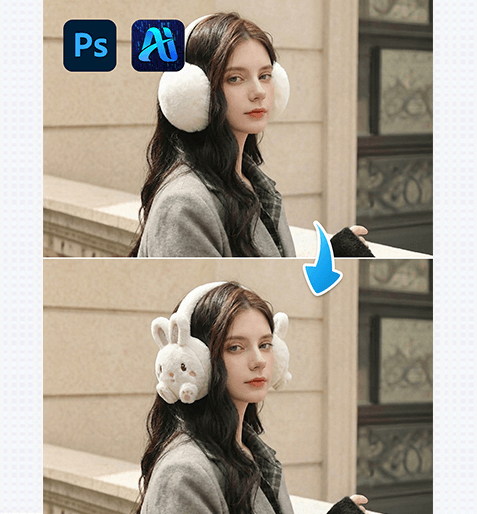
1. nano banana Warm Ear Muff Replacement Workflow
Using PsAide’s nano banana technology, replacing warm earmuffs on a model is fast, accurate, and visually natural.
(1)Import the Model Image and Define the Head Area
Open the model image in Photoshop and ensure the ears and surrounding hair are clearly visible. nano banana relies on accurate head structure for realistic earmuff placement.
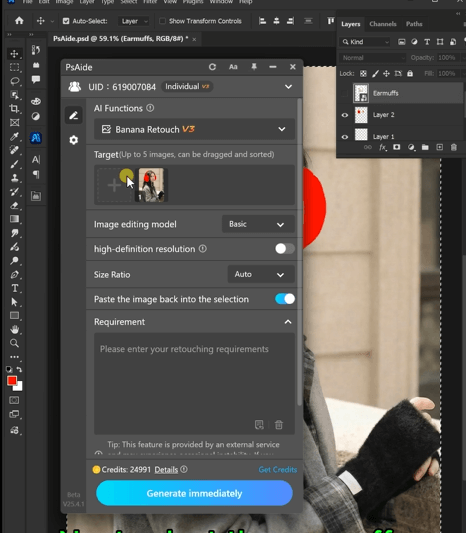
Best Practices
①Keep the head angle natural and unobstructed
②Avoid heavy hair overlap covering the ears
③Clean backgrounds improve nano banana precision
(2)Apply PsAide nano banana for Ear Muff Swapping
Activate nano banana in PsAide and enter a prompt related to warm earmuff replacement. nano banana automatically aligns earmuffs with the head shape and ear position.
The girl in Image 2 wears the earmuffs from Image 1, maintaining consistent color andmateriall details.
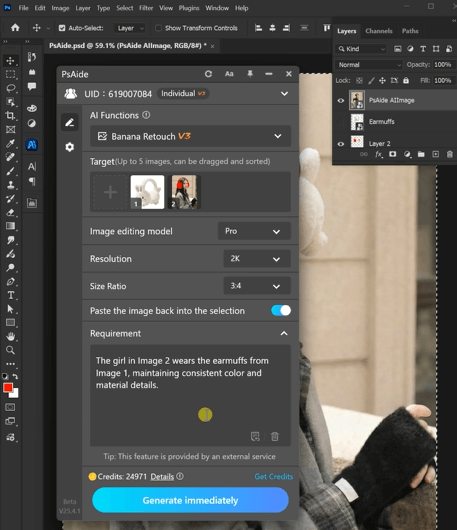
① nano banana Key Advantages
①Precise alignment with ear and head contours
②Natural integration with hair and skin tones
③Realistic thickness and texture of warm earmuffs
(3)Refine Details and Export the Final Image
nano banana generates high-quality earmuff results that require only minor refinements before export.
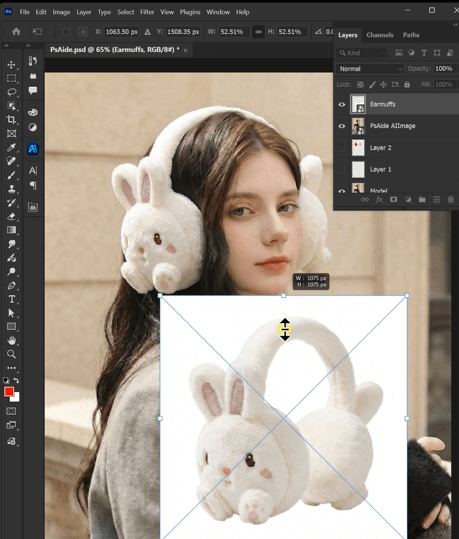
Recommended Final Checks
①Ensure symmetrical placement on both ears
②Check the connection between headband and earmuffs
③Confirm material texture matches winter accessories
2. nano banana Use Cases for Warm Earmuff Editing
nano banana is ideal for various winter accessory scenarios:
(1)Multiple Earmuff Styles from One Model
Quickly generate different earmuff colors and designs using the same model image with nano banana.
(2)Seasonal Accessory Conversion
Transform non-winter images into winter-themed visuals by adding warm earmuffs via nano banana.
(3)Consistent Branding Across Platforms
nano banana ensures consistent earmuff appearance across marketplaces and marketing channels.
3. Why nano banana Is Better Than Manual Accessory Editing
Compared with traditional retouching methods, nano banana delivers clear advantages:
①No facial distortion or proportion changes
②No complex masking around hair
③Natural depth and softness of earmuffs
④Faster production with fewer revisions
For fashion brands and sellers, nano banana offers a reliable way to create professional winter accessory visuals efficiently.

Download Link: https://psaide.com/?sfrom=ZfhxUK
Invitation Code: ZfhxUK

