
Table of Contents
In fashion and apparel visuals, socks may seem simple, but replacing them convincingly can be surprisingly difficult. Ankle proportions, fabric folds, and shadows often make manual editing inefficient.
With PsAide powered by nano banana, you can seamlessly replace socks on models while preserving leg shape, fabric texture, and lighting realism—ideal for eCommerce product images and lookbooks.
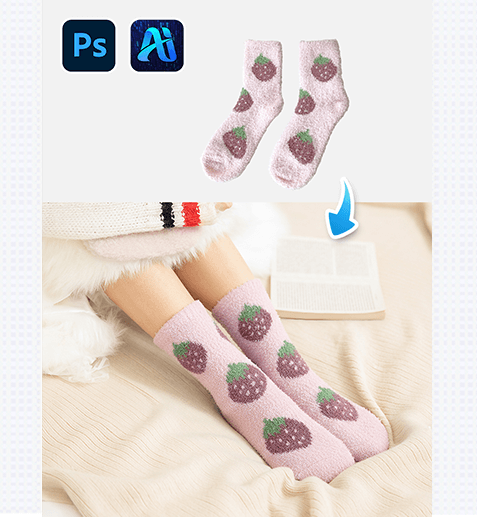
1. nano banana Sock Replacement Workflow
Using PsAide’s nano banana technology, changing socks on a model can be done quickly while maintaining natural and professional results.
(1)Import the Model Image and Define the Ankle Area
Open the model image in Photoshop and ensure the ankle and lower leg area are clearly visible. Accurate ankle structure allows nano banana to generate realistic sock placement.
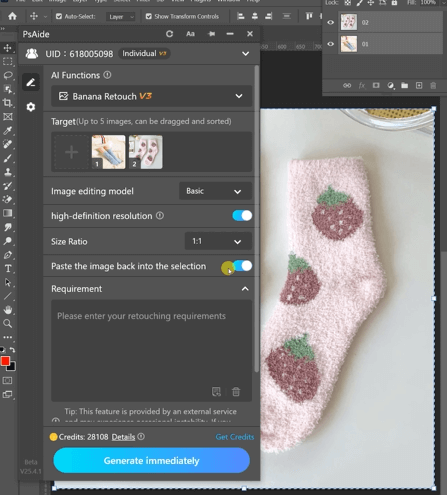
Best Practices
①Avoid heavy shadows covering the ankle
②Keep leg posture natural and undistorted
③Clean backgrounds improve nano banana accuracy
(2)Apply PsAide nano banana for Sock Replacement
Activate nano banana in PsAide and enter a prompt
Change the socks on the model in Figure 1 tothe socks from Figure 2, keeping everythingelse the same.
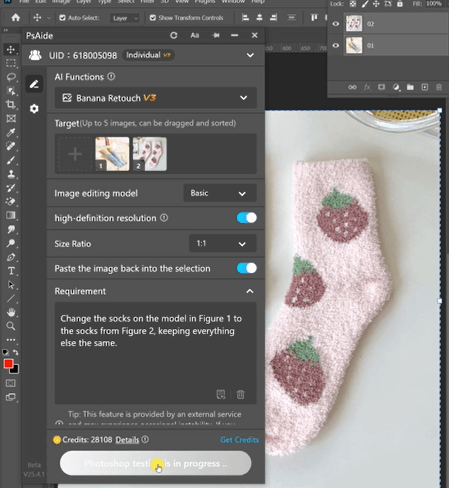
nano banana Key Advantages
①Natural sock length and tightness control
②Realistic fabric folds and elasticity
③Seamless integration with skin and footwear
(3)Refine Details and Export the Final Image
nano banana produces highly finished sock results that usually require only light refinement before export.
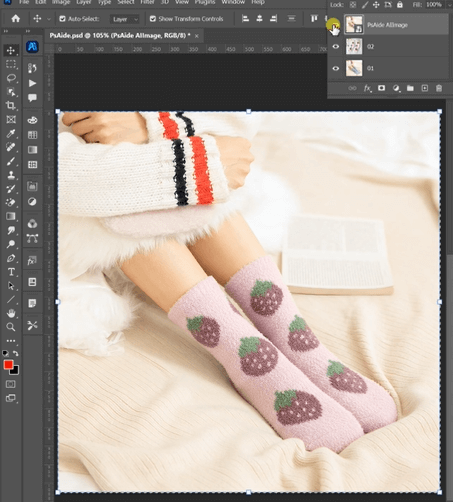
Recommended Final Checks
①Ensure the sock edge sits evenly on the leg
②Check transitions between sock and shoe
③Confirm fabric texture matches the sock material
2. nano banana Use Cases for Sock Editing
nano banana is highly effective across multiple apparel scenarios:
(1)Multiple Sock Styles from One Model
Quickly generate different sock colors, lengths, or patterns using the same model image with nano banana.
(2)Seasonal Styling Adjustments
Convert barefoot or low-sock images into seasonal looks using nano banana without reshooting.
(3)Consistent Apparel Presentation Across Platforms
nano banana ensures uniform sock appearance across eCommerce listings, ads, and social media visuals.
3. Why nano banana Is Better Than Manual Sock Editing
Compared to traditional sock replacement methods, nano banana offers clear advantages:
①No distortion of leg or ankle proportions
②No manual fabric reconstruction
③Natural folds and realistic shadows
④Faster workflow with fewer revisions
For apparel brands and online sellers, nano banana provides a scalable and reliable solution for professional sock replacement.

Download Link: https://psaide.com/?sfrom=ZfhxUK
Invitation Code: ZfhxUK

