
Table of Contents
Sweaters and knitwear are essential items in fashion catalogs, but changing them on models often involves complex masking around arms, collars, and fabric folds. Manual editing can easily break realism and consume hours of work.
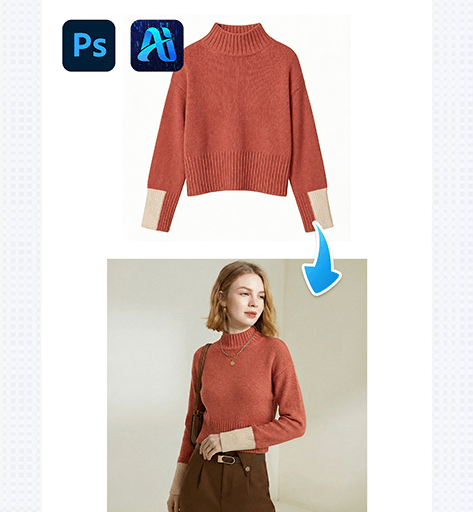
With PsAide powered by nano banana, you can replace sweaters on models efficiently while preserving body proportions, fabric depth, and natural lighting—perfect for seasonal collections and eCommerce listings.
1. nano banana Sweater Replacement Workflow
nano banana enables a smoother and more controlled sweater replacement process, especially for thick or textured knitwear.
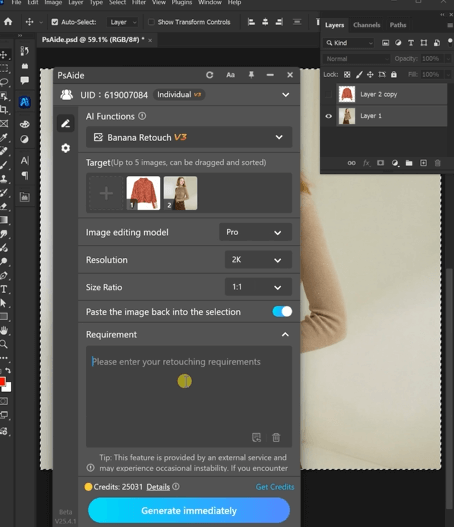
(1)Prepare the Model Image and Upper-Body Area
Open the model image in Photoshop and make sure the torso, shoulders, and arms are fully visible. Clear body structure helps nano banana generate accurate sweater placement.
Preparation Tips
①Avoid extreme arm bends or crossed poses
②Ensure the neckline and shoulder lines are visible
③Neutral backgrounds improve nano banana stability
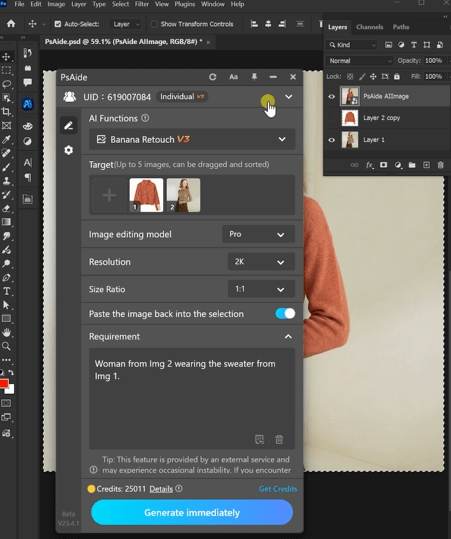
(2)Apply PsAide nano banana for Sweater Swapping
Launch PsAide and activate nano banana, then describe
Woman from Img 2 wearing the sweater from Img 1.
What nano banana Handles Automatically
①Shoulder width and sleeve length
②Natural drape over chest and waist
③Knit thickness and overall volume
(3)Adjust Fit and Fabric Details
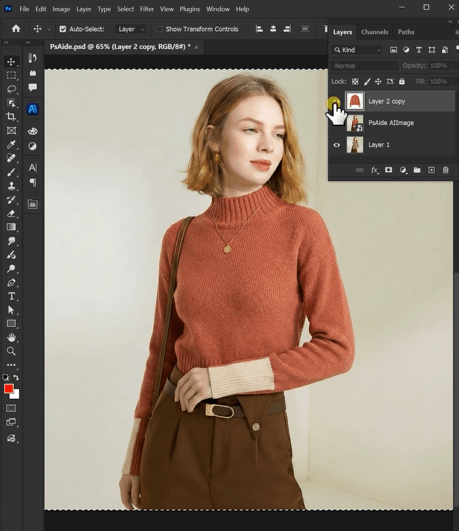
After generation, nano banana allows light refinements to better match styling needs.
Suggested Refinements
①Check sleeve alignment at wrists
②Ensure collar fits naturally around the neck
③Confirm fabric folds follow body posture
(4)Finalize and Export for Use
Once details are confirmed, export the image for product pages, ads, or lookbooks.
Final Quality Check
①Lighting consistency with original image
②Clean edges around arms and waist
③Realistic sweater texture and depth
2. nano banana Applications for Sweater Editing
nano banana is especially effective for knitwear-heavy workflows:
(1)Seasonal Sweater Line Updates
Quickly replace summer tops with sweaters using nano banana—no reshoots required.
(2)Multiple Sweater Styles on One Model
Display different colors or patterns on the same model while maintaining identical posture.
(3)Consistent Knitwear Presentation
nano banana ensures uniform sweater visuals across stores, campaigns, and platforms.
3. Why nano banana Works Better Than Traditional Clothing Edits
Compared with manual sweater replacement, nano banana delivers stronger consistency and efficiency:
①No body distortion during clothing swap
②No hand-drawn fabric reconstruction
③Natural knit folds and thickness
④Faster turnaround with fewer revisions
For fashion brands managing large apparel catalogs, nano banana offers a scalable and professional sweater replacement solution.

Download Link: https://psaide.com/?sfrom=ZfhxUK
Invitation Code: ZfhxUK

