
Table of Contents
In fashion photography and eCommerce visuals, replacing hats on models often requires precise alignment, perspective matching, and careful shadow control. Brims, crowns, and hair interaction make manual retouching slow and inconsistent.
With PsAide powered by nano banana, you can seamlessly replace hats on models while preserving head proportions, hair details, and realistic lighting—ideal for seasonal collections, brand lookbooks, and product imagery.
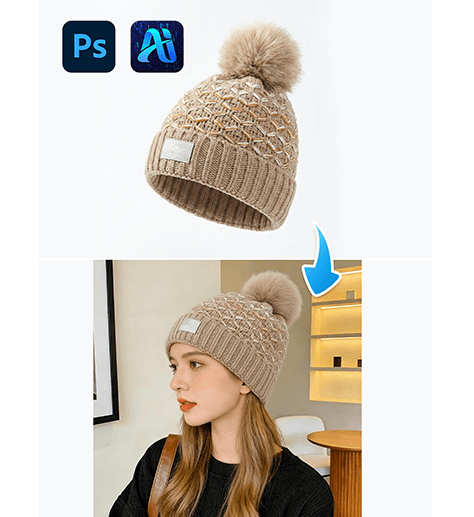
1. nano banana Hat Replacement Workflow
nano banana simplifies the entire hat replacement process, making it accessible even for users with limited Photoshop experience.
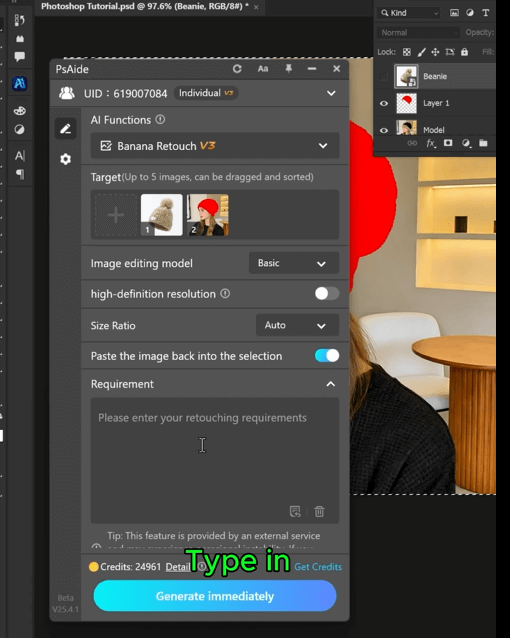
(1)Import the Model Image and Focus on the Head Area
Open the model photo in Photoshop and ensure the head, hairline, and forehead are clearly visible. A clean head structure helps nano banana generate accurate hat placement.
Preparation Tips
①Avoid images where hair heavily covers the forehead
②Keep the head angle natural and stable
③Simple backgrounds improve nano banana recognition
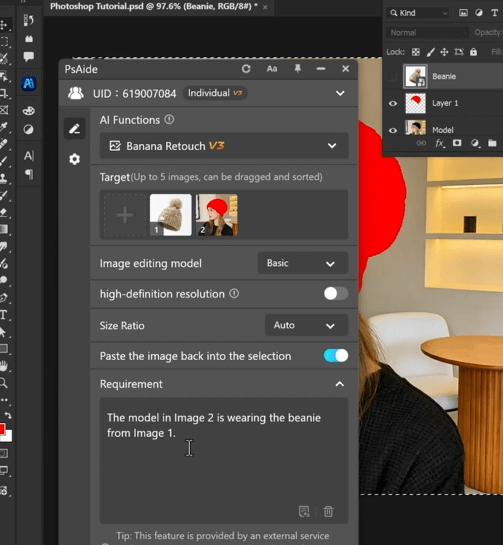
(2)Apply PsAide nano banana for Hat Swapping
Activate nano banana in PsAide and describe
The model in Image 2 is wearing the beanie from Image 1.
nano banana Key Advantages
①Automatic alignment with head tilt and rotation
②Natural interaction between hat and hair
③Realistic shadow casting and depth
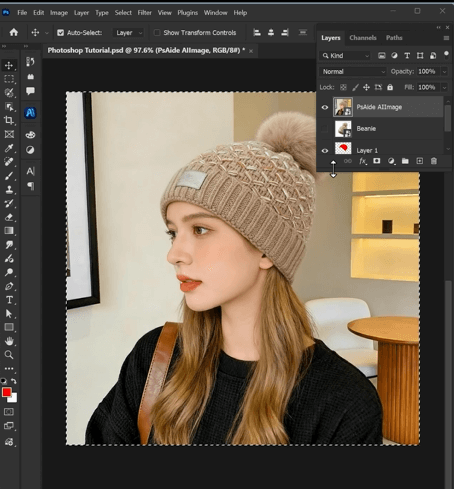
(3)Refine Details and Export the Final Image
nano banana generates a highly realistic hat replacement that typically requires only minor adjustments before export.
Recommended Final Checks
①Ensure the brim sits naturally relative to the face
②Check the contact area between hat and hair
③Confirm lighting consistency with the original image
2. nano banana Use Cases for Hat Editing
nano banana is highly versatile for various commercial and creative scenarios:
(1)Multiple Hat Styles from One Model
Create different hat designs—such as beanies, caps, or wide-brim hats—using the same model image with nano banana.
(2)Seasonal Styling Conversion
Quickly transform a no-hat image into a winter or summer look using nano banana without reshooting.
(3)Consistent Branding Across Platforms
nano banana ensures uniform hat presentation across eCommerce listings, ads, and social media visuals.
3. Why nano banana Outperforms Traditional Hat Editing
Compared to manual compositing, nano banana delivers clear efficiency and quality advantages:
①No distortion of head or facial proportions
②No complex masking around hair strands
③Natural depth, shadows, and perspective
④Faster turnaround with fewer revisions
For fashion brands, photographers, and online sellers, nano banana provides a reliable and scalable solution for professional hat replacement.

Download Link: https://psaide.com/?sfrom=ZfhxUK
Invitation Code: ZfhxUK

