
Table of Contents
Product photos shot on a plain white background are clean but often lack atmosphere, storytelling, and emotional appeal. Creating realistic scenes around appliances like a bread maker usually requires professional compositing skills, multiple layers, and careful lighting adjustments.
With PsAide powered by nano banana, you can transform a simple white-background bread maker photo into a fully styled environment in seconds—just upload your image, type a prompt, and let nano banana do the rest.
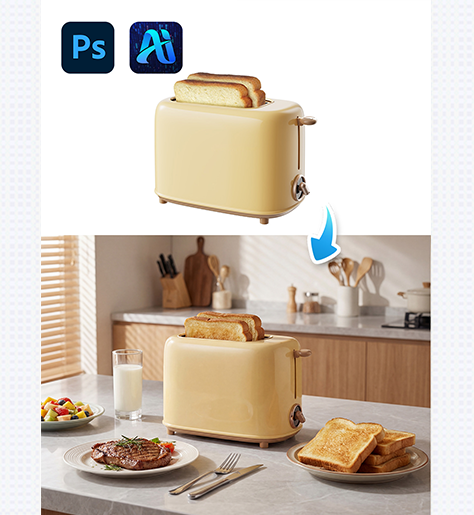
1. nano banana One-Click Background Generation
Instead of manually cutting out your product or rebuilding shadows from scratch, nano banana handles all the heavy lifting automatically.
(1)Upload Your White-Background Bread Maker Image
Start by importing your clean product photo into PsAide. Images with clear edges and even lighting work best.
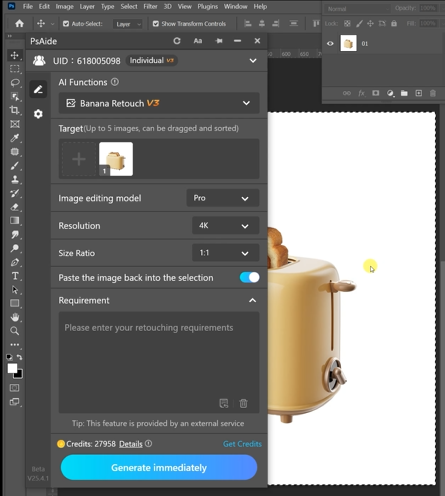
Image Preparation Tips
- Use a high-resolution photo
- Make sure the bread maker is fully visible
- Avoid harsh reflections on the surface
(2)Describe Your Desired Scene with nano banana
Activate nano banana and enter a simple prompt, for example:
BreadMake rPhotograpny maintan consistency of the bread maker modern,minimalist style kitchen, light gray marble countertop,background features blurred wooden cabinets and kitchen utsensits,blind on the left side of the background, soft natural.
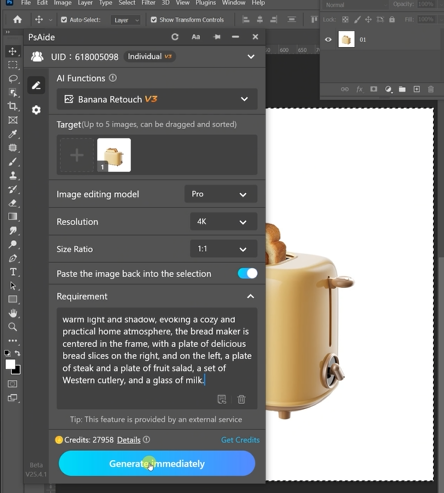
nano banana analyzes the product shape, perspective, and lighting before generating a matching background.
What nano banana Handles Automatically
- Realistic perspective matching
- Natural shadow placement under the bread maker
- Consistent lighting between product and background
(3)Preview, Adjust, and Export
Once the background is generated, you can refine the prompt if needed and export the final image.
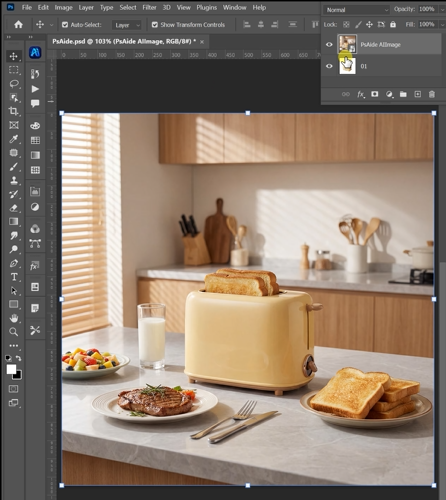
Final Quality Checks
- Does the shadow align with the light source?
- Does the countertop perspective feel natural?
- Does the bread maker blend smoothly with the scene?
2. Creative Uses of nano banana for Bread Maker Images
nano banana is not just for a single background—it enables multiple creative possibilities.
(1)Multiple Lifestyle Scenes from One Photo
Turn one white-background image into dozens of marketing visuals:
- Cozy home kitchen
- Minimalist studio setup
- Baking-themed environment
(2)E-Commerce Main Image Enhancement
Keep your product centered while adding depth and storytelling without cluttering the composition.
(3)Social Media & Advertising Content
Generate visually engaging posts without reshooting or hiring a professional studio.
3. Why nano banana Is Better Than Manual Background Editing
Traditional background replacement requires masking, color matching, and shadow drawing. nano banana simplifies everything:
- No manual cutouts needed
- Automatic lighting consistency
- Realistic integration of product and environment
- Fast iteration with different prompts
For brands, sellers, and designers, nano banana makes professional product imagery accessible without technical Photoshop expertise.

Download Link: https://psaide.com/?sfrom=ZfhxUK
Invitation Code: ZfhxUK

