
Table of Contents
For e-commerce, product photos with clean and natural backgrounds are essential, but it’s often difficult to showcase different product variations or create specific visuals without a new photoshoot. Luckily, with nano banana in PsAide, you can replace objects in real-life scene images, such as a cat bowl, without the need for complex editing. Just upload the images, enter a simple prompt, and let nano banana do the work.
By leveraging nano banana technology, you can seamlessly integrate new items—such as a new design or product variant—into a scene, maintaining realistic lighting, shadows, and proportions. This method is quick, cost-effective, and ideal for e-commerce sellers who need to produce multiple product images with different variations.
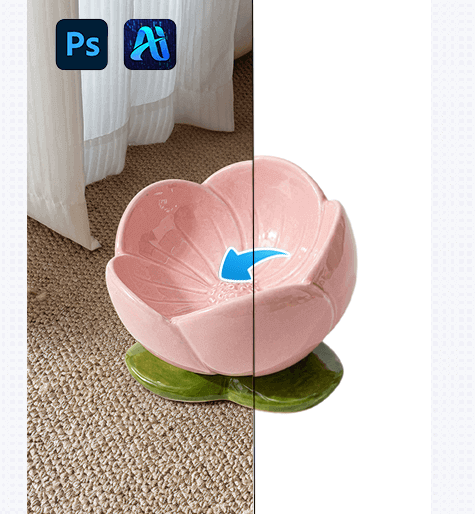
1. nano banana: Effortless Cat Bowl Replacement
Instead of manually cutting out objects or dealing with tedious masking, nano banana simplifies the process into a quick four-step workflow.
(1)Step 1 — Paint the Original Cat Bowl Red
Open the scene image in Photoshop and paint the existing cat bowl red. This step helps nano banana clearly identify the object that needs replacing, avoiding any interference from the original design and texture of the cat bowl.
You don’t need to be too precise—just cover the visible areas of the cat bowl, as this will guide nano banana in replacing it effectively.
(2)Step 2 — Upload Scene and Product Images
Once the original cat bowl is painted red, upload both:
①The edited scene image (with the red-painted cat bowl)
②The product image of the new cat bowl you want to showcase
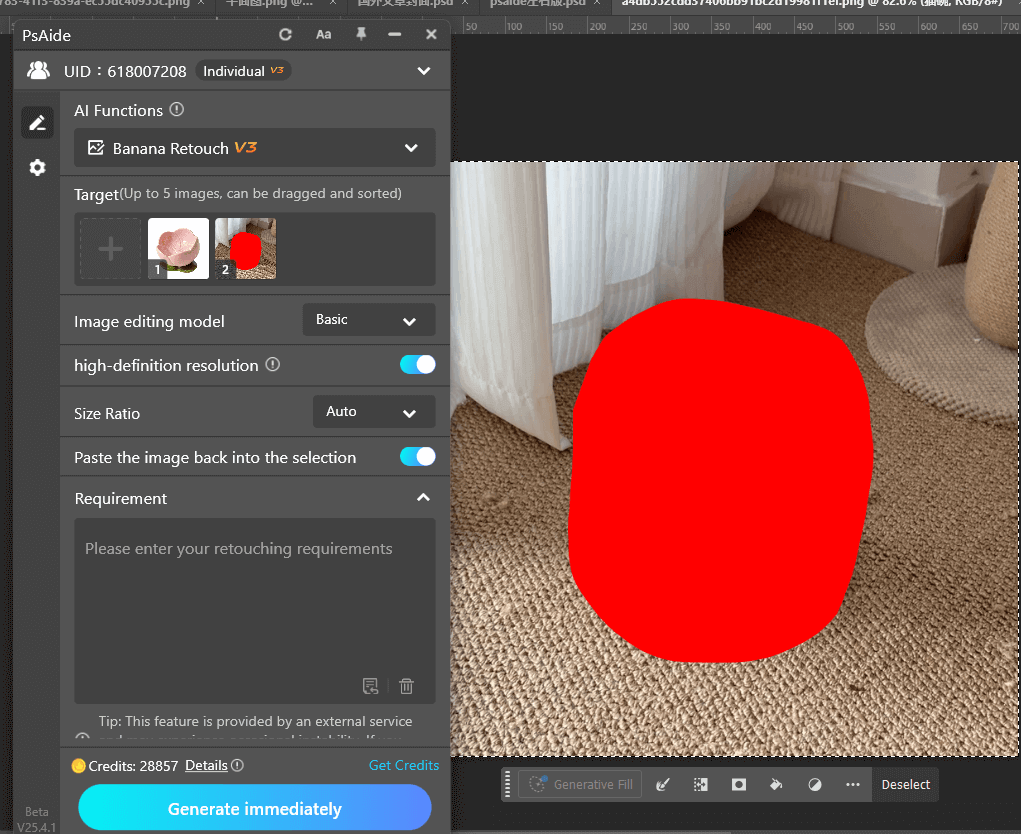
nano banana in PsAide will automatically analyze the scene for lighting, pose, and object proportions, while referencing the new cat bowl design to seamlessly integrate it into the scene.
(3)Step 3 — Enter a Clear Prompt
Provide a descriptive prompt to guide nano banana, such as:
Thebowl in Figure 1 is placed in the scene of Figure 2.
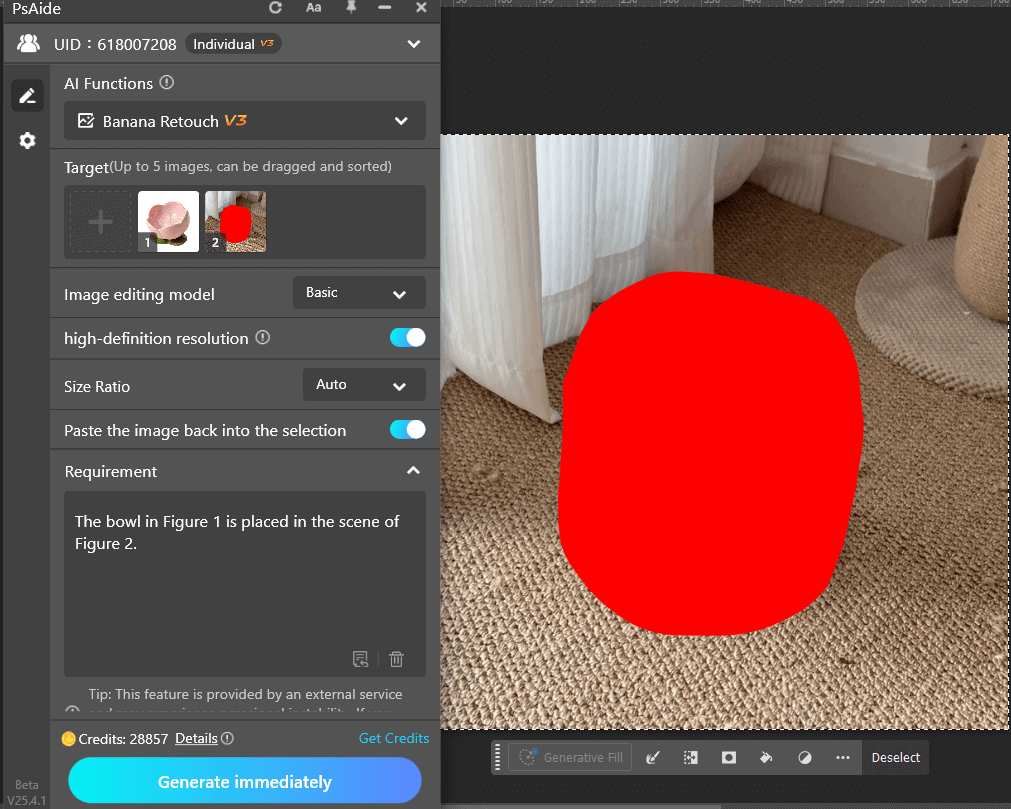
The more specific your prompt, the more accurate the result.
(4)Step 4 — Generate and Refine
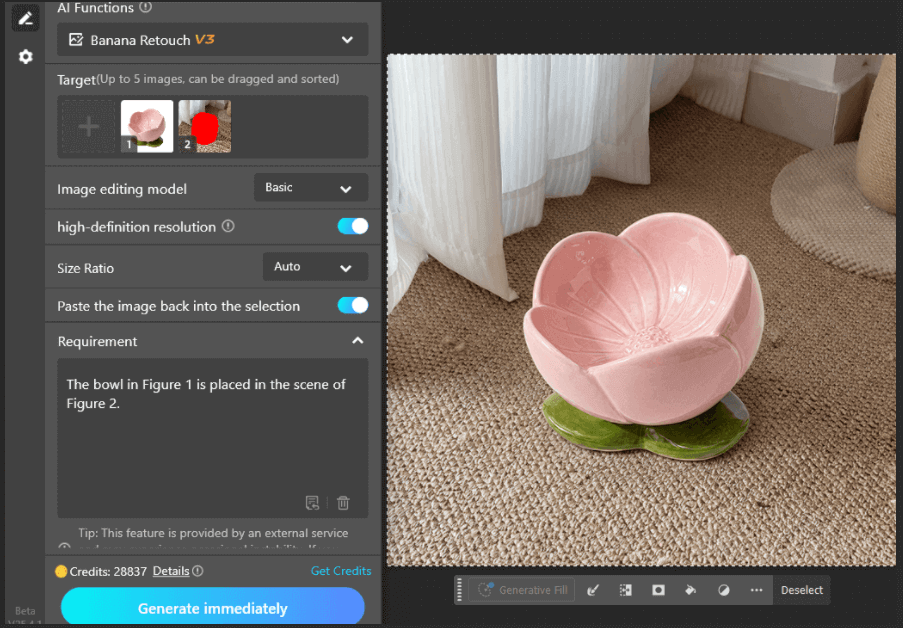
Click Generate, and nano banana in PsAide will automatically replace the cat bowl in the scene. If necessary, adjust the prompt to regenerate or fine-tune the image for better alignment and realistic integration.
2. Why nano banana Is Ideal for E-Commerce Product Images
With nano banana in PsAide, you can:
①Quickly replace products in scene photos without reshooting
②Easily create multiple variations for different product models
③Maintain visual consistency across product listings
④Save time and resources, allowing for faster content production
This method is perfect for e-commerce businesses looking to showcase different product styles or designs using the same model and scene, significantly reducing the need for new photoshoots.
3. Conclusion
nano banana in PsAide revolutionizes the way e-commerce sellers approach product image creation. With just a few simple steps—upload, describe, and generate—you can efficiently swap out objects like a cat bowl, ensuring that your product images are professional, consistent, and visually appealing without the need for complex editing.

Download Link: https://psaide.com/?sfrom=ZfhxUK
Invitation Code: ZfhxUK

