
Table of Contents
In fashion e-commerce and seasonal campaigns, footwear often needs frequent updates. Re-shooting models for every new boot style is expensive and inefficient. With nano banana in PsAide, you can replace boots directly in scene photos while preserving natural shadows, leg posture, and ground contact realism.
By marking the original boots and letting nano banana handle the rest, creators can generate clean, professional visuals suitable for product listings, ads, and lookbooks.
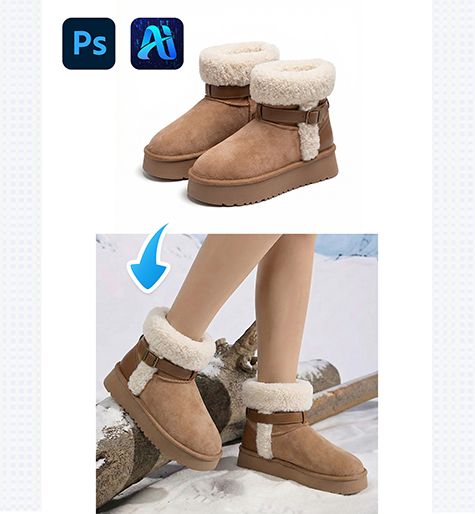
1. nano banana Workflow for Boot Replacement
This method uses a clear four-step structure to ensure accurate object replacement.
(1)Paint the Original Boots Red
Open the scene image in Photoshop and paint the model’s existing boots red.
This helps nano banana precisely identify the replacement area and prevents the original material or color from affecting the final result.
Rough coverage is sufficient—accuracy matters more than precision.
(2)Upload Scene and Boot Product Images
Upload:
①The edited scene image (boots painted red)
②The product image of the new boots
nano banana in PsAide analyzes leg position, scale, lighting direction, and contact shadows.
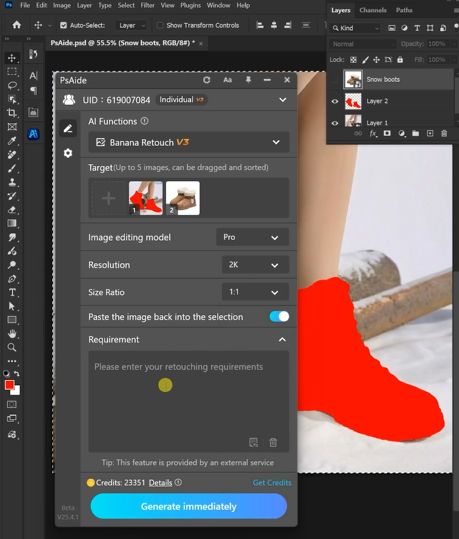
(3)Enter a Clear Prompt
Example prompt:
“Model from Image 1 wearing the snow boots
from Image 2″
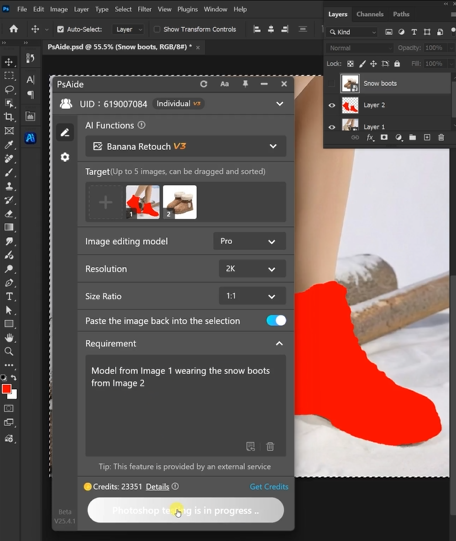
Clear prompts significantly improve realism.
(4)Generate and Review
Click Generate, and nano banana will seamlessly integrate the new boots into the scene.
You may refine results by adjusting the prompt or regenerating variations.
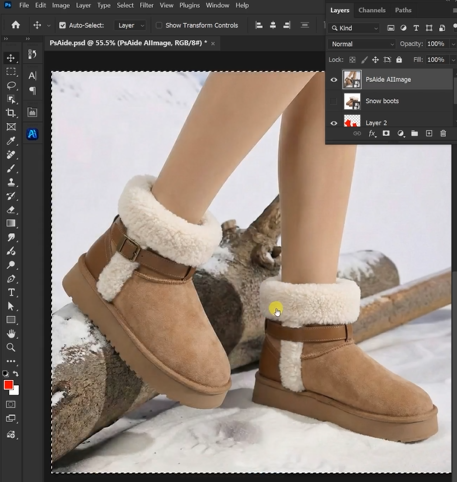
2. Why nano banana Works Well for Footwear
- Maintains realistic foot-to-ground interaction
- Preserves lighting and shadow depth
- Ideal for seasonal boot collections
- Reduces repeated photoshoots
3.Conclusion
With nano banana in PsAide, boot replacement becomes fast, scalable, and visually consistent—perfect for modern fashion workflows.

Download Link: https://psaide.com/?sfrom=ZfhxUK
Invitation Code: ZfhxUK

