
Table of Contents
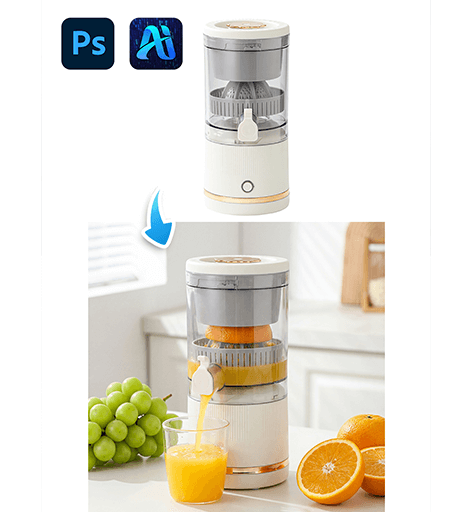
Creating high-quality eCommerce main images for kitchen appliances often requires professional photography, studio lighting, and complex compositing. With nano banana in the PsAide plugin, sellers and designers can now transform a simple white-background juicer photo into a polished lifestyle or product showcase image in just a few clicks.
Instead of building scenes manually, nano banana intelligently generates realistic backgrounds, shadows, and environmental lighting—making product visualization faster and more cost-efficient for online stores.
1. nano banana Advantages for Juicer eCommerce Images
(1)Limitations of Traditional Product Photography
Manual scene creation usually involves expensive shoots, lighting setups, and time-consuming retouching.
(2)How nano banana Simplifies the Process
nano banana analyzes product contours, reflections, and scale, then automatically builds a natural environment that fits the juicer without distortion.
2. nano banana White Background Workflow
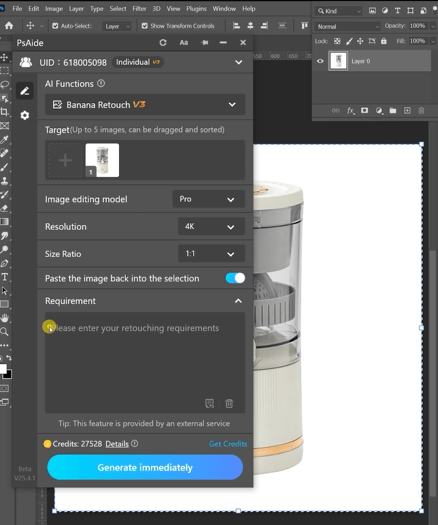
(1)Upload the White Background Juicer Image
① Open the PsAide plugin panel.
② Upload the juicer image with a clean white background.
③ No masking or red painting is required.
(2)Enter a Clear Prompt
① Describe the desired scene style such as modern kitchen, minimal studio, or bright countertop.
② Mention realistic shadows and natural lighting.
③ Keep the prompt concise and product-focused.
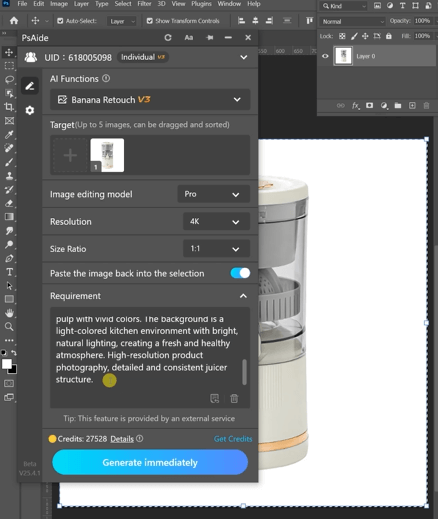
Example prompt:
An electric juicer pressing fresh orangesto extract golden juice. The juice is slowlyflowing from a side spout into a transparent glass cup, which is already partially filled with orange juice, surfaceglistening with light. Surrounding thejuicer are fresh ingredients: on the leftis a bunch of green grapes; on the rightare cut oranges, half whole and half withthe cross-section facing up,revealingplump and juicy pulp with vivid colors.The background is a light-colored kitchen environment with bright, natural lighting,creating a freshand health yatmosphere.High-resolution product photography,detailed and consistent juicer structure.
(3)Click Generate
① Click Generate in nano banana.
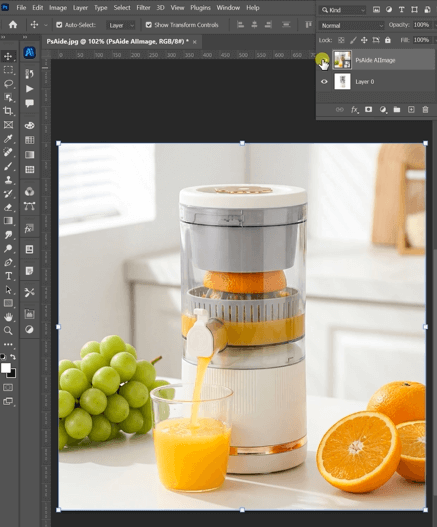
② Review background harmony and shadow placement.
③ Regenerate if you want alternative scene styles.
3. Visual Quality Control for Appliance Displays
(1)Natural Shadow and Reflection
nano banana automatically creates grounding shadows so the juicer does not appear floating.
(2)Consistent Scale and Perspective
The generated background adapts to product size, ensuring realistic proportions.
4. Typical Use Scenarios
(1)Online Marketplace Listings
Produce multiple main images from a single white-background product photo.
(2)Brand Storefront Visuals
Quickly switch between lifestyle and minimal studio scenes.
5. Summary
With its prompt-based workflow and intelligent background generation, nano banana allows sellers to convert simple white-background juicer photos into professional eCommerce visuals—without studio shoots or complex editing.

Download Link: https://psaide.com/?sfrom=ZfhxUK
Invitation Code: ZfhxUK

