
Table of Contents
Hoodies are essential in casual fashion, streetwear campaigns, and seasonal eCommerce collections. Instead of reshooting models for every new sweatshirt design, nano banana in the PsAide plugin enables seamless hoodie replacement within existing scene images while maintaining posture, fabric drape, and lighting consistency.
By combining red mask precision with garment structure recognition, nano banana accurately adapts sleeve length, hood volume, and torso fit—ensuring the new hoodie integrates naturally into the original environment.

1. nano banana Advantages for Hoodie Replacement
(1)Limitations of Manual Sweatshirt Editing
Traditional compositing often leads to distorted shoulder seams, unnatural folds, or mismatched hoodie proportions.
(2)How nano banana Preserves Garment Structure
nano banana analyzes body posture, shoulder alignment, and fabric thickness to maintain realistic hoodie placement and natural draping.
2. nano banana Red Mask Hoodie Workflow
(1)Paint the Original Hoodie Area Red
① Open the scene image in Photoshop.
② Paint the model’s existing hoodie or upper garment red.
③ Keep the mask strictly within the clothing boundary to avoid covering hair or background.
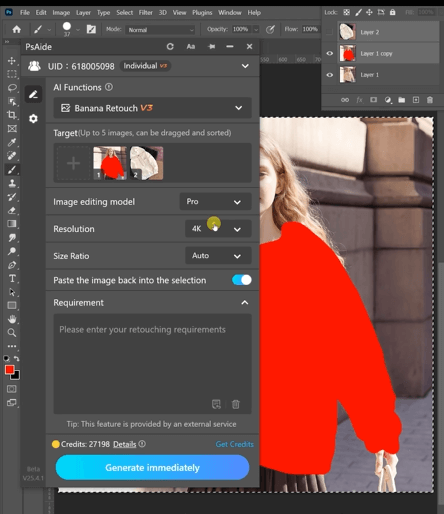
This step reduces interference from the original garment and clearly defines the transfer area for nano banana.
(2)Upload Scene Image and Hoodie Product Image
① Upload the red-masked scene image.
② Upload the hoodie product image with a clean background.
③ Ensure the product image has sufficient resolution for fabric detail.
(3)Enter a Clear Prompt
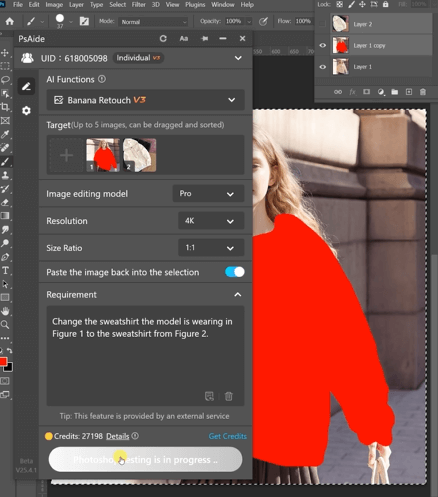
① Specify hoodie color, fit (oversized or slim), and fabric thickness.
② Mention natural folds and realistic lighting consistency.
③ Keep the prompt concise and descriptive.
Change the sweatshirt the model is wearing in Figure 1 to the sweat shirt from Figure 2
(4)Click Generate
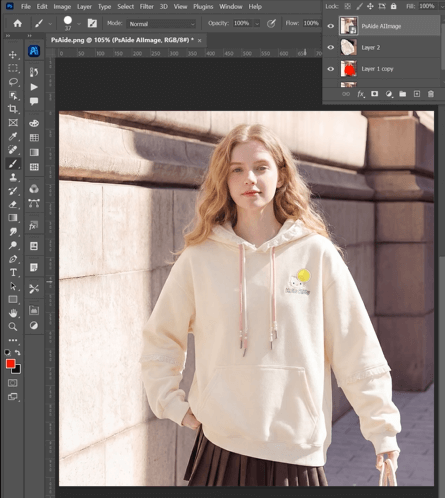
① Click Generate in nano banana.
② Review shoulder alignment, sleeve length, and hood volume.
③ Regenerate if minor refinements are needed.
3. Summary
With red mask targeting and garment-aware rendering, nano banana enables efficient and realistic hoodie replacement, helping brands scale apparel visuals while maintaining professional quality.

Download Link: https://psaide.com/?sfrom=ZfhxUK
Invitation Code: ZfhxUK

