
Table of Contents
Watermarks in AI-generated images often ruin design and presentation. Removing them with traditional PS methods is frustrating: Clone Stamp is slow, Content-Aware Fill looks unnatural, and complex backgrounds are easy to blur.
Psaide plugin provides one‑click watermark removal with AI intelligence. It auto‑repairs backgrounds without damaging texture, works for text, logo, and translucent watermarks.

1.Pain Points of Traditional PS Watermark Removal
- Slow and tedious, especially for multiple or large watermarks
- Easy to damage background texture, cause blurring or repeating patterns
- Cannot cleanly remove complex or semi-transparent watermarks
- High skill threshold for beginners
2.How to Remove Watermark in PS + Psaide
Complex / Stubborn Watermark – AI Advanced Retouch
- Use the Lasso Tool to select the watermark area.
- Fill the selection with red to mark the removal zone.

- Open Psaide → AI Advanced Photo Editing.
- Enter prompt: Remove the red area.
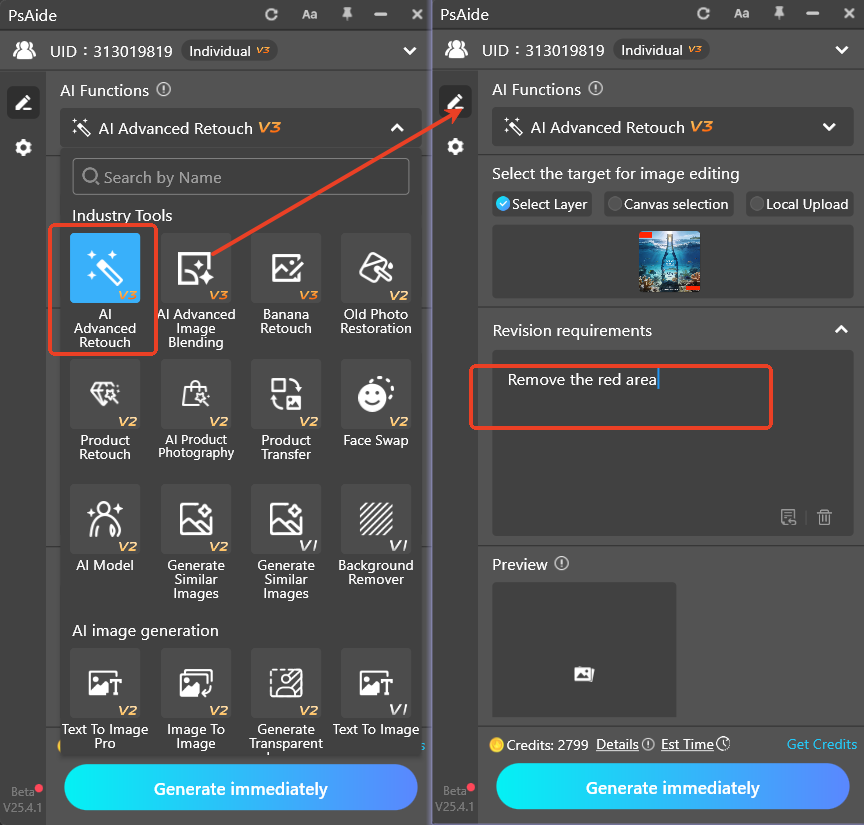
- Click Generate. AI repairs the background naturally. This method also removes people, objects, and text.

3.Common Issues & Solutions
- Incomplete watermark removal
- Select the full image or use Pro mode
- Blurry or unnatural texture
- Use high-resolution original image
- Complex watermark not removed
- Use AI Advanced Retouch with red marking
- Add prompt: Remove completely, seamless repair
With PS and Psaide, you can remove any watermark quickly, cleanly, and professionally.
Download link

https://psaide.com/?sfrom=A86R4u
Invitation Code: A86R4u

