
Table of Contents
Creating bracelet model images often requires photoshoots or manual editing. With nano banana, you can quickly generate realistic product-on-model images by transferring bracelets from a product image onto a model photo.
This guide explains how to use the red mark method with nano banana to generate bracelet model images in just a few simple steps.
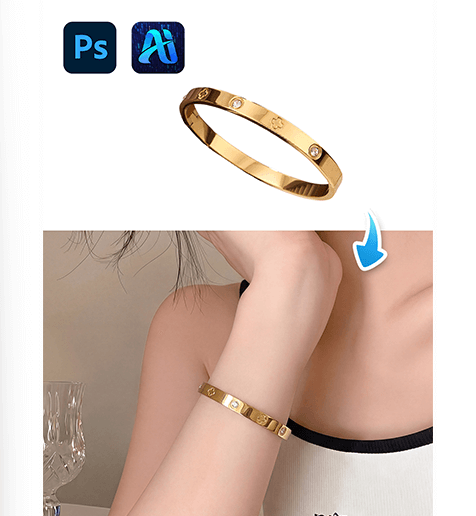
1. Nano Banana Bracelet Transfer Steps
Follow these steps to create bracelet model images using nano banana.
(1)Mark the original bracelet in red
If the model photo already contains a bracelet, it may affect the generation result.
Use a red brush to cover the original bracelet so nano banana can clearly identify the area that needs to be replaced.
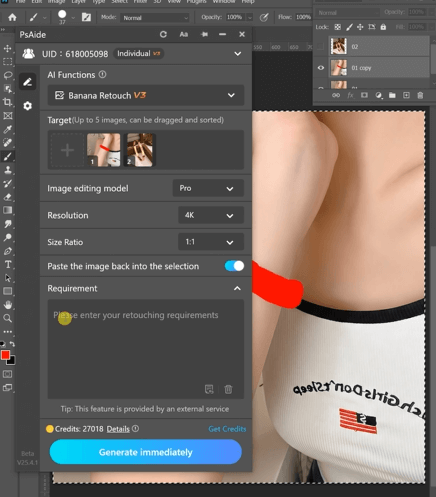
(2)Upload the model image and product image
Open the nano banana feature in the PSAide plugin, then upload:
① The model image with the red mark
② The bracelet product image
For better results with nano banana, the bracelet product image should be clear and ideally on a white or transparent background.
(3)Enter the prompt
Use a prompt to guide nano banana during generation, for example:
Remove the bracelet on the model’s hand in
Figure 1 and naturally replace it with thebracelet from Figure 2
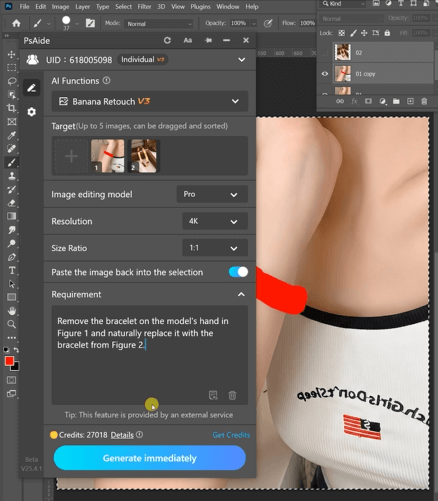
This helps nano banana generate a natural bracelet placement.
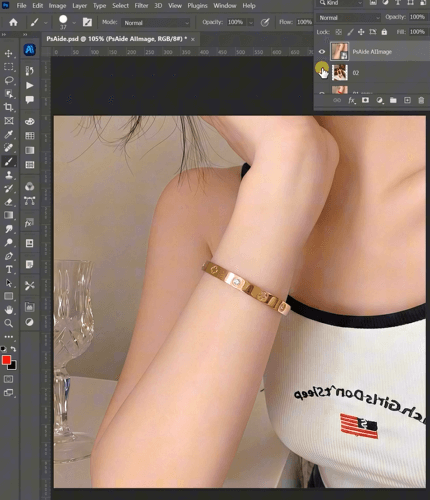
(4)Generate the final image
Click Generate and wait a few seconds.
Nano banana will create a realistic model image with the bracelet placed on the marked wrist area.
2、Conclusion
Using the red mark method with nano banana makes it easy to create bracelet model images without complex editing. By marking the bracelet area, uploading images, entering a prompt, and generating the result, nano banana can quickly produce realistic bracelet model photos for e-commerce use.

Download Link: https://psaide.com/?sfrom=ZfhxUK
Invitation Code: ZfhxUK

