
Table of Contents
Leather jackets are a staple in fashion campaigns, known for their structure, texture, and bold visual impact. Instead of manually compositing garments or organizing new photoshoots, creators can use nano banana in the PsAide plugin to directly place a leather jacket onto a model in an existing scene image.
With AI-powered garment analysis, nano banana ensures accurate fit, natural folds, and realistic lighting, making leather jacket visualization fast and efficient.
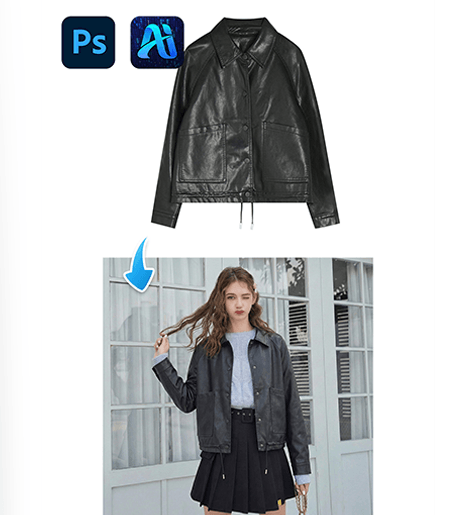
1. nano banana Advantages for Leather Jacket Transfer
(1)Complexity of Traditional Editing
Manual garment replacement often requires detailed masking and can result in unnatural proportions or stiff fabric appearance.
(2)How nano banana Improves Workflow Efficiency
nano banana automatically adapts the leather jacket to the model’s posture, ensuring proper shoulder alignment and sleeve positioning.
2. nano banana 3-Step Workflow for Leather Jacket Replacement
(1)Upload the Model Image and Product Image
① Open the PsAide plugin panel.
② Upload the model’s scene image.
③ Upload the leather jacket product image.
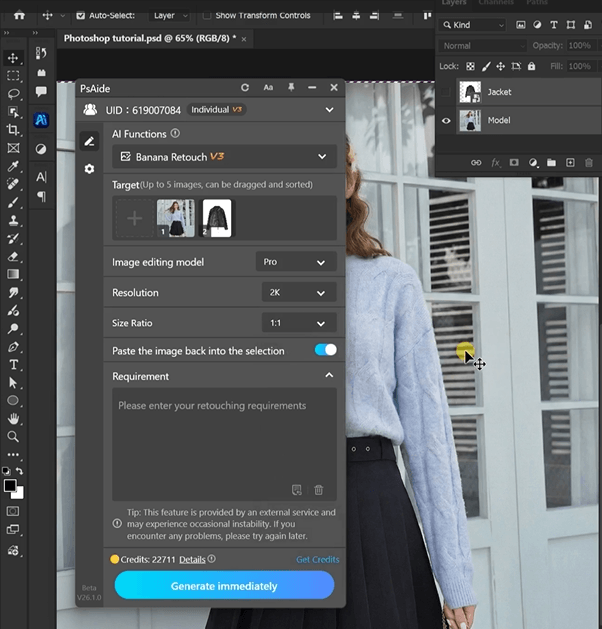
This allows nano banana to analyze both the model’s posture and the garment structure.
(2)Enter a Prompt
① Describe the leather jacket style (biker, oversized, slim fit).
② Mention realistic texture, highlights, and shadows.
③ Keep the prompt clear and concise.
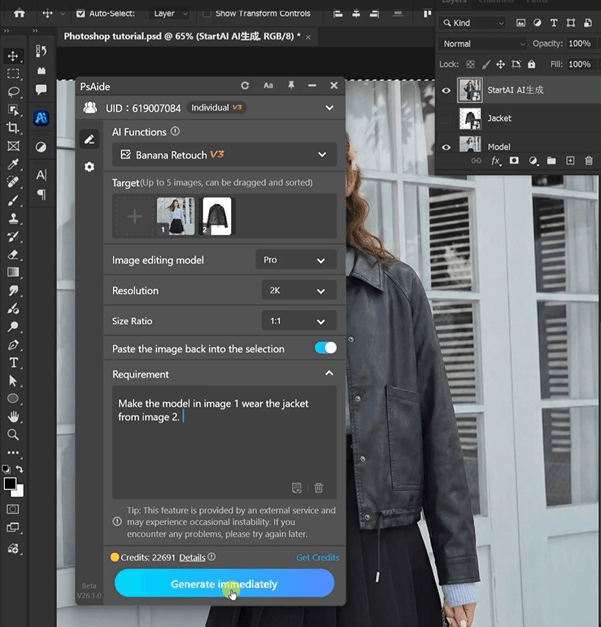
Example prompt:
“Make the model in image 1 wear the jacket from image 2..”
(3)Click Generate
① Click Generate in nano banana.
② Review jacket fit and lighting consistency.
③ Regenerate if needed.
3. Texture and Structure Accuracy
(1)Realistic Leather Texture
nano banana preserves the glossy finish and material thickness of leather.
(2)Natural Lighting Adaptation
Highlights and shadows match the original scene for a cohesive result.
4. Practical Use Scenarios
(1)Fashion Campaign Production
Quickly generate multiple leather jacket looks.
(2)eCommerce Product Visualization
Create professional model images without reshooting.
5. Summary
By simplifying garment placement into a prompt-based workflow, nano banana enables efficient and realistic leather jacket transfer, helping creators produce high-quality fashion visuals with minimal effort.

Download Link: https://psaide.com/?sfrom=ZfhxUK
Invitation Code: ZfhxUK

