
Table of Contents
Headbands are widely used in portrait photography, fashion styling, and eCommerce visuals. Replacing small accessories like headbands manually can be difficult due to hair overlap and fine detail. With nano banana in the PsAide plugin, creators can easily replace headbands while maintaining natural hair flow and head shape.
Using a red mask workflow, nano banana ensures accurate placement and seamless blending with the hairstyle.
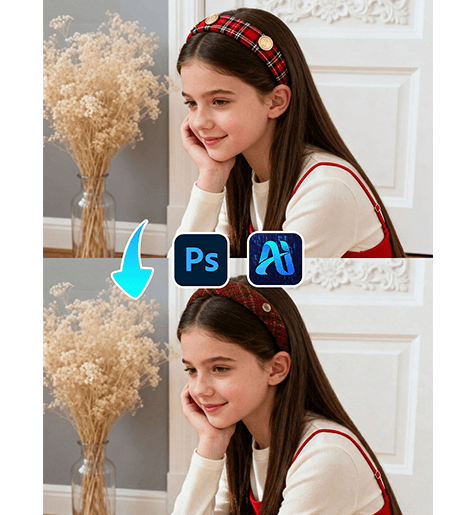
1. nano banana Advantages for Headband Replacement
(1)Challenges in Manual Accessory Editing
Traditional editing often struggles with hair overlap, resulting in unnatural edges or misalignment.
(2)How nano banana Improves Detail Integration
nano banana analyzes head shape, hair structure, and lighting to ensure the headband fits naturally.
2. nano banana Workflow for Headband Replacement
(1)Paint the Original Headband Area Red
① Open the scene image in Photoshop.
② Paint the existing headband red.
③ Avoid covering hair or skin unnecessarily.
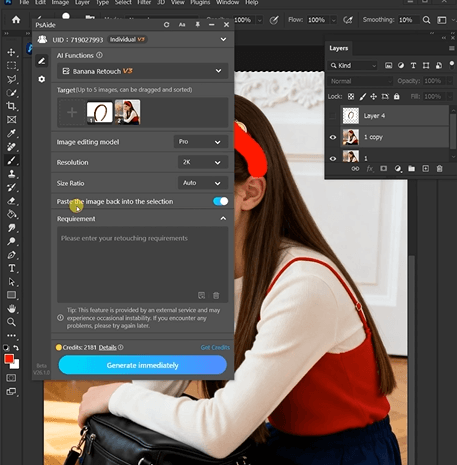
This step clearly defines the replacement area for nano banana.
(2)Upload Scene Image and Product Image
① Upload the red-masked scene image.
② Upload the headband product image.
③ Ensure design details are visible.
(3)Enter a Prompt
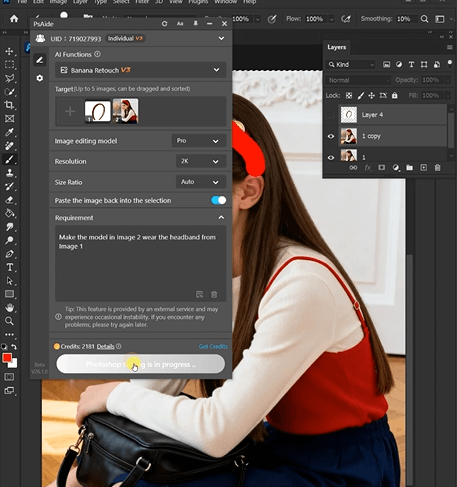
① Describe headband style and color.
② Mention natural fit and lighting consistency.
③ Keep the prompt clear.
Example prompt:
“Make the model in Image 2 wear the headband from Image 1.”
(4)Click Generate
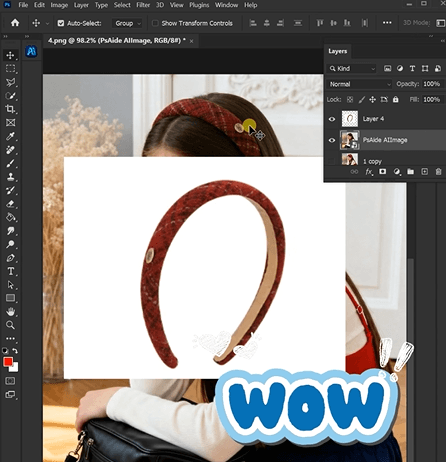
① Click Generate in nano banana.
② Review placement and blending with hair.
③ Regenerate if needed.
3. Detail and Fit Accuracy
(1)Natural Hair Integration
nano banana ensures the headband blends smoothly with hair.
(2)Consistent Lighting
Shadows and highlights match the scene.
4. Use Cases
(1)Fashion Accessories eCommerce
Generate multiple headband styles quickly.
(2)Portrait Styling
Enhance visual variety without reshooting.
5. Summary
With red mask precision and detailed accessory rendering, nano banana enables efficient and realistic headband replacement for portrait and fashion visuals.

Download Link: https://psaide.com/?sfrom=ZfhxUK
Invitation Code: ZfhxUK

