
Table of Contents
Replacing a bag in an image can be difficult when it interacts with the hand or body. With nano banana, you can easily complete a realistic nano banana bag replacement.
Using nano banana, you first mark the bag area, then upload the image, enter a prompt, and generate a natural nano banana bag replacement instantly.
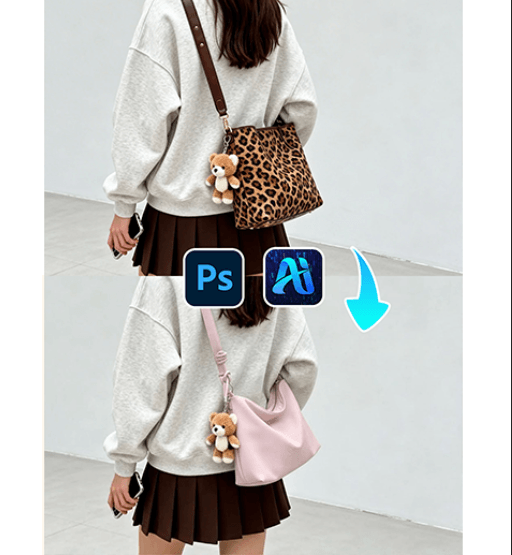
1. nano banana bag replacement workflow
(1)Simple process with nano banana
① Mark the bag area
② Upload the image
③ Enter prompt and generate nano banana bag replacement
(2)Realistic results using nano banana
① Preserves hand position
② Maintains natural interaction
③ Matches lighting and shadows
(3)Efficient workflow with nano banana
① No complex editing required
② Fast nano banana generation
2. How to use nano banana for bag replacement
(1)Prepare your image
① Use a clear image with visible bag
② Ensure hand interaction is clear
(2)Mark the area (key step)
① Mark the bag area precisely
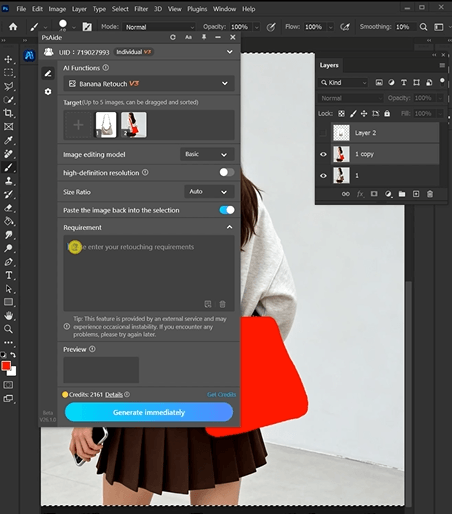
(3)Open nano banana
(4)Upload image
① Upload the marked image
(5)Enter prompt in nano banana
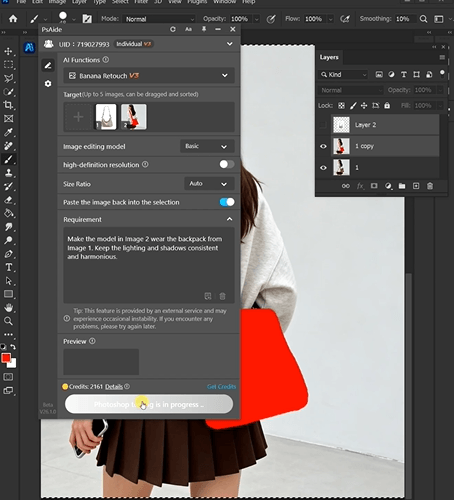
Recommended prompt:
Malke the model in Image 2 wear the backpack froemImage 1, Keep the lighting and shadows consistentand harmonkous.
(6)Generate nano banana bag replacement
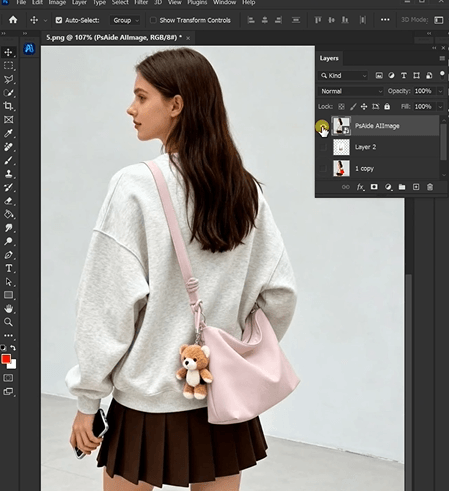
3. Tips to improve nano banana bag replacement
(1)Accurate masking
① Cover the full bag
② Avoid marking hands
(2)Prompt optimization in nano banana
① Use “realistic leather”, “natural lighting”
② Specify bag style
(3)Maintain realism
① Keep proportions correct
4. Use cases
(1)E-commerce
(2)Fashion content
(3)Product display

Download Link: https://psaide.com/?sfrom=ZfhxUK
Invitation Code: ZfhxUK

