
Table of Contents
The Product Mockup Challenge
You have a perfect hair tie mockup and a beautiful new pattern design. But applying that pattern to the curved, fabric surface of a hair tie is not simple. Manual methods require complex warping, texture blending, and shadow adjustments to make the pattern look like it was printed on the fabric rather than pasted on top. This process can take 30 minutes or more and often results in flat, unrealistic product images.
1.Why Pattern Application on Hair Ties Is Difficult
A hair tie is not a flat surface. It has:
- Circular curvature that requires the pattern to wrap around
- Fabric texture that needs to show through the pattern
- Folds and creases from the elastic construction
- Cast shadows that must interact with the printed design
Manual pattern application struggles with all these elements. Nano Banana Pro solves this by intelligently analyzing the mockup’s 3D form and rendering the pattern with proper distortion, texture preservation, and lighting integration.
2.3-Step Pattern Application Process
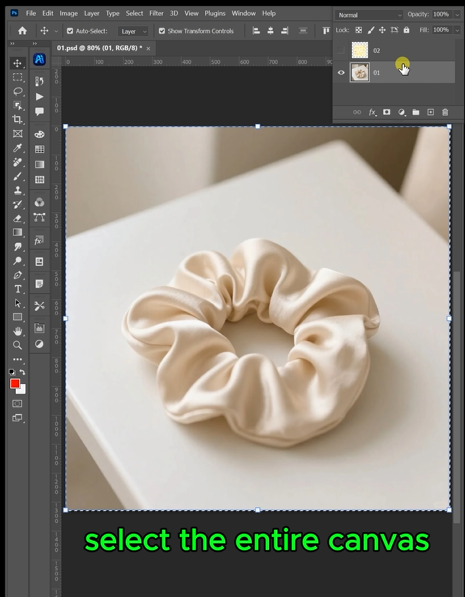
Step 1: Prepare Your Images
Open both your hair tie mockup image and your pattern design in Photoshop. For best results, ensure your mockup is well-lit and shows the hair tie clearly. Your pattern should be high-resolution for clean transfer.
Step 2: Configure AI for High-Quality Output
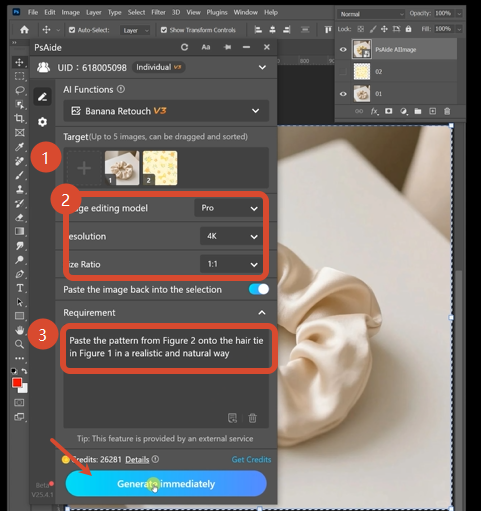
Open Nano Banana and select the Pro version. Choose a 1:1 aspect ratio for balanced product presentation. Under resolution settings, select 4K output for the highest detail clarity—this preserves fine pattern details and fabric textures. Upload both images to the interface.
In the prompt box, enter this precise command:
Paste the pattern from Figure 2 onto the hair tie in Figure 1 in a realistic and natural way.
Step 3: Generate Your Professional Mockup
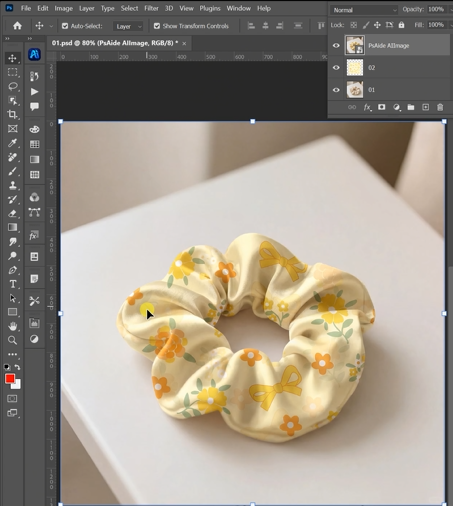
Click Generate. Within 45-60 seconds, the Pro version performs advanced rendering:
- Surface Mapping: Analyzes the hair tie’s 3D form and maps the pattern to follow its circular curvature
- Texture Preservation: Maintains the fabric grain and texture while applying the new pattern
- Distortion Correction: Warps the pattern naturally to match folds, creases, and elastic gathering
- Lighting Integration: Adjusts pattern highlights and shadows to match the mockup’s original light source
- Edge Blending: Softens pattern boundaries where they meet shadows or background elements
The result is a realistic product mockup where your pattern looks professionally printed on the hair tie fabric.
3.Applications for Product Designers
This technique is perfect for:
- Print-on-Demand Sellers: Create mockups for multiple pattern variations without reshooting
- Fabric Designers: Show how new印花 designs look on actual products
- E-commerce Brands: Rapidly produce catalog images for patterned accessories
- Social Media Content: Generate eye-catching product visuals for marketing campaigns
4.Pro Tips for Best Results
Save output as PNG to preserve transparency and quality for further editingr marketing. With Nano Banana Pro, you can bring your products to life on real models instantly, creating compelling, relatable imagery that drives sales and connects with customers.
High-resolution source images are essential for 4K output to maintain detail
Choose well-lit mockups with even lighting for the most natural pattern integration
Simple, repeating patterns often yield the most realistic results on curved surfaces
5.Download link

https://psaide.com/?sfrom=A86R4u
Invitation Code: A86R4u

