
Table of Contents
1、The Swimsuit Editing Challenge
You have a beautiful beachwear photo but the swimsuit needs to change. Maybe you’re testing different styles, updating a summer catalog, or preparing for a new collection launch.
Traditional Photoshop methods require hours of meticulous work. Masking around skin, matching tan lines, adjusting strap positions, and preserving body contours is extremely difficult. The skin-swimsuit edge is notoriously hard to blend naturally. Even small mistakes make the edit obvious.
The result? Most manual swimsuit edits look fake—floating straps, mismatched skin tones, and visible cutout edges.
Nano Banana Pro changes this completely. The AI understands body contours, skin textures, and how swimwear should naturally fit.
2、Why Swimsuit Replacement Is Uniquely Difficult
Swimwear presents challenges that other clothing doesn’t:
| Challenge | Why It’s Hard |
|---|---|
| Skin contact | The swimsuit edges must blend seamlessly with bare skin |
| Strap positioning | Straps must sit naturally on shoulders and back |
| Body contour fit | The fabric needs to follow the body’s curves precisely |
| Skin tone matching | Tan lines and skin colors must remain consistent |
| Minimal fabric | Less coverage means more visible skin to blend |
Manual editing struggles with all of these. Nano Banana Pro handles them automatically.
3、What You Need
- Photoshop with PsAide plugin
- Model photo (wearing original swimsuit)
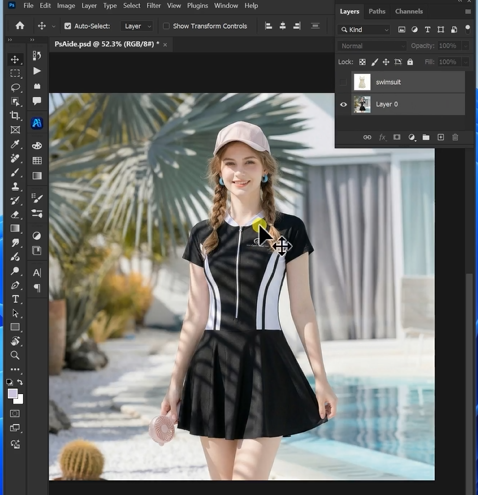
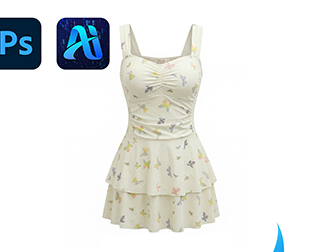
- New swimsuit product image
- 60 seconds of time
4、The 3-Step Swimwear Swap
Step 1: Configure AI and Write Your Prompt
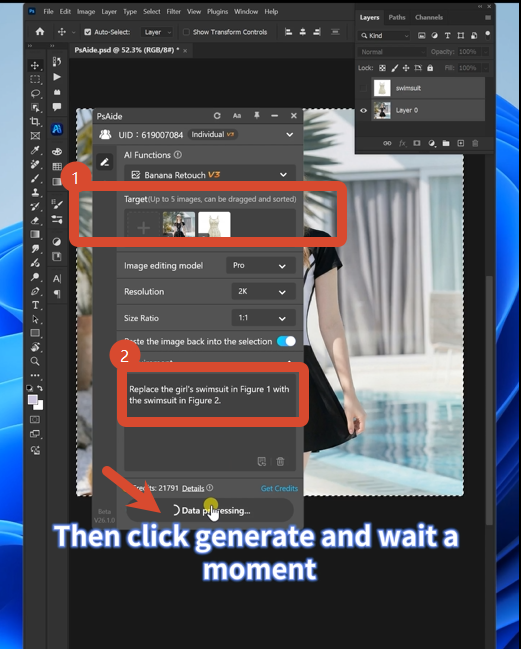
Open Nano Banana and select the Pro version. Set resolution to 2K—perfect for preserving skin texture and fabric details without excessive file sizes.
Upload your two images:
- Image 1: Your new swimsuit product photo
- Image 2: Your model photo with red-marked swimsuit
Type this prompt:
“Replace the girl’s swimsuit in Figure 1 with the swimsuit in Figure 2. “
Click Generate.
Step 2: Get Your Natural Result
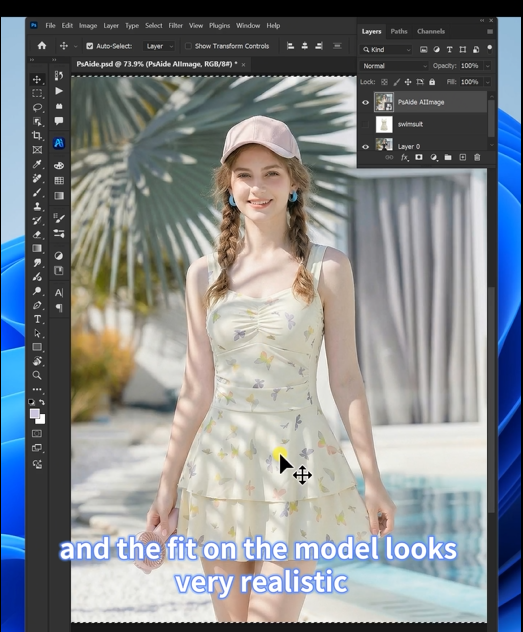
Wait 45-60 seconds. The AI processes the image and delivers a new swimsuit edit where:
- The new swimsuit fits the body naturally
- All edges blend seamlessly with skin
- Straps position correctly on shoulders
- Skin tones remain consistent and natural
- Body contours are preserved perfectly
The result looks like it was photographed that way.
5、What The AI Does Behind The Scenes
| Your Concern | AI’s Solution |
|---|---|
| Skin-blending edges | Analyzes skin texture around the swimsuit and creates seamless transitions |
| Strap placement | Maps shoulder and back contours to position straps naturally |
| Body contour fit | Warps the swimsuit fabric to follow the body’s exact curves |
| Skin tone preservation | Maintains original skin colors and tan lines throughout |
| Minimal coverage areas | Carefully handles edges where swimsuit meets bare skin |
You don’t see this happen. You just get the result.result.
6、Download link

https://psaide.com/?sfrom=A86R4u
Invitation Code: A86R4u

