Table of Contents
You have a beautiful model photo but the sofa needs to change. Maybe you’re updating a catalog, testing different furniture styles, or refreshing an old campaign without a costly reshoot.
Traditional Photoshop methods require hours of painstaking work. Masking the model from the old sofa, adjusting the new sofa’s perspective to match the camera angle, recreating realistic shadows where the model sits, and blending the model’s body naturally onto the new furniture surface.
The result? Most manual furniture swaps look obviously edited—floating models, mismatched shadows, and perspective mismatches.
Nano Banana Pro changes this completely. The AI understands depth, seating positions, and how light interacts with fabric surfaces.
1、Why Sofa Replacement Is Uniquely Difficult
Furniture replacement presents challenges that clothing edits don’t:
| Challenge | Why It’s Hard |
|---|---|
| Perspective matching | The new sofa must align with the exact camera angle |
| Seating position | The model must sit naturally on the new sofa’s surface |
| Shadow consistency | Shadows under and behind the model must match original lighting |
| Depth interaction | The model’s body needs to press into cushions realistically |
| Fabric texture | Different sofa materials reflect light differently |
Manual editing struggles with all of these. Nano Banana Pro handles them automatically.
2、What You Need
- Photoshop with PsAide plugin
- Model photo seated on original sofa
- New sofa product image
- 60 seconds of time
3、The 3-Step Sofa Swap
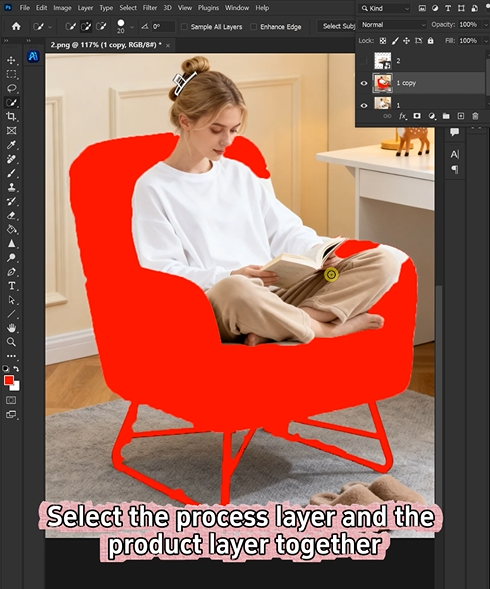
Step 1: Mark the Original Sofa in Red
Open your model photo in Photoshop. Use the Lasso Tool to select the existing sofa. Include the seat area, backrest, and armrests that are visible in the frame.
Fill the selection with bright red (R=255, G=0, B=0).
Why red? It provides the highest contrast against most furniture colors, giving the AI a crystal-clear target for replacement.
Step 2: Configure AI and Write Your Prompt
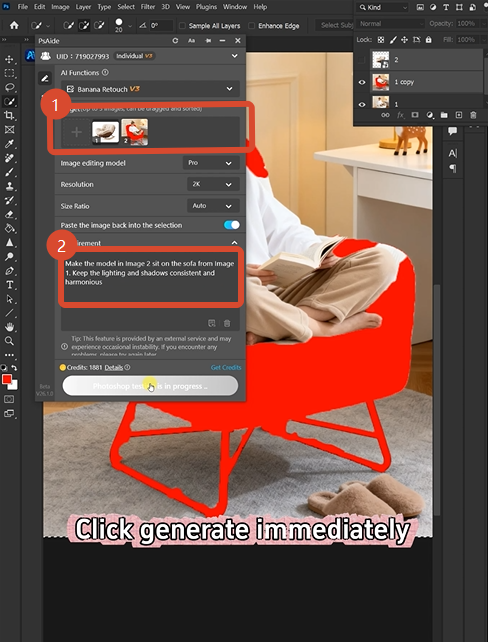
Open Nano Banana and select the Pro version. Set resolution to 2K—perfect for preserving fabric texture and shadow details without excessive file sizes.
Upload your two images:
- Image 1: Your new sofa product photo
- Image 2: Your model photo with red-marked sofa
Type this prompt:
“Make the model in image 2 sit on the sofa from image 1. Keep the lighting and shadows consistent and harmonious.”
Click Generate.
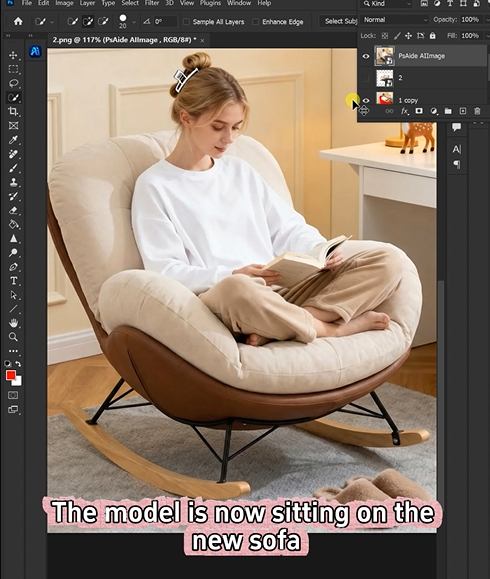
Step 3: Get Your Natural Result
Wait 45-60 seconds. The AI processes the image and delivers a new scene where:
- The model sits naturally on the new sofa
- Shadows fall correctly based on the original lighting
- The sofa’s perspective matches the camera angle
- The model’s body interacts realistically with cushions
- All edges blend seamlessly
The result looks like it was photographed that way.
4、What The AI Does Behind The Scenes
| Your Concern | AI’s Solution |
|---|---|
| Perspective matching | Analyzes camera angle and warps sofa to match |
| Seating position | Positions the model naturally on the new surface |
| Shadow recreation | Generates consistent shadows based on original lighting |
| Depth interaction | Creates realistic pressure points where model meets cushions |
| Fabric lighting | Adjusts sofa texture reflections to match scene |
You don’t see this happen. You just get the result.
5、When To Use This
Furniture brands: Update catalog images without reshoots
Interior designers: Show different sofa options with the same model pose
E-commerce teams: Test multiple furniture styles in lifestyle scenes
Home decor content: Refresh old imagery with new products
Magazine editors: Swap furniture in editorial spreads quickly
6、Pro Tips For Perfect Results
- Select the entire visible sofa including seat, back, and arms
- Use 2K resolution for the best balance of quality and file size
- Choose sofa images with similar lighting direction for optimal results
- Save your original file as a backup before editing
- Include floor shadows in your selection for complete replacement
7、What You Get
A finished image where:
- The new sofa sits correctly in the scene’s perspective
- The model appears naturally seated on the furniture
- All shadows and highlights match the original lighting
- Fabric textures look consistent with the environment
- The edit is completely undetectable
8、The Bottom Line
| Method | Time | Quality | Difficulty |
|---|---|---|---|
| New photoshoot | Days | Perfect | Expensive |
| Manual Photoshop | 45-60 min | Unreliable | Expert-level |
| Nano Banana Pro | 60 seconds | Consistent | Beginner |
You don’t need to reshoot. You don’t need to spend hours matching perspectives and painting shadows.
One red marker. One prompt. One minute. Perfect sofa swap.get the result.result.
9、Download link

https://psaide.com/?sfrom=A86R4u
Invitation Code: A86R4u