Table of Contents
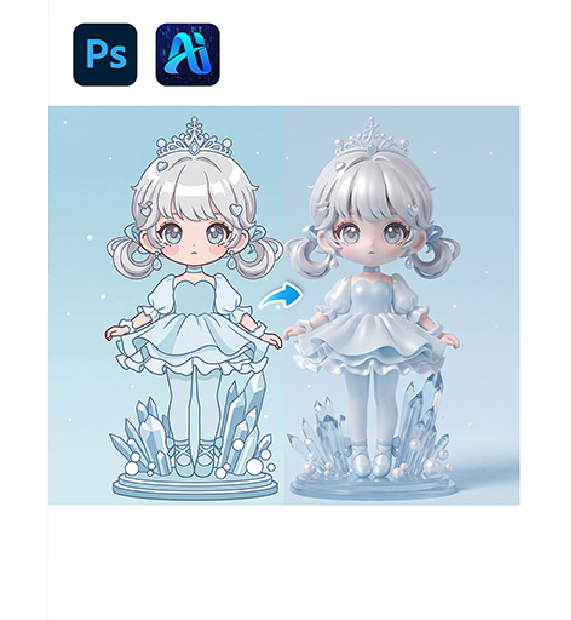
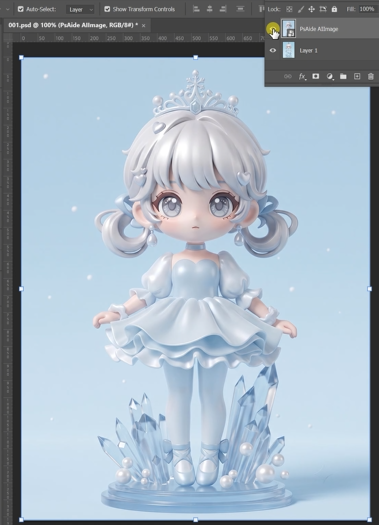
Converting a 2D IP character into a high-quality 3D model usually requires professional 3D modeling tools. With nano banana, you can easily achieve nano banana IP character to 3D conversion in one step.
Using nano banana, upload a 2D character image, enter a prompt, and generate a realistic 3D-style rendering instantly.
1. nano banana IP to 3D workflow
(1)Simple process with nano banana
① Upload 2D IP character image
② Enter prompt
③ Generate nano banana IP to 3D conversion
(2)Realistic 3D results
① Adds depth and volume
② Enhances lighting and shading
③ Keeps original character identity
(3)Efficient workflow
① No 3D software required
② Fast rendering
2. How to use nano banana for IP to 3D
(1)Prepare your image
① Use clean 2D character design
② Ensure full body visibility
(2)Open nano banana
(3)Upload image
(4)Enter prompt
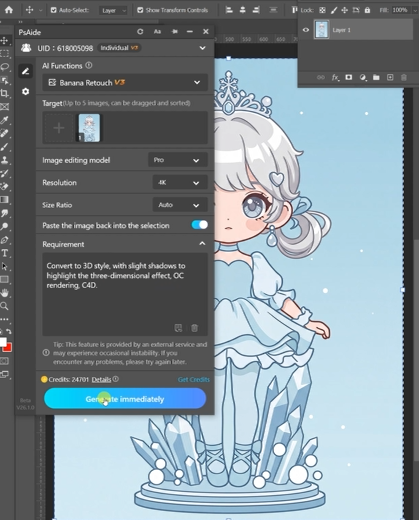
Recommended prompt:
Convert this 2D IP character into a high-quality 3D render, add depth, realistic lighting, smooth shading, cinematic style, and preserve original character identity.
(5)Generate result
3. Tips
(1)Use clean vector-style images
(2)Keep original proportions
(3)Add “3D render quality” in prompt
Download Link: https://psaide.com/?sfrom=ZfhxUK
Invitation Code: ZfhxUK