Table of Contents
1、The Activewear Editing Challenge
You have a great model photo, but the outfit needs to change. Maybe you’re launching a new sun protection line, testing different UV fabrics, or simply refreshing an old campaign without a costly reshoot.
Manually replacing a T-shirt with a lightweight sun protection jacket in Photoshop is a tedious process. The jacket has a different silhouette—looser, often with thumbholes, a standing collar, and fabric that drapes differently than cotton. Masking around arms, matching the fabric’s sheen, and getting the drape right takes 30-45 minutes of expert work.
Sun protection jackets are particularly tricky because they’re made from lightweight, often slightly shiny UV-blocking fabric. This material reflects light differently than a standard cotton T-shirt, making manual lighting matching especially difficult.
Nano Banana Pro automates the complex parts. The AI understands garment structure, fabric behavior, and how different materials interact with light, enabling a seamless swap in seconds .
2、The Solution: Nano Banana Pro in 3 Steps
What You Need
- Adobe Photoshop with PsAide plugin (includes Nano Banana Pro model)
- One model photo (wearing a T-shirt)
- One product photo (your sun protection jacket)
- 60 seconds
Step 1: Open Your Images
Launch Photoshop. Open both your model photo and your new jacket product image. No red marking or manual selection needed—the AI handles the identification and replacement automatically when you provide clear reference images .
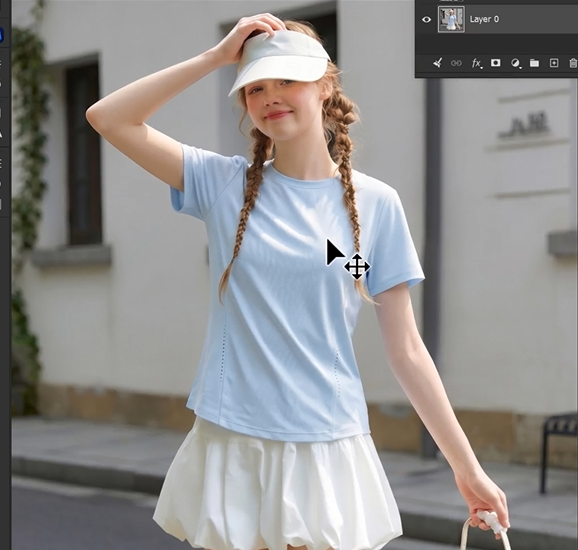
Step 2: Write Your Prompt
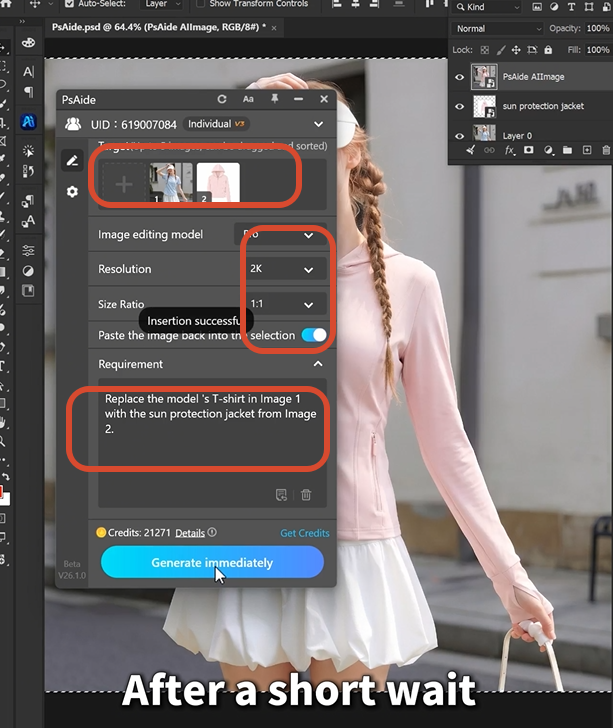
Open the PsAide panel. Launch Nano Banana and select the Pro version for the strongest garment understanding and detail preservation . Set output resolution to 4K—essential for preserving lightweight UV fabric textures, collar details, and the subtle sheen of sun protection material.
Upload your two images in the correct order:
- Image 1: Your model photo
- Image 2: Your new sun protection jacket product photo
Type this prompt:
“Replace the model’s T-shirt in image 1 with the sun protection jacket from image 2.”
Click Generate. Wait 45-60 seconds.
Step 3: Get Your Professional Result
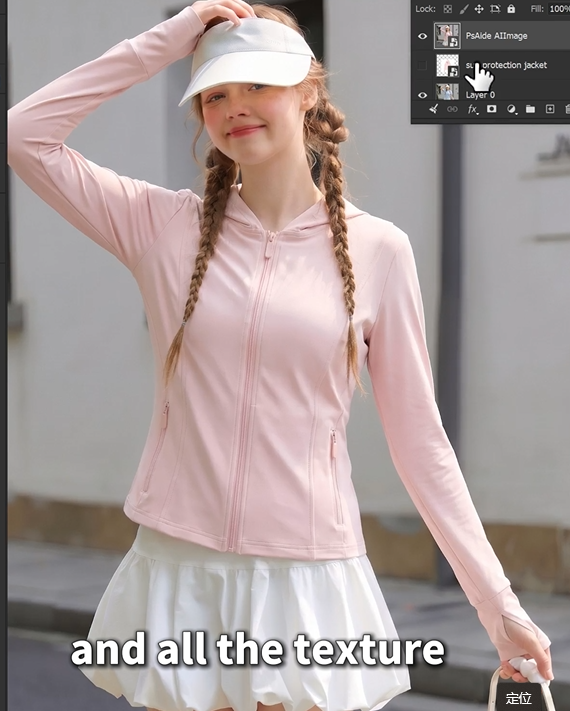
The AI processes your images. It analyzes the model’s posture and the jacket’s design—collar structure, sleeve length, fabric weight. It removes the T-shirt. It positions the new jacket, automatically adapting to the model’s shoulder width and arm position. It adjusts the fabric drape and sheen to match the scene’s lighting . It blends all edges seamlessly.
Your model is now wearing the sun protection jacket. Same pose. Same photo. Different garment.
3、Pro Tips for Perfect Jacket Replacement
1. Use high-resolution product images. Sun protection fabrics often have subtle textures and sheen. Start with a sharp product photo to preserve these details. The AI generates better results when it has clear reference material.
2. 4K resolution is ideal for outerwear. Collar details, sleeve cuffs, and fabric textures require high resolution to look natural. 4K preserves these details where lower resolutions might blur them.
3. Match the general style. The AI handles significant shape changes, but similar silhouettes yield cleaner results. If your model wears a fitted tee and the jacket is oversized, the AI adapts—but starting with a jacket image that’s similarly relaxed helps.
4. Choose similar lighting. The AI automatically adjusts the jacket to match the scene’s lighting. However, starting with product photos that have similar light direction yields cleaner results with fewer generations needed.
5. Save your prompt. Once you have a prompt that works, save it. Apply the same prompt to your entire activewear collection for consistent catalog results.
4、Download link

https://psaide.com/?sfrom=A86R4u
Invitation Code: A86R4u