Table of Contents
1、The Fitness Photography Problem
You’re shooting a fitness campaign.
The model is perfect. The pose is strong. The lighting is dramatic.
But the client looks at the photo and says: “Great shot. But can we use the black dumbbells instead of the chrome ones? Our new line is matte black.”
A reshoot means:
- Rebooking the model
- Resetting the lighting
- Another day of studio time
- Thousands of dollars
Or you could swap the dumbbell in Photoshop.
2、Why Dumbbells Are Harder Than They Look
A dumbbell seems simple. It’s just a metal bar with weights on the ends.
But replacing one in a photo is surprisingly tricky.
| Challenge | Why It’s Hard |
|---|---|
| Grip position | The model’s hand must wrap around the new handle naturally |
| Finger overlap | Fingers should appear to grip, not float |
| Shadow angle | The dumbbell’s shadow must match the original lighting direction |
| Weight realism | The dumbbell should look heavy, not like a prop |
| Perspective | The angle of the weights must match the camera view |
| Skin contact | Shadows where the hand meets the handle need to look real |
Manual editing struggles with grip and shadows. Nano Banana Pro understands hand anatomy and lighting.
3、Real Scenario
A fitness brand shot a model doing a bicep curl.
Chrome dumbbell. Great shot.
Then they launched a new matte black collection.
They had no photos of the black dumbbells being used.
A reshoot would cost $3,000 and take two weeks.
4、What You Need
- Photoshop with PsAide plugin
- One fitness photo (model holding any dumbbell)
- One product photo of your target dumbbell
- 60 seconds
5、The 3-Step Dumbbell Swap
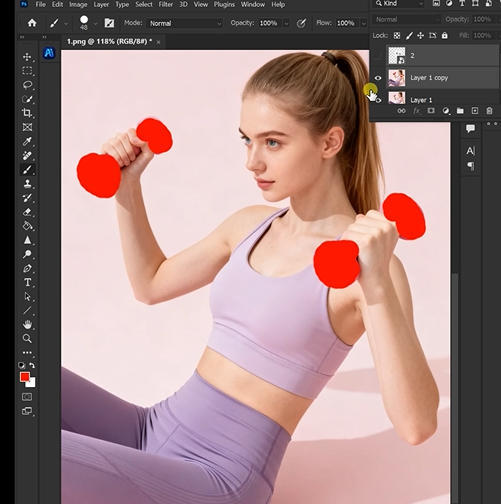
Step 1: Mark the Old Dumbbell in Red
Open your model photo in Photoshop.
Take the Lasso Tool. Draw a rough shape around the dumbbell. Include the handle and both weight ends.
Don’t worry about perfect edges. Just cover the main object.
Fill it with red. RGB: 255, 0, 0.
Why red works: The AI sees red as “replace exactly this object.”
Step 2: Write Your Prompt
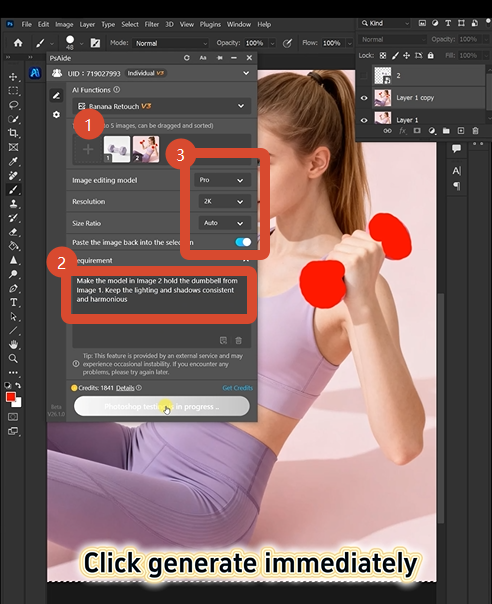
Open PsAide. Launch Nano Banana. Select the Pro version.
Set resolution to 2K (sharp enough for metal textures, small enough for quick processing).
Upload your images:
- Image 1: Your target dumbbell product photo
- Image 2: Your model photo with the red-marked dumbbell
Type this:
“Make the model in image 2 hold the dumbbell from image 1. Keep the lighting and shadows consistent and harmonious.”
Click Generate.
Step 3: Get Your Result
Wait 45-60 seconds.
The AI removes the red-marked dumbbell. It places the new one. It adjusts the grip to match the model’s hand position. It recalculates shadows based on the original lighting.
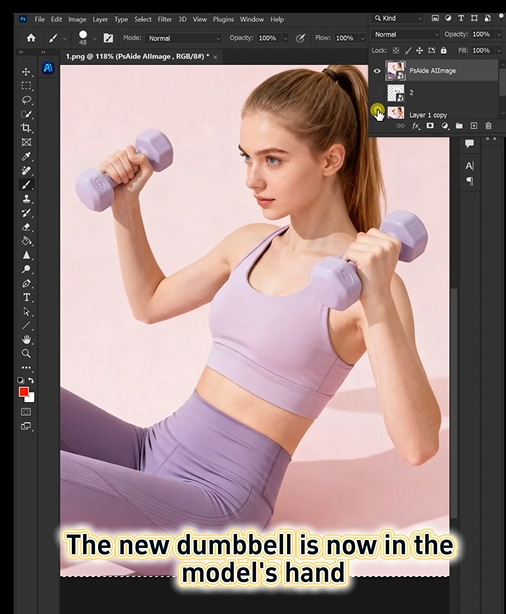
The model is now holding a different dumbbell. Same pose. Same grip. Same shadow angle.
6、What The AI Understands About Hands and Weights
| Element | AI Processing |
|---|---|
| Grip position | Maps finger placement around the new handle |
| Hand overlap | Positions fingers correctly over and under the bar |
| Shadow angle | Recreates cast shadows based on original light source |
| Weight ends | Maintains perspective on both sides of the handle |
| Metal texture | Preserves realistic reflections and highlights |
| Skin contact | Blends where the hand meets the handle |
This is what makes the Pro version different. Basic AI pastes an object.
7、Download link
https://psaide.com/?sfrom=A86R4u
Invitation Code: A86R4u