
Table of Contents
For jewelry e-commerce sellers, designers, and luxury marketers, high-quality metal jewelry photos are non-negotiable. Crisp details, natural shine, and flaw-free surfaces showcase craftsmanship and value, directly driving buyer trust. Yet traditional Photo Retouching for metal jewelry is intricate and time-consuming. Thanks to AI Photo Editing, PsAide’s built-in Product Retouch feature simplifies this process, delivering professional results efficiently.
Pain Points of Traditional Metal Jewelry Retouching
Metal jewelry has unique retouching challenges that frustrate traditional workflows. Tiny flaws like surface scratches, fingerprint smudges, or uneven plating ruin luxury appeal. Manual Photo Retouching requires zooming in to fix each flaw pixel by pixel, taking 20–30 minutes per piece. Worse, over-editing often dulls metal shine or blurs delicate details (e.g., engravings, gem settings). Without AI Photo Editing, maintaining consistency across a jewelry collection is extremely difficult.
PsAide’s Product Retouch: Precision for Metal Jewelry
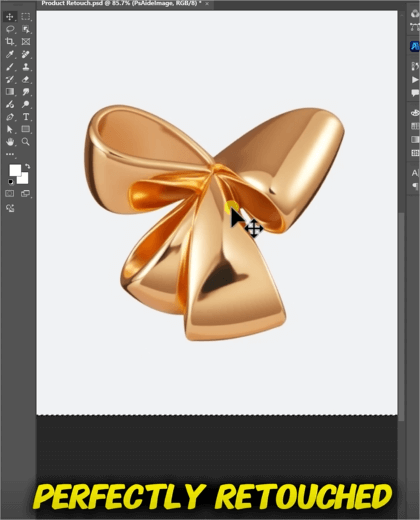
PsAide’s Product Retouch leverages advanced AI Photo Editing to address these pain points. It automatically detects metal-specific flaws while preserving critical details. In tests, it transformed a tarnished silver necklace with scratches into a radiant, retail-ready piece—retaining engraving clarity and natural metallic sheen. The result outperformed manual edits and took just 4 minutes.
3-Step Guide to Metal Jewelry Retouching
- Launch & Upload: Install PsAide (Photoshop 2015+), open the plugin, and select Product Retouch. Upload your metal jewelry image (JPG/PNG/TIFF supported, high-resolution recommended).
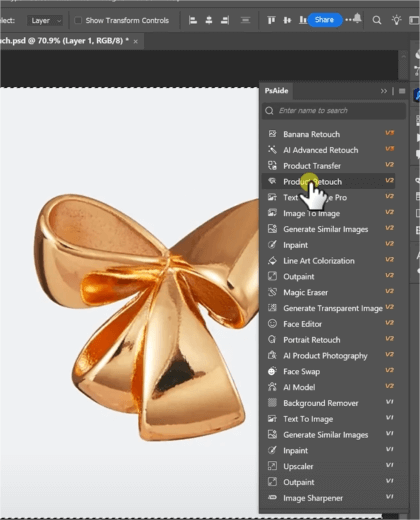
- Select Mode: Choose “Metal Jewelry Retouch” from the mode list—optimized for silver, gold, and platinum textures, and sensitive to tiny details.
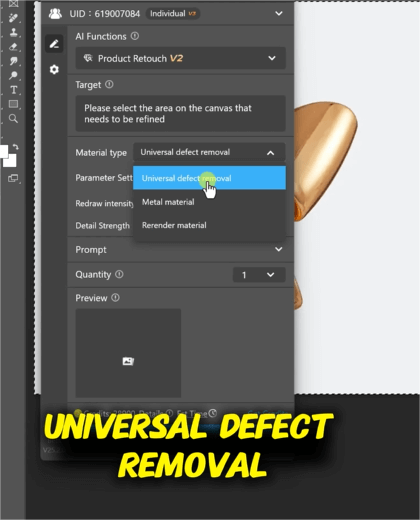
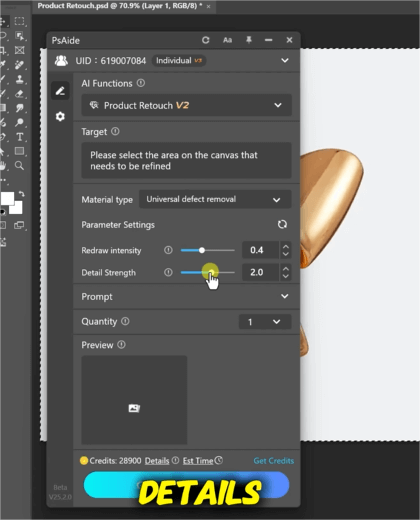
- Adjust & Export: Slide “Repair Intensity” to target scratches/smudges. Use “Shine Enhancement” to refine metal luster. Click “Retouch” and wait 3 seconds. Export once satisfied.
Key Advantages for Jewelry Marketers
It cuts editing time by 85%, preserves intricate details, and enhances natural metal shine. No advanced Photo Retouching skills are needed. Whether for e-commerce listings, catalogs, or social media, it ensures consistent luxury aesthetics across all pieces.
Download PsAide today to elevate your metal jewelry visuals and boost conversions!

