
Table of Contents
For pet product e-commerce sellers, pet accessory designers, and pet brand marketers, high-quality dog collar on-pet images are vital. They showcase fit, style, and comfort—key factors for pet owners choosing collars. Traditional ways to update these images are costly and inefficient, but AI Photo Editing changes this. PsAide’s built-in Product Transfer feature simplifies dog collar replacement, outperforming manual Photo Retouching.
Pain Points of Traditional Dog Collar Image Creation
Before AI Photo Editing, creating on-pet collar images was challenging. Reshooting required hiring pet models, handlers, and setting up scenes—costing $300+ per collar style and taking 2–4 days. Manual Photo Retouching for replacement often failed: collars misaligned with dog necks, fabric/metal textures distorted, and shadows clashed with backgrounds. Consistency across multiple collar designs was hard to maintain, weakening brand identity.
PsAide’s Product Transfer: AI-Powered Collar Replacement
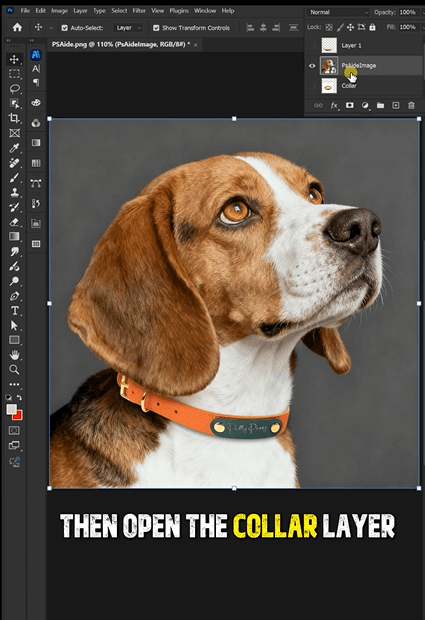
PsAide’s Product Transfer uses advanced AI Photo Editing to solve these issues. A test replacing a terrier’s plain nylon collar with a leather studded one proved its power: the new collar fit the neck curve perfectly, stud details stayed crisp, and shadows matched the outdoor scene. The result looked naturally shot—far better than manual Photo Retouching.
3-Step Guide to Dog Collar Replacement
1.Launch & Upload: Install PsAide (Photoshop 2015+), open the plugin, and select Product Transfer. Upload two images: Image A (dog with old collar) and Image B (new collar product photo).
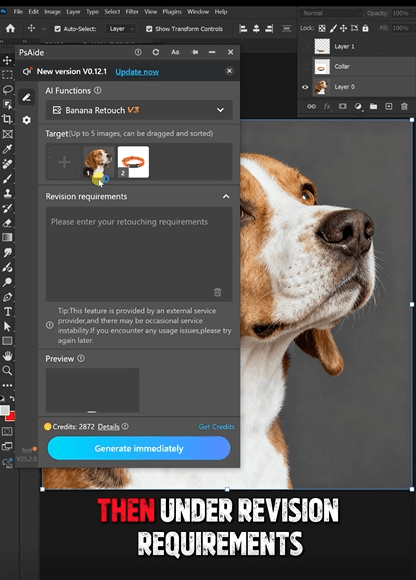
2.Mark & Prompt: Use the brush to mark the old collar in Image A. Enter a prompt: “Replace Image A’s collar with Image B’s leather studded one. Align with dog’s neck, keep stud details, match outdoor shadows.”
3.Generate & Refine: Click “Transfer Now” for results in 3–5 seconds. Use “Fine-Tune” to adjust fit or texture, then export the final image.
Key Advantages for Pet Marketers
It cuts costs by 65% by skipping reshoots and reduces time from days to minutes. AI Photo Editing preserves collar details (buckles, studs) and ensures natural fit. It works for all collar types (nylon, leather, reflective) and scenarios (e-commerce, social posts, catalogs). No advanced Photo Retouching skills are needed.
Download PsAide today to streamline your dog collar visuals and boost sales!

