Table of Contents
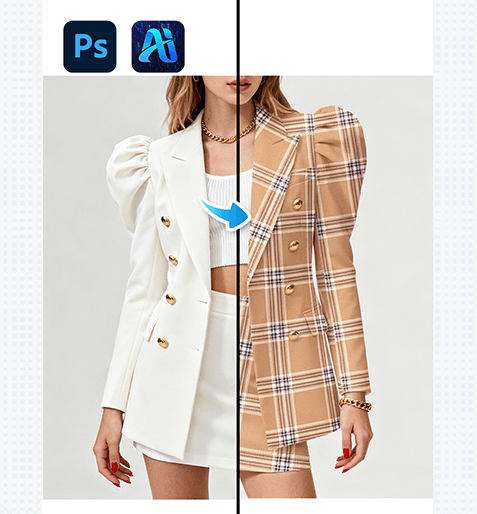
Nano Banana transforms fashion design workflows by letting you add custom patterns to clothing while preserving fabric texture, lighting, and fit. Here’s how to achieve realistic, professional results (using the blazer/skirt demo):
1. Pro Tip for Pattern Compatibility
Before editing: Choose a pattern with a scale that matches the clothing item . For small garments, use finer patterns; for larger pieces , opt for patterns with bolder details—this ensures the final look feels natural.
2. Key Advantages of Nano Banana for Clothing Pattern Application
① Preserves Fabric Texture & Fit: Unlike basic “fill” tools (which flatten details), Nano Banana analyzes the clothing’s folds, seams, and lighting (e.g., the blazer’s shoulder padding and skirt’s creases) to wrap the pattern around the garment realistically—no distorted or mismatched details.
② Saves Design Time: Testing 3+ patterns on a single outfit used to require hours of manual warping and shading. With Nano Banana, you can swap patterns in 2-3 minutes, ideal for fast fashion mockups.
3. 3-Step Workflow: Nano Banana + Photoshop
① Import Assets: Open your clothing image (Figure 2: the model’s blazer/skirt) and pattern file (Figure 1: the plaid design) in Photoshop. Launch the Nano Banana plugin via the Plugins menu.
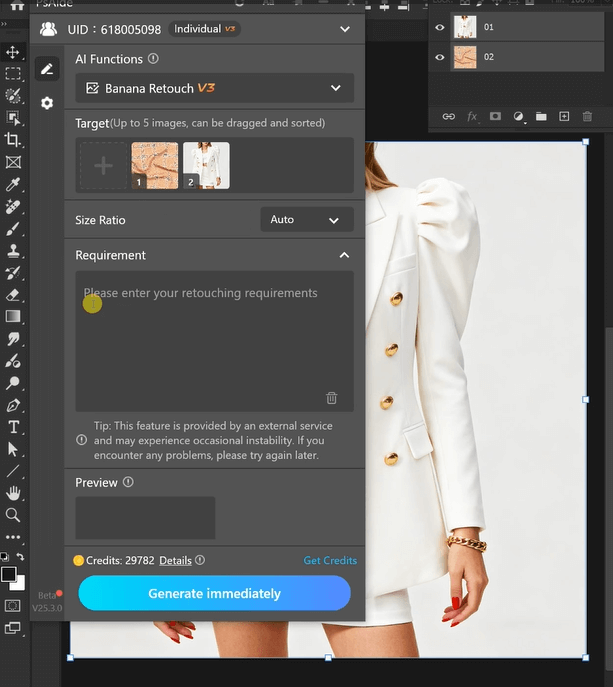
② Define Requirements: In the plugin panel, upload both assets. Enter a prompt:
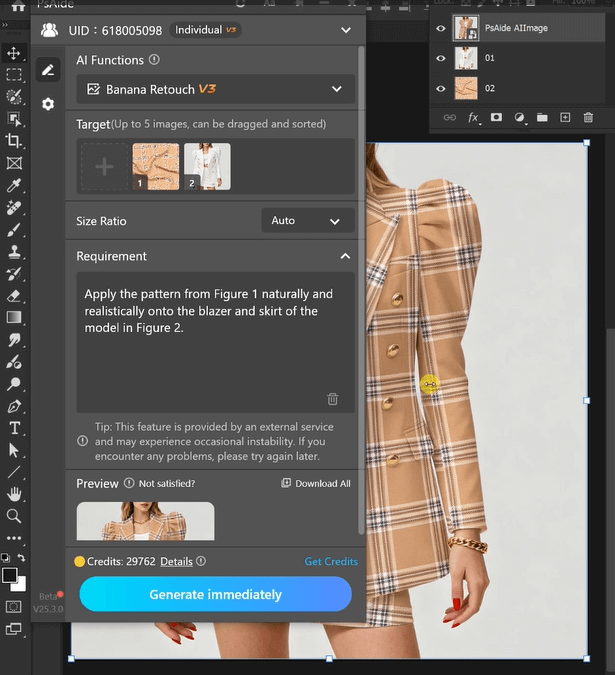
Apply the pattern from Figure 1 naturally andrealistically onto the blazer and skirt of themodel in Figure 2.

③ Generate & Refine: Click “Generate Immediately” in Nano Banana.
4. Tool Access & Download
Nano Banana is a must-have for fashion designers, stylists, and brands needing quick, high-quality clothing pattern mockups.
Download Link: https://psaide.com/?sfrom=ZfhxUK
Invitation Code: ZfhxUK