
Table of Contents
Model outfit change is a high-frequency demand in e-commerce retouching and outfit design. Whether for new clothing displays, style switches, or poster outfit adjustments, it’s essential to ensure clothes fit the model’s posture perfectly with natural lighting. However, using PS native methods for model outfit changes comes with obvious pain points: manual cutout to separate the model from existing clothes, precise adjustment of new clothes’ size and angle, repeated edge fitting tweaks, and manual lighting/tone adaptation. It’s not only time-consuming but also prone to clothes distortion, stiff fitting, and mismatched lighting—hard for beginners to master. With PS paired with Psaide’s Nano Banana Pro, you can easily achieve AI outfit swaps, one-click outfit changes, and avoid all pain points.
1.PS Native Model Outfit Change: Unavoidable Pain Points
Many people try PS native methods for model outfit changes and often fall into dilemmas:
- Tedious operation: First, use the Pen Tool to precisely cut out the model’s existing top, import new clothes images, repeatedly stretch/adjust size and rotate with Ctrl+T to match the model’s posture. Cutout and adjustment alone take 20–30 minutes.
- Poor fit: New clothes tend to stretch, distort, or have misaligned wrinkles, with stiff connection at the model’s arms, waist, and other parts, lacking real wearing texture.
- Mismatched lighting: Manual adjustment of new clothes’ lighting with PS Curves and Levels tools to fit the model’s ambient light is required; slight mistakes lead to brightness deviations, making the effect unrealistic. For beginners, achieving natural outfit changes with PS native methods is even more challenging—Psaide’s Nano Banana AI outfit swap solves these core pain points perfectly.
2.Core Solution: Nano Banana Pro AI Outfit Swap – 3-Step Seamless Change
Psaide’s built-in Nano Banana Pro relies on AI intelligent posture recognition and clothing fusion algorithms. It accurately matches new clothes to the model’s posture, automatically adapts lighting, and optimizes fit—no complex manual adjustments. Finish seamless outfit swaps in 3 steps with natural, trace-free effects. Here are the specific steps:
Step 1: Mark the Outfit Change Area in PS
Launch PS, click “File > Open” to import the model image. Press Ctrl+J to duplicate the background layer (protect the original image from irreversible mistakes). Use the Rectangular Marquee Tool or Lasso Tool on the left of PS to precisely select the top area to be changed on the model, fitting the top outline as much as possible (no excessive precise tracing). After selection, press ALT+DEL to fill the area with red, clearly marking the outfit change area for AI accurate recognition.
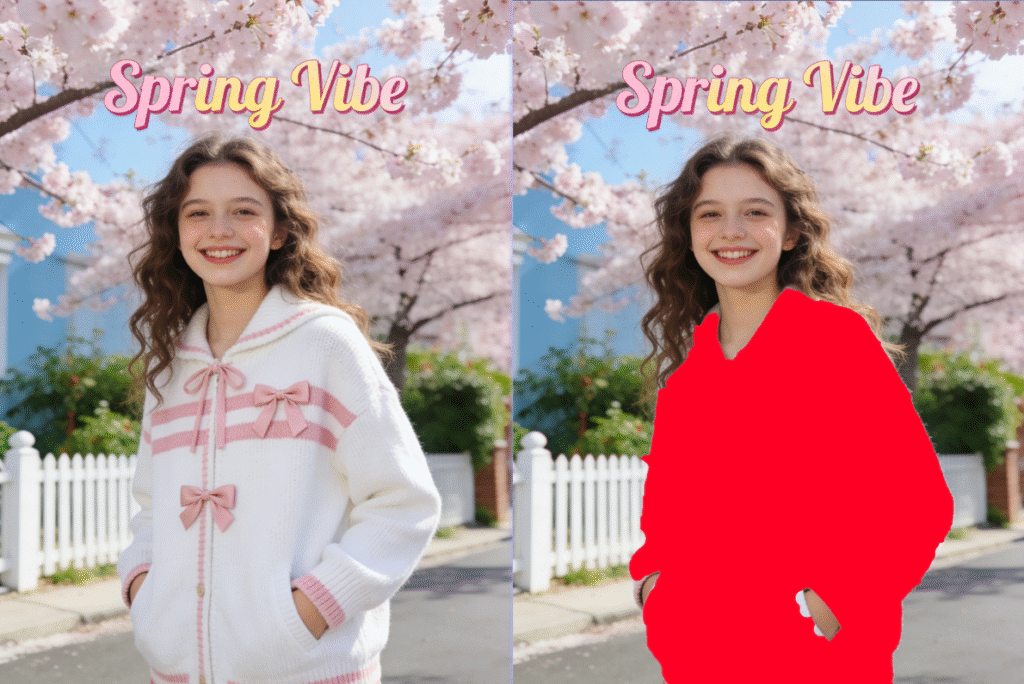
Step 2: Launch Nano Banana Pro, Upload Materials & Set Prompt
Locate the installed Psaide plugin panel in PS (download from the official website if not installed; compatible with PS CC2015+, Windows/Mac). Expand the function list, click “Nano Banana”, and select “Pro Version” (improves outfit swap precision, fit, and optimizes clothing wrinkles and lighting details). Click the plugin’s upload button to upload the marked model image (Figure 1) and prepared new clothes image (Figure 2) separately. Enter the precise prompt in the text box: “Let the model in Figure 1 wear the clothes from Figure 2, ensuring consistency with the clothing style in Figure 1”—ensure AI executes the outfit swap accurately, retaining the model’s original posture and overall style.
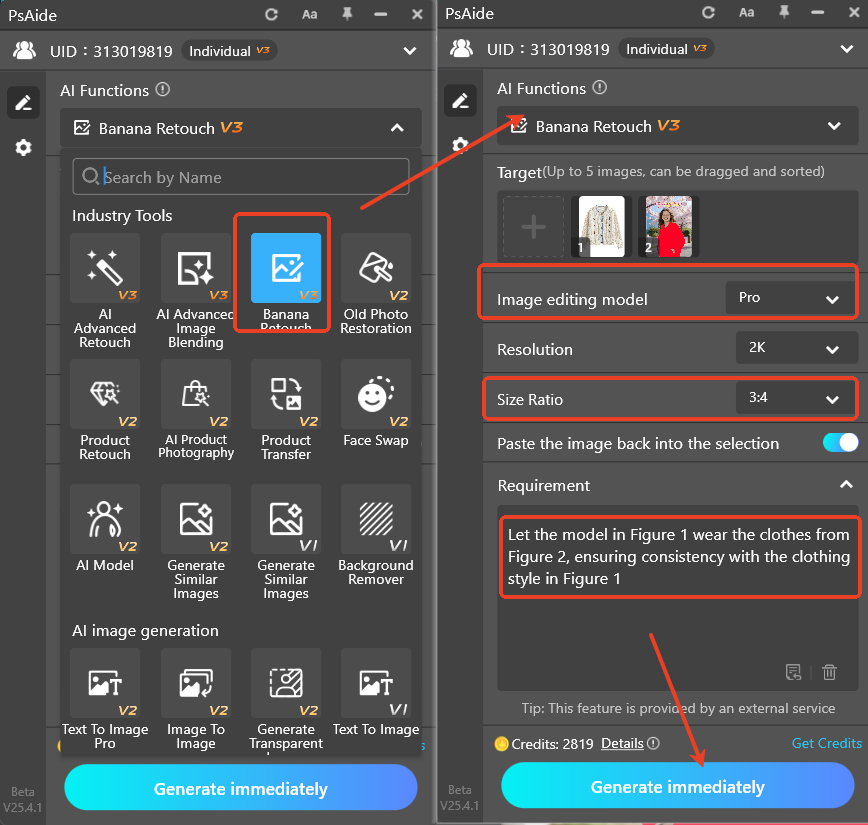
Step 3: One-Click Generate & Preview Seamless Effect
Confirm the uploaded materials and prompt, then click “Generate” on the plugin. The AI processes in 15–20 seconds, automatically recognizes the red-marked area, precisely fuses new clothes with the model’s posture, adapts ambient lighting, and optimizes clothing wrinkles and edge fit. PS automatically creates a new processed layer—check the effect: the model has successfully put on the new clothes, with perfect fit of clothes size/angle to the model’s posture, natural lighting, seamless fit, and no stiffness. It’s ready for direct use without secondary PS tweaks.
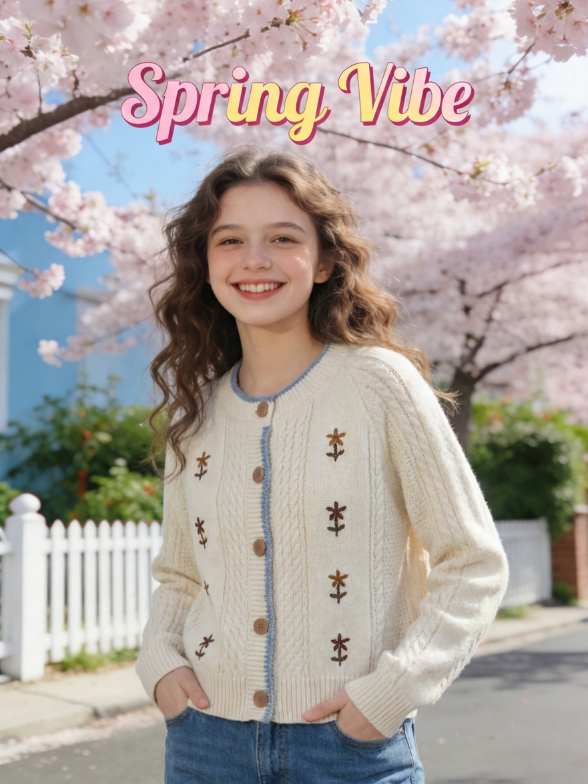
3.Core Advantages of Nano Banana AI Outfit Swap (Better Than PS Native)
Compared to PS native model outfit change methods, Nano Banana Pro has significant advantages:
- Ultra-efficient: 3 steps, less than 1 minute total—far faster than manual retouching.
- High fit: AI intelligently recognizes the model’s posture; new clothes won’t stretch or shift, with natural wrinkles and seamless fit.
- Automatic lighting adaptation: Matches the original image’s lighting and tone automatically, no manual adjustment, avoiding mismatches.
- Beginner-friendly: No need to master complex PS cutout or color adjustment skills; just mark the area and set the prompt to finish the outfit swap.
Wondering “how to use Nano Banana for outfit swaps”? Tired of the tediousness and pain points of PS native outfit changes? Try PS + Psaide’s Nano Banana Pro! No professional retouching skills needed—one-click AI outfit swaps, seamless model outfit changes, and efficient production of natural, professional effects for e-commerce, posters, outfit design, and other scenarios.
Download link
https://psaide.com/?sfrom=A86R4u
Invitation Code: A86R4u

