Table of Contents
For fashion marketers, e-commerce sellers, and content creators, showcasing hats on models is pivotal to highlighting design details, fit, and style—helping consumers visualize how the accessory complements different looks. Yet traditional hat replacement on models is riddled with frustrations: manual Photoshop editing requires tedious hat selection (often struggling with fine details like brims or pom-poms), painstaking perspective adjustment to match the model’s head angle, and hours of refining lighting to avoid a “cut-and-paste” effect. Even seasoned designers face issues like mismatched hat proportions, unnatural alignment with hair, or distorted textures—resulting in unconvincing visuals that undermine product appeal. This is where Nano Banana, the AI-powered feature in the PsAide plugin, revolutionizes AI Photo Editing for seamless hat replacement.
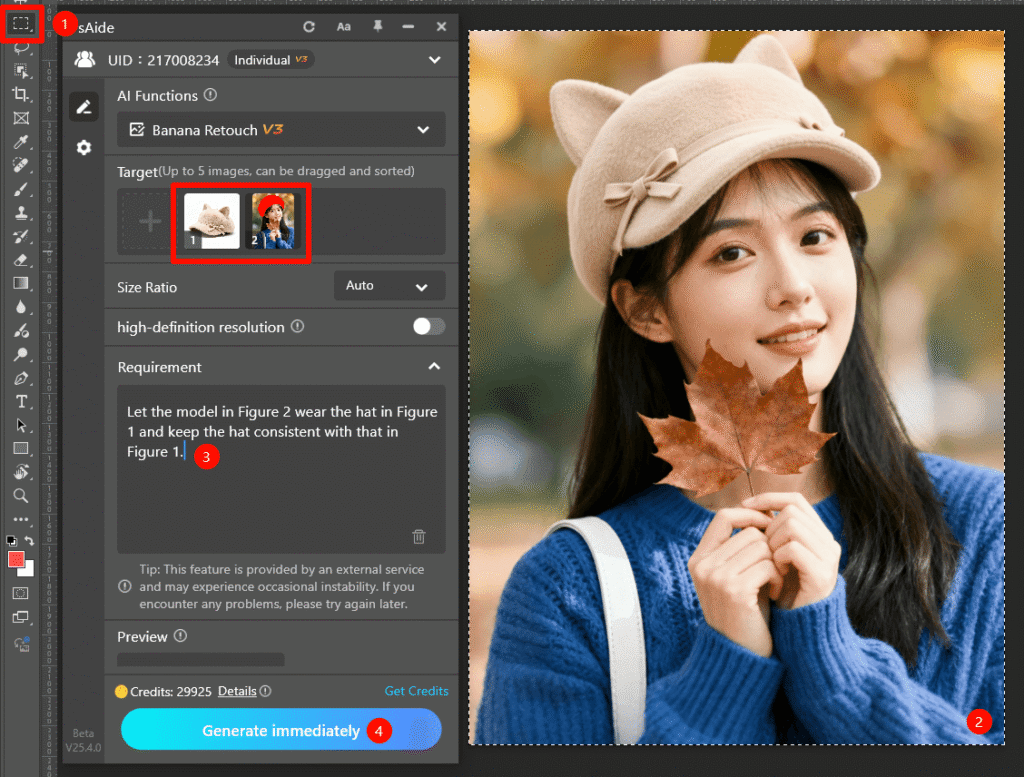
Nano Banana addresses the core pain points of manual hat editing through advanced deep learning and spatial recognition technology. Unlike basic editing tools that overlay hats as flat layers, Nano Banana intelligently analyzes both the hat (from Figure 1) and the model (from Figure 2): it maps the model’s head contour, hair texture, and facial angle to ensure the hat fits naturally, preserves the hat’s original details (e.g., stitching, material sheen, logo placement), and syncs lighting with the model’s environment. Whether it’s a baseball cap, beanie, or sunhat, Nano Banana maintains the hat’s integrity while making it look like the model is genuinely wearing it—avoiding common AI pitfalls like distorted head shapes or “stuck-on” accessories . All this is powered by AI Photo Editing that simplifies what once took hours into seconds.
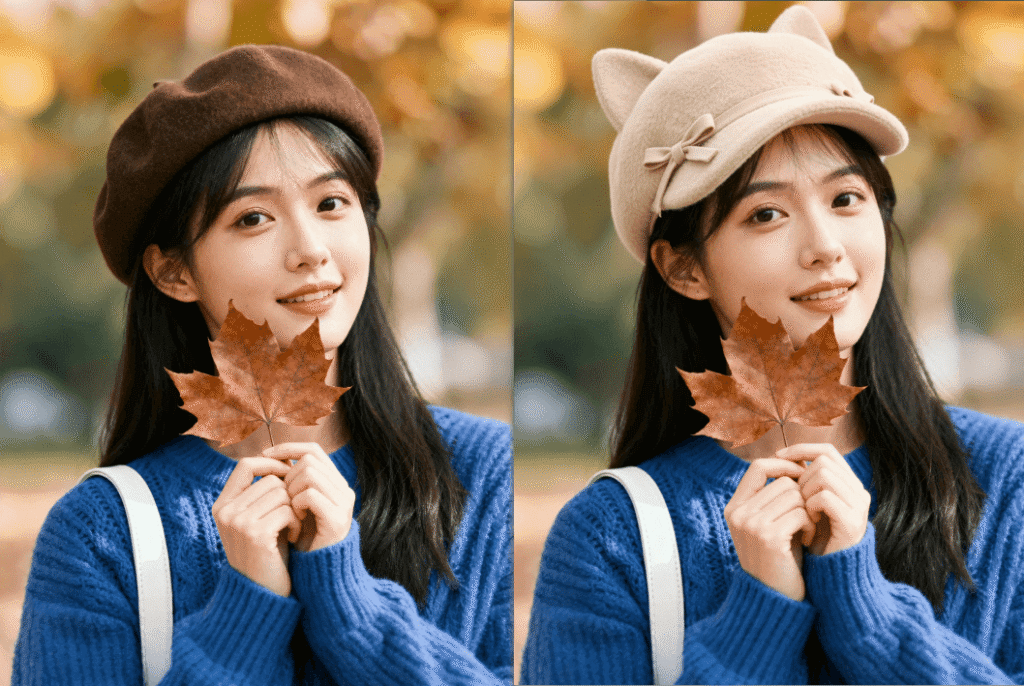
3 Simple Steps to Replace Model’s Hat with Nano Banana
Even users with basic Photoshop skills can master professional hat replacement in minutes using NanoBanana. Follow these three straightforward steps:
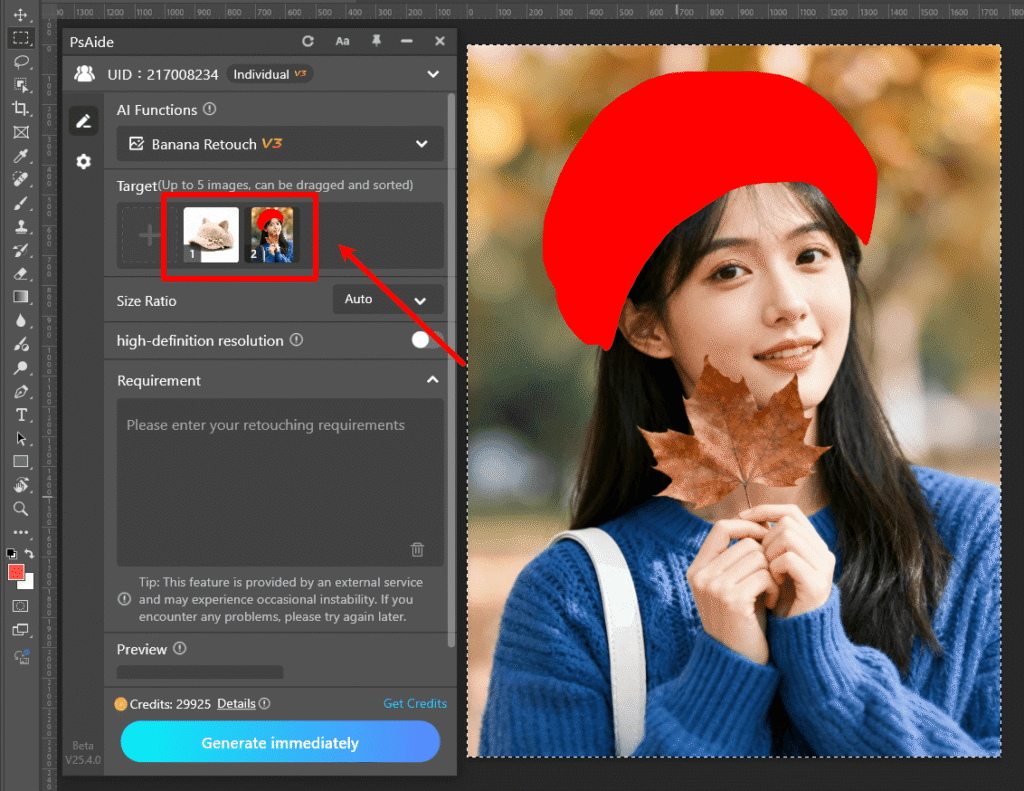
Step 1: Prepare Images and Use Nano Banana
Open two images in Photoshop (compatible with versions 2015 and above): Image 1 (the hat product photo, with clear texture and shape details) and Image 2 (the model photo, in a pose suitable for hat display). Install the PsAide plugin, launch the Nano Banana feature from the plugin menu, and upload both images to the Nano Banana workspace—no pre-editing (like background removal) is needed, as the AI automatically isolates the hat .
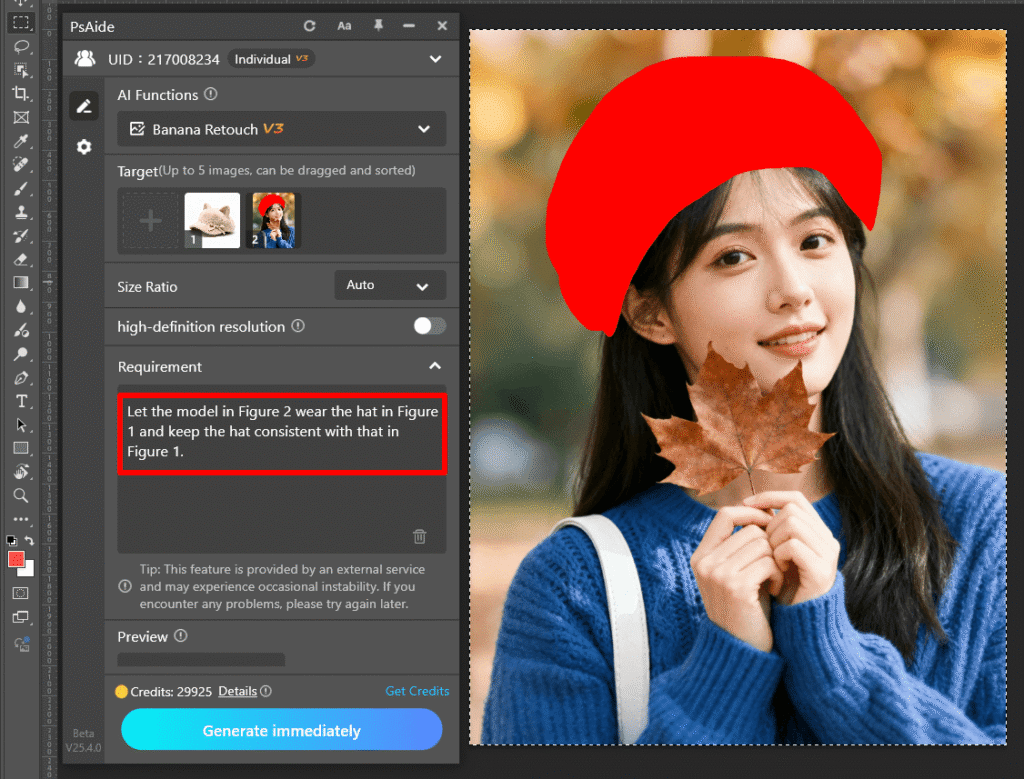
Step 2: Enter the Precise AI Photo Editing Prompt
Locate the prompt box in the Nano Banana interface and type the clear instruction: “Let the model in Figure 2 wear the hat in Figure 1 and keep the hat consistent with that in Figure 1.” This prompt guides the AI Photo Editing engine to prioritize hat detail preservation, natural fit, and alignment with the model’s features .
Step 3: Preview and Finalize the Composite Image
Click the “Generate immediately” button. Nano Banana processes the request in 5–7 seconds, generating a preview where the hat sits perfectly on the model’s head. The hat will match the model’s head angle, hair will peek naturally from under brims or edges, and lighting will blend with the scene (e.g., subtle shadows on the model’s forehead). Save the composite image directly to your Photoshop project—minor tweaks to brightness or position are optional for further refinement.
Core Advantages of Nano Banana for Hat Replacement
Compared to traditional methods, Nano Banana offers unmatched benefits for fashion professionals. First, it saves time: what takes hours of manual editing is done in seconds, ideal for bulk visuals (e.g., one hat style on multiple models). Second, it ensures consistency: the AI preserves the hat’s original design and proportions, avoiding the distortion common in generic tools . Third, it delivers realism: 3D contour mapping eliminates the “floating hat” effect, making the accessory look authentic. Finally, it’s user-friendly—no advanced AI Photo Editing skills required, empowering even beginners to create professional results.
Industry Application Value
Nano Banana is a game-changer for fashion and e-commerce. Brands can quickly test hat styles on existing model photos without costly reshoots. E-commerce sellers can create diverse listings (e.g., the same hat on male/female models) to target audiences. Content creators can produce trend reels featuring hat makeovers, boosting engagement . All use cases leverage Nano Banana’s ability to deliver high-quality composites with minimal effort.
If you’ve wondered how to edit photo on Nano Banana for seamless hat replacement, Nano Banana is the solution. It harnesses AI Photo Editing to eliminate traditional frustrations, preserve product integrity, and elevate your fashion visuals. Download PsAide today to unlock Nano Banana—transform your hat marketing with effortless, professional model composites!fe!