
Table of Contents
Innovative breakthroughs in AI Advanced Retouch technology provide an efficient and accurate solution to the industry pain point of converting real scene images into line drawings.
For graphic designers, product designers, and educators, converting real scene pictures into line drawings directly affects design efficiency and teaching quality. Traditional methods rely on time-consuming manual tracing or basic edge tools that often produce stiff lines and lose structural details. With recent advances in AI Advanced Retouch, combined with a professional Photoshop plugin, this process can now be completed more efficiently and accurately.
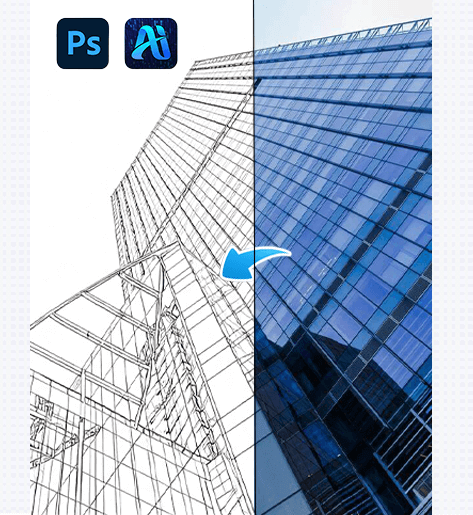
1. PsAide Plugin Easily Converts Real Scene Pictures into Precise Line Drawings
(1)AI Advanced Retouch Feature: Example Display of Real Scene to Line Drawing Conversion
The practical application of AI Advanced Retouch far exceeds traditional line drawing methods. As shown in the example, the plugin can convert complex real scene images into clear line drawings — not only preserving the structural proportions of objects in the scene completely, but also using intelligent line optimization from AI Advanced Retouch to distinguish primary and secondary contour lines while restoring texture details of the scene. The overall line drawing appears smooth and natural, showing no mechanical feel from AI retouching, as if carefully hand-traced by a designer, and can be directly used for design refinement or teaching demonstrations.
(2)Advantages of Real Scene to Line Drawing Conversion
The core advantages of the real scene to line drawing conversion function align precisely with the needs of design, education, and other industries and fully leverage the technical strengths of AI Advanced Retouch:
①Greatly saves time costs
No manual tracing by designers is required. Real scene to line drawing conversion can be completed solely through AI Advanced Retouch, reducing hours of manual drawing to minutes and significantly improving the efficiency of design output and teaching material preparation.
②High detail restoration
AI Advanced Retouch can accurately recognize object structures and detailed characteristics in real scene images. Whether it is the precise contours of industrial product components, the lines of doors and windows in architectural scenes, or the branch and leaf textures of natural landscapes, all can be clearly presented in the line drawing conversion process, avoiding detail loss and proportion imbalance issues.
③Controllable and adjustable line quality
Line thickness, solidity, and smoothness can be adjusted according to needs — for example, using bold lines in initial design drafts to highlight overall structure, and switching to fine lines in detail refinement stages to present textures. AI Advanced Retouch can quickly respond to different line style requirements.
④Strong multi-scenario adaptability
Whether it is structural line drawing for product design, material extraction in graphic design, or real object line drawing in education, this function can quickly adapt to professional requirements of different scenarios through AI Advanced Retouch, satisfying diverse line drawing usage needs.
(3)Operation Steps
This Photoshop plugin that supports real scene to line drawing conversion simplifies the operation process based on AI Advanced Retouch technology. Even users without professional design experience can quickly get started; only three steps are needed to complete the process:
① Import the image
Import the real scene picture to be converted into Photoshop and use the selection tool to select the entire real scene area.
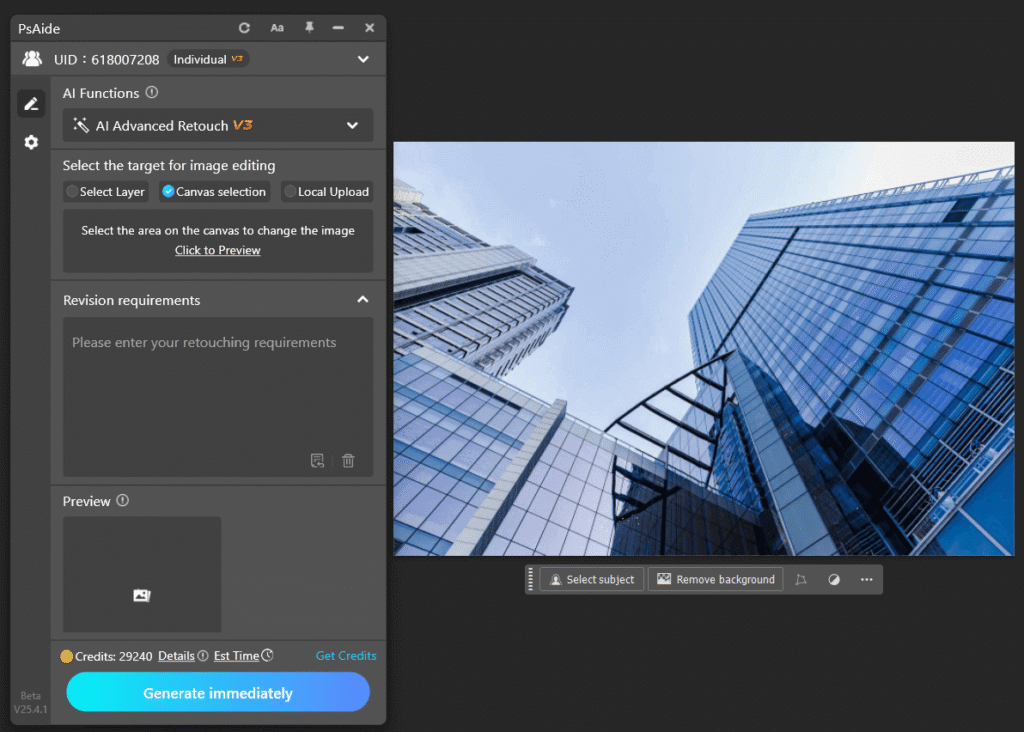
② Fill in the prompt
clearly stating the specific requirements for converting the real scene picture into a line drawing, such as “line drawing”.

③ Click the Generate button.
The AI Advanced Retouch system will automatically extract and optimize the lines, and after a few seconds, you will obtain an accurate and natural line drawing image.

With this tool, graphic designers, product designers, and others no longer need to worry about the complex process of converting real scene pictures into line drawings. By leveraging the efficiency and accuracy of AI Advanced Retouch, they can complete design creation and teaching material production faster and better, helping to improve professional output quality and efficiency.
2. Example Prompt for Real Scene to Line Drawing Conversion
Prompt:
line drawing

Download Link: https://psaide.com/?sfrom=ZfhxUK
Invitation Code: ZfhxUK

