
Table of Contents
Old photos hold priceless memories, but time fades them—scratches, discoloration, and fading often ruin these treasures. Traditional Old Photo Restoration and Photo Retouching demand professional skills, taking hours to fix flaws and add natural colors. Now, PsAide’s built-in AI Advanced Retouch feature simplifies this process, making high-quality restoration accessible to everyone. This guide explores how it solves classic pain points and delivers stunning results.
Pain Points of Traditional Old Photo Restoration
Before AI-powered tools, Old Photo Restoration was daunting. Manual Photo Retouching required tedious work: erasing scratches pixel by pixel, adjusting faded tones with complex curves, and guessing original colors for black-and-white photos. Even skilled retouchers spent 2–4 hours per photo, with risks of over-editing that erased original details. For beginners, achieving natural colorization and seamless repairs was nearly impossible.
PsAide’s AI Advanced Retouch: Game-Changer for Restoration
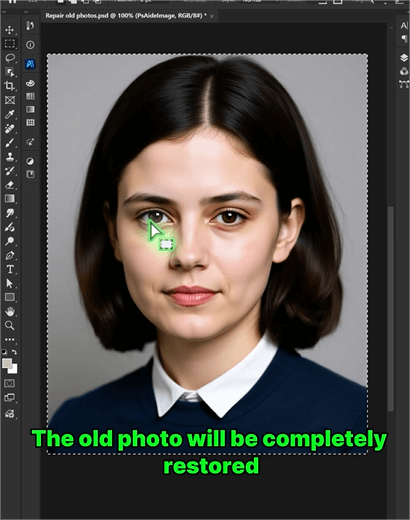
PsAide’s AI Advanced Retouch leverages machine learning to redefine Old Photo Restoration. It automatically detects flaws (scratches, dust, tears) and analyzes historical color palettes to add authentic hues. A test with a 1970s family photo proved its power: faded faces regained vitality, scratches vanished, and clothing/backgrounds got natural, era-appropriate colors—all in 5 minutes, outperforming manual edits.
3-Step Guide to Restore & Colorize Old Photos
- Launch & Select Feature: Install PsAide (Photoshop 2015+), open the plugin, and select AI Advanced Retouch from the menu. Upload your old photo .
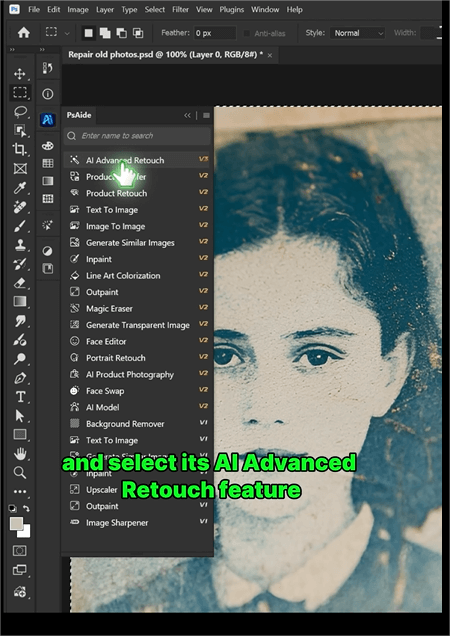
- Choose Restoration Modes: Tick “Defect Removal” to fix scratches/dust. Select “Intelligent Colorization” for black-and-white photos—AI will match era-accurate colors.
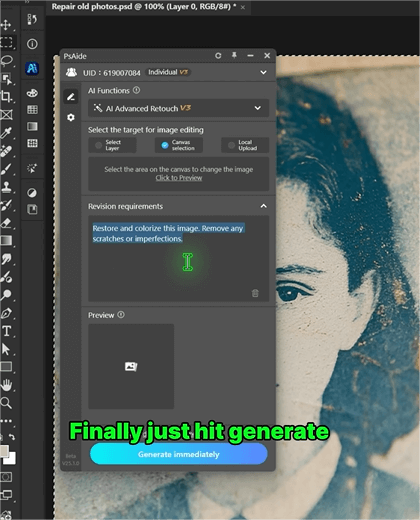
- Adjust & Generate: Click on “Generate” and wait for 3 to 5 seconds. If necessary, you can use PS for further adjustments.
Why It Stands Out for Photo Retouching
It saves 90% of time vs. manual work, retains original details, and needs no professional skills. Whether restoring family heirlooms or vintage collections, it balances efficiency and quality. For anyone into Old Photo Restoration, PsAide is a must-have tool.
Download PsAide today to bring old memories back to life!

