
Table of Contents
1、The Situation
You have a great model photo. The pose is perfect. The lighting is beautiful. The only problem? She’s wearing sweatpants.
But your new campaign needs her in a flowy midi skirt. Or a sleek pencil skirt. Or a summer maxi.
What do you do?
Option A: Schedule a new photoshoot. Pay for studio time, photographer, hair, makeup, and styling. Wait two weeks.
Option B: Edit it manually in Photoshop. Mask the pants. Warp the skirt to match the pose. Paint shadows from scratch. Spend 30-45 minutes hoping it looks real.
Option C: Use AI. Take 60 seconds. Get a perfect result.
Let’s talk about Option C.
2、Why Changing Bottoms Is Harder Than You Think
Replacing pants with a skirt isn’t just swapping one garment for another. Here’s what makes it difficult:
Different silhouette. Sweatpants are loose. Skirts are open at the bottom. The AI needs to understand where the skirt ends and legs begin.
Leg visibility. Pants cover legs completely. A skirt reveals them. The AI must generate realistic legs below the skirt hem.
Movement and flow. Sweatpants have vertical creases. Skirts have horizontal draping and swing. The fabric behavior is completely different.
Waist transition. The new skirt needs to sit at the natural waist, blending seamlessly with the top the model is wearing.
Manual editing struggles with all of this. Nano Banana Pro handles it automatically.
3、What You Need
- Photoshop with PsAide plugin
- Model photo (currently wearing pants/sweatpants)
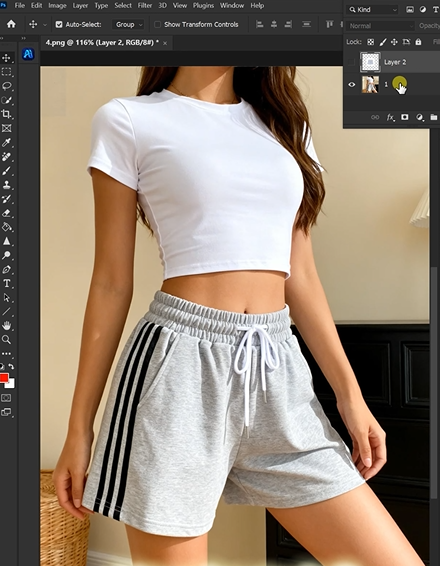
- Product photo of your target skirt
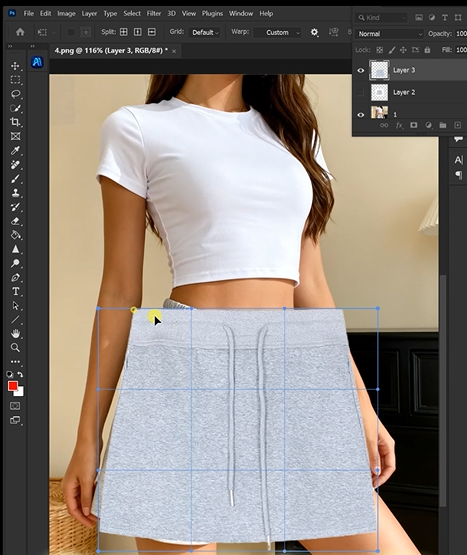
- 60 seconds of patience
4、The 3-Step Transformation
Step 1: Mark the Pants in Red (20 seconds)
Open your model photo in Photoshop. Grab the Lasso Tool. Draw a rough selection around the pants or sweatpants from waist to hem. Don’t worry about perfect edges—just cover the main area.
Fill the selection with bright red (R=255, G=0, B=0).
Why red? It’s a color that doesn’t naturally appear in skin tones or most clothing. The AI instantly recognizes it as “replace this exact area.”
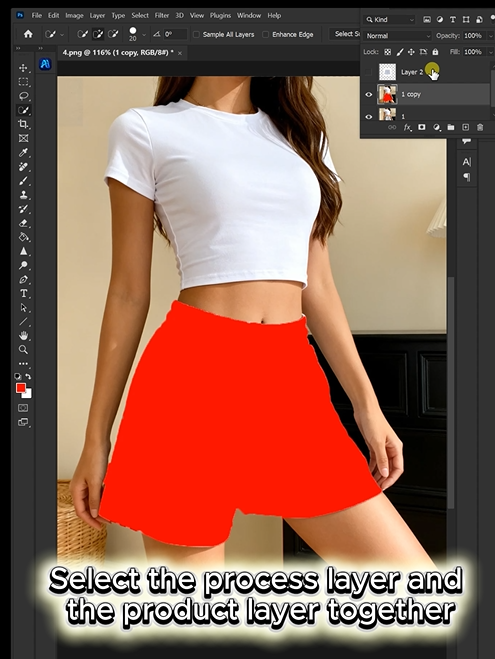
Step 2: Write Your Prompt (15 seconds)
Open Nano Banana. Select the Pro version. Set resolution to 2K (perfect for crisp fabric details without huge files).
Upload your two images:
- Image 1: Your new skirt product photo
- Image 2: Your model photo with red-marked pants
Type this prompt:
“Make the model in image 2 wear the skirt from image 1. Keep the lighting and shadows consistent and harmonious.”
Click Generate.
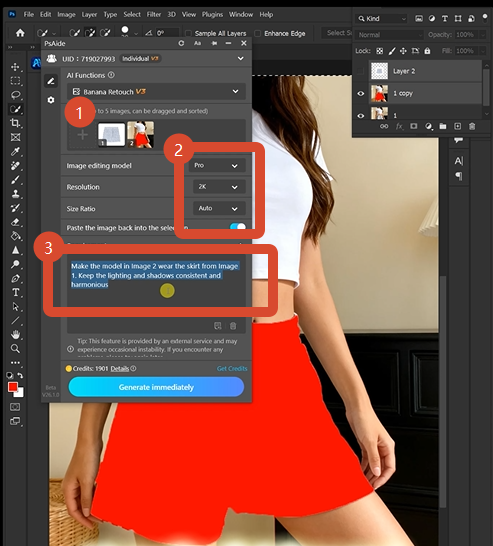
Step 3: Get Your Result (25 seconds)
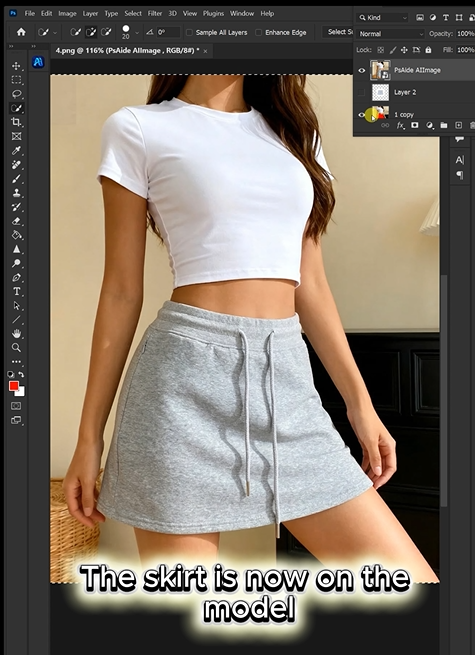
Wait 45-60 seconds. The AI delivers a new image where the model is now wearing your skirt instead of sweatpants. The waist sits naturally. The fabric flows correctly. The legs beneath the hem look realistic. The lighting matches perfectly.
Done.
5、What The AI Does While You Wait
| Challenge | AI’s Solution |
|---|---|
| Pants to skirt silhouette | Removes the pant structure, adds open bottom with appropriate drape |
| Hidden legs | Generates realistic leg details below the new hemline |
| Fabric behavior | Creates horizontal draping and natural skirt movement based on pose |
| Waist blending | Seamlessly integrates the skirt top with the model’s existing top |
| Lighting harmony | Matches all shadows and highlights to the original scene |
You don’t see any of this. You just get a finished image.
6、Real-World Examples
Before: Model in black sweatpants, standing casually.
After: Model in a flowing floral midi skirt, same pose, same lighting. Looks like it was shot that way.
Before: Model in gray joggers, sitting on a bench.
After: Model in a structured pencil skirt, seated naturally. The hem falls correctly over her knees.
Before: Model in athletic leggings, walking pose.
After: Model in a lightweight summer skirt with natural movement and swing.
7、When To Use This
Fashion catalogs: Update seasonal looks without new photoshoots
E-commerce sites: Show the same top with different bottoms instantly
Social media content: Create variety from a single photoshoot
Design testing: Visualize how a skirt design works with different poses before production
Lookbook creation: Mix and match outfits from existing assets
8、Pro Tips For Perfect Results
- For long skirts, the AI handles floor contact and hem placement automaticallyget the result.
- Mark from waist to hem for complete coverage
- Choose skirt images with similar lighting to your model photo for best results
- 2K resolution is ideal for most web and catalog use
- Keep your original file as a backup layer
9、Download link

https://psaide.com/?sfrom=A86R4u
Invitation Code: A86R4u

