
Table of Contents
1.PsAide Plugin: AI-Powered Background Remover
This is particularly true when dealing with details like dog fur, where color fringing or background remnants are common. In such cases, the PsAide plugin offers an efficient and precise solution. Using AI smart algorithms, it automatically identifies the main subject and completes the cutout, helping you quickly remove the background.
2.Step-Srep:
- Open the PsAide plugin and locate the 【Background Remover】 function.
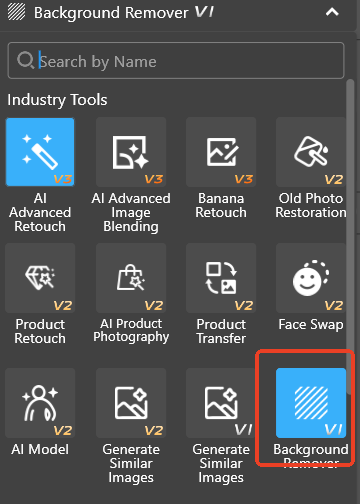
- Open your dog photo, select the entire image, and click the “Remove Now” button.

- PsAide will automatically recognize and remove the background, completing a high-precision cutout within seconds. It will display the clear fur details, perfectly separating the dog from the background.
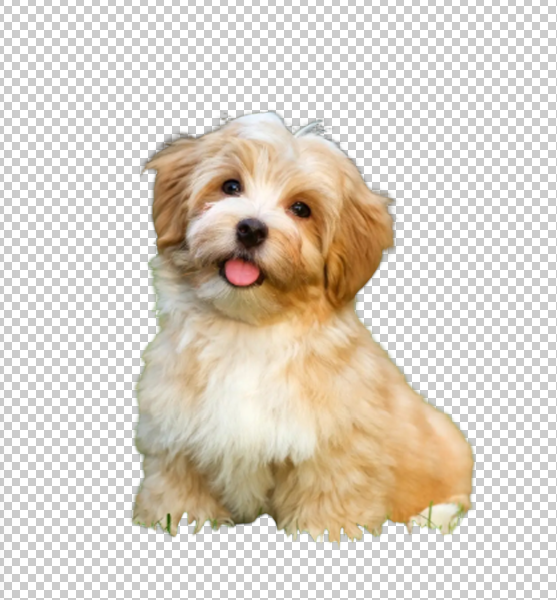
The advantage of the PsAide plugin lies in the efficiency of its AI algorithms. It can quickly process complex fur and fine details, performing exceptionally well on challenging images like human hair or pet fur.
3.Conclusion
Hair cutouts in Photoshop are indeed a technical task, but with the right tools and techniques, you can handle them with ease. Whether you use Photoshop’s built-in “Select and Mask” function, the Quick Selection Tool, or leverage the AI-powered Background Remover in the PsAide plugin, you can achieve high-quality cutouts quickly without sacrificing precision.
Download link
https://psaide.com/?sfrom=A86R4u
Invitation Code: A86R4u

