Table of Contents
For graphic designers, product marketers, and digital content creators, transforming 2D images into immersive 3D visuals is a powerful way to elevate branding, product showcases, and social media content. Whether it’s a 2D logo, a product sketch, or a flat illustration, a 3D effect can make the design pop and resonate more with audiences. Yet traditional 2D-to-3D conversion is fraught with pain points: it requires advanced 3D modeling software (like Blender or Maya), hours of manual mesh creation and texturing, and a steep learning curve for beginners. Even experienced designers struggle with uneven depth, unrealistic lighting, or lost details in the conversion process—resulting in stiff, unconvincing 3D visuals that fail to capture the original 2D design’s essence. This is where Nano Banana, the AI-powered feature in the PsAide plugin, revolutionizes AI Photo Editing for 2D-to-3D conversion.
Nano Banana solves the core challenges of traditional 2D-to-3D conversion through advanced deep learning and spatial mapping technology. Unlike generic 3D filters that add superficial depth, Nano Banana analyzes the 2D image’s key elements—shapes, colors, and textures—to create a true 3D spatial structure. It interprets the image’s perspective to generate realistic depth layers, adds soft light background to enhance the 3D effect, and preserves the original design’s color and detail consistency. Whether it’s a 2D product drawing, a brand logo, or a character illustration, Nano Banana transforms flat visuals into lifelike 3D images with natural depth and lighting, all powered by AI Photo Editing to simplify the once-complex process.

3 Simple Steps to Convert 2D to 3D with Nano Banana
Even users with basic Photoshop skills can master 2D-to-3D conversion in minutes using Nano Banana. Follow these three straightforward steps:
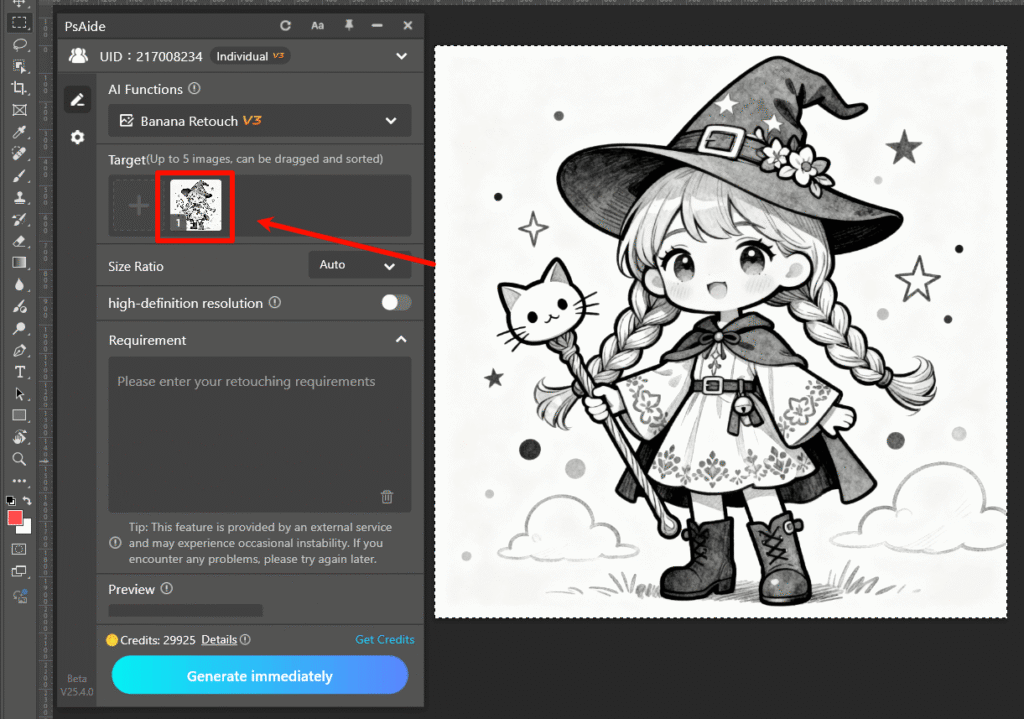
Step 1: Prepare Image and Use Nano Banana
Open your 2D image (e.g., a flat product illustration, logo, or sketch) in Photoshop (compatible with versions 2015 and above). Install the PsAide plugin, launch the Nano Banana feature from the plugin menu, and upload the 2D image to the Nano Banana workspace—no pre-editing or layer separation is needed, as the AI automatically identifies the image’s key elements.
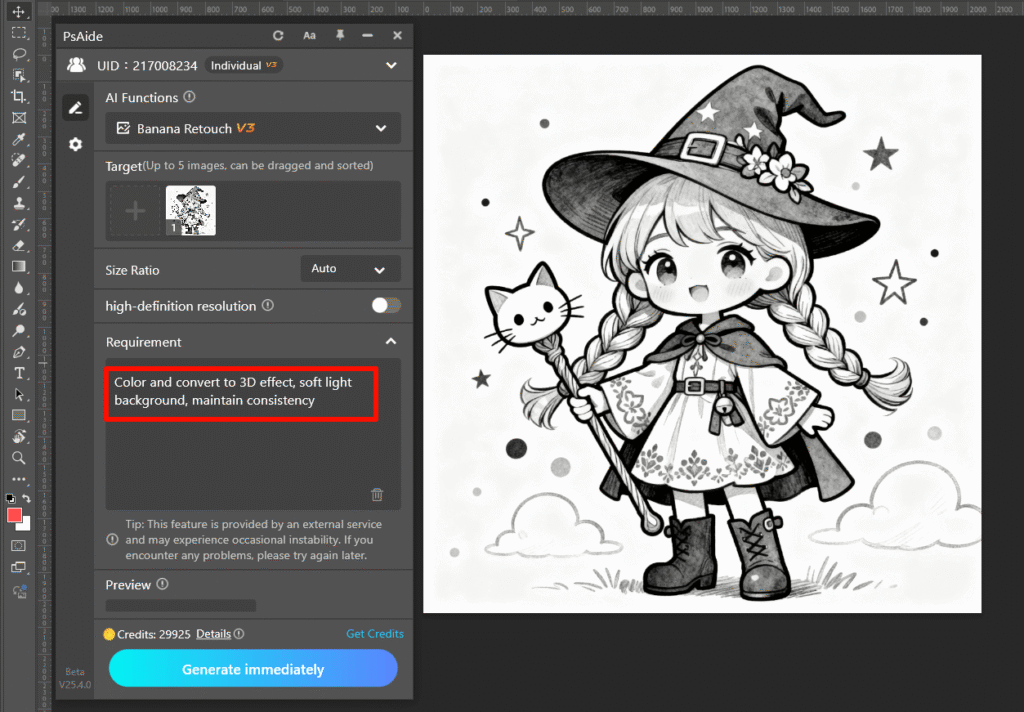
Step 2: Enter the Precise AI Photo Editing Prompt
Locate the prompt box in the Nano Banana interface and type the clear instruction: “Color and convert to 3D effect, soft light background, maintain consistency.” This prompt guides the AI Photo Editing engine to prioritize accurate color preservation, realistic 3D depth creation, and a cohesive soft light background that complements the converted 3D visual.
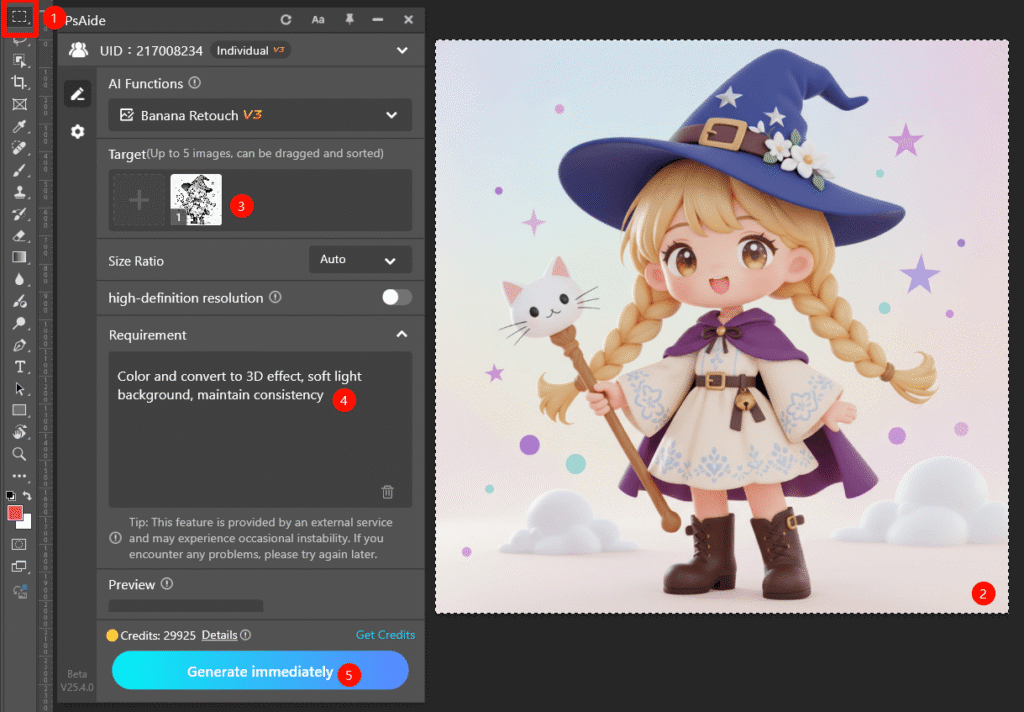
Step 3: Preview and Finalize the 3D Image
Click the “Generate immediately” button. Nano Banana processes the request in 6–9 seconds, generating a preview of the converted 3D image. You’ll see the 2D design transformed into a layered 3D visual with natural depth, vibrant colors matching the original, and a soft light background that enhances the immersive effect. Save the 3D image directly to your Photoshop project—you can further adjust the 3D depth or background brightness if needed to refine the result.
Core Advantages of Nano Banana for 2D-to-3D Conversion
Compared to traditional 3D conversion methods, Nano Banana offers unmatched benefits for creators and marketers. First, it slashes time and effort: what takes hours of manual 3D modeling is done in seconds, ideal for rapid content creation. Second, it lowers the skill barrier: no advanced 3D design or AI Photo Editing expertise is required, making 2D-to-3D conversion accessible to all. Third, it ensures quality: the AI’s spatial mapping creates realistic 3D depth without losing original details, unlike basic filters. Finally, it’s customizable: the soft light background and color preservation features let you maintain brand consistency while adding 3D flair.
Industry Application Value
Nano Banana is a game-changer across multiple industries. Graphic designers can quickly convert 2D logos to 3D for brand identity materials. E-commerce sellers can turn 2D product photos into 3D visuals to showcase products from new angles. Digital content creators can produce eye-catching 3D illustrations for social media or marketing campaigns. All these use cases leverage Nano Banana’s ability to deliver high-quality, immersive 3D visuals with minimal effort.
If you’ve wondered how to edit photo on Nano Banana to convert 2D images to stunning 3D visuals, Nano Banana is the solution. It harnesses the power of AI Photo Editing to simplify 2D-to-3D conversion, eliminate traditional pain points, and unlock creative possibilities for your flat designs. Download PsAide today to unlock Nano Banana—elevate your visuals with effortless, professional 3D conversions!