
Table of Contents
In Amazon e-commerce operations, main product images and size marked images are essential materials that directly impact click-through and conversion rates. Traditional creation in PS requires separate scene setup, manual size marking and tedious retouching—not only time-consuming, but also prone to mismatched product-scene combinations, non-standard size labels and inconsistent visual effects. With PS paired with Psaide’s Nano Banana Pro, you can create these two types of images in one stop, significantly lowering the operational threshold.
1.Core Solution: Nano Banana Pro + PS – One-Stop for Amazon Main & Size Marked Images
Psaide’s built-in Nano Banana Pro enables precise product-background integration and intelligent size marking via AI. No complex manual PS design is needed—you can create Amazon-compliant images in 3 steps, balancing visual quality and production efficiency perfectly.
Step-by-Step Process
- Import Materials to PS & Manage Layers Launch PS, click “File > Open” to import your vase product image (Figure 1) and a selected minimalist desktop background (Figure 2, Amazon’s preferred style). Press Ctrl+J to duplicate both background layers, hide the original ones, and perform all edits on the duplicated layers. This PS layer management trick prevents accidental changes to raw images and facilitates subsequent adjustments.
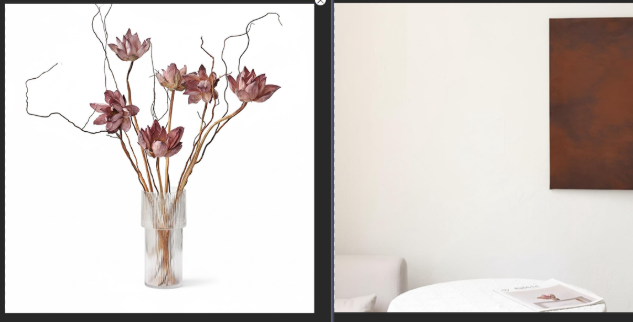
- Launch Nano Banana Pro & Generate Main Image with Product-Background Fusion Locate the installed Psaide plugin panel in PS, expand the function list and click Nano Banana, then select the Pro version for higher fusion precision. Click the plugin’s upload button to add the vase image and background image separately, choose Amazon’s standard main image size (recommended 1:1 for HD display), and enter the precise prompt in the text box: “Naturally place the vase from Figure 1 on the table in Figure 2 while preserving all details of Figure 1”. No extra parameter adjustments are needed.
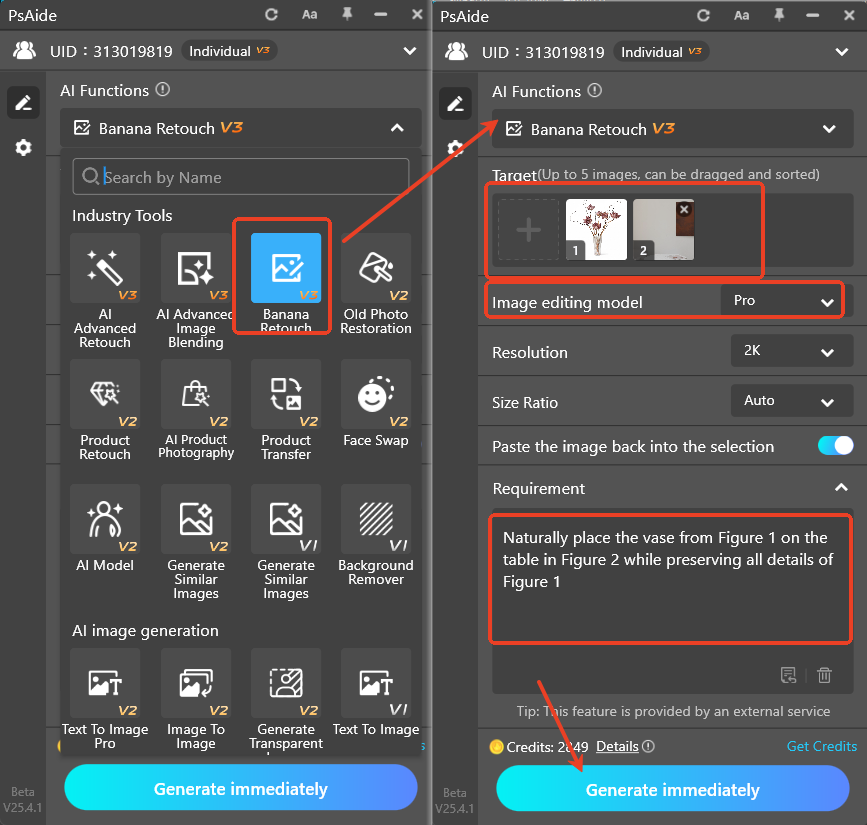
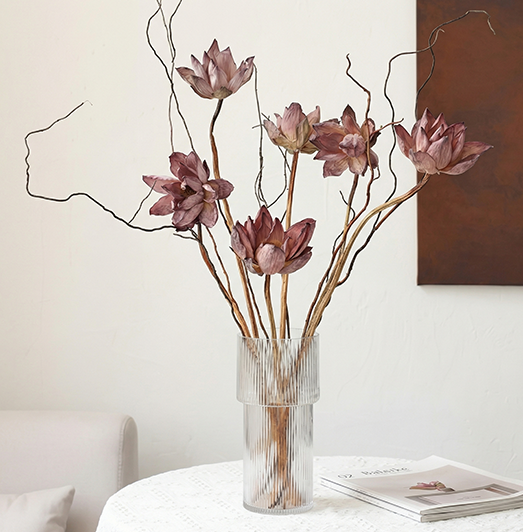
- Generate Main Image & Modify Prompt for Size Marked ImageClick the “Generate” button—the AI will finish processing in 20 seconds, automatically adjusting light and shadow to blend the vase with the desktop naturally. PS will create a new layer for the main image, which is ready for direct use on Amazon.
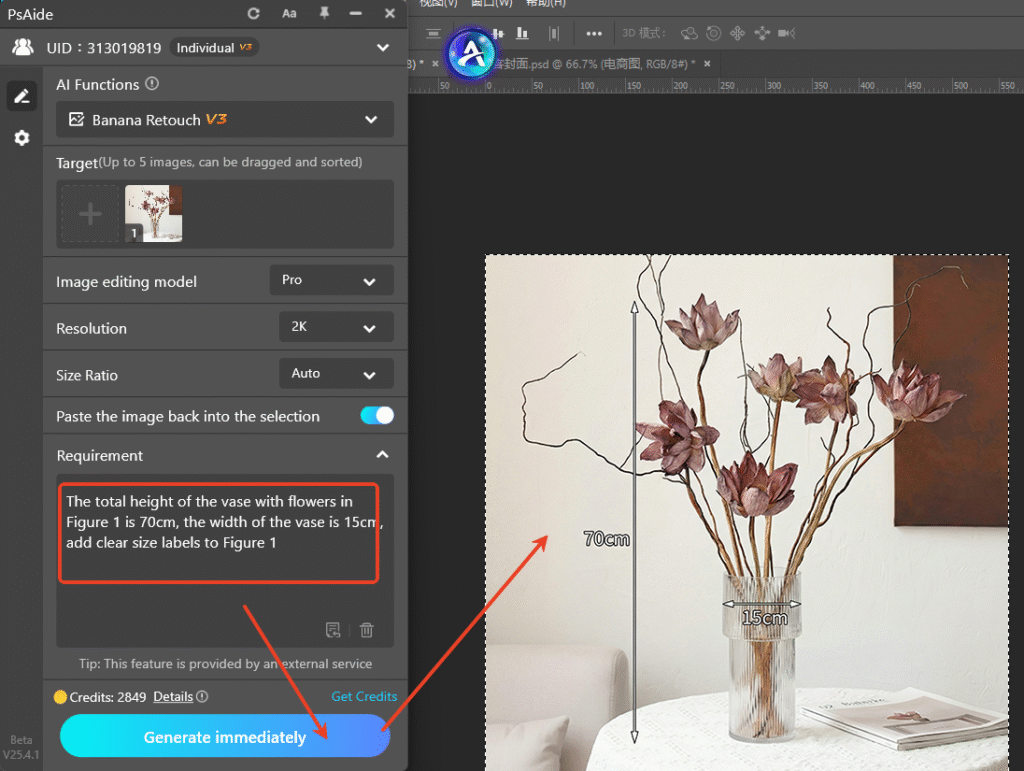
- For a size marked image, there’s no need to re-import materials: simply modify the prompt to “The total height of the vase with flowers in Figure 1 is 70cm, the width of the vase is 15cm, add clear size labels to Figure 1” and click “Generate” again to get an image with standard, legible size markings.
2.Core Advantages of Nano Banana Pro for Amazon Image Creation
Compared with the traditional PS workflow, Nano Banana Pro has prominent advantages:
- One-stop Efficiency: Create two key Amazon images in under 3 minutes, far outpacing manual design speed.
- Precise & Compliant Effects: AI optimizes scene light and shadow, and generates standard size markings that meet Amazon’s display requirements.
- Beginner-Friendly Operation: Switch between image types only by modifying prompts, with zero learning curve for new users.
- Unified Visuals: AI ensures consistent texture and style across main and size marked images, maintaining a cohesive storefront look.
3.Pro Tips (PS + Plugin Matching Skills)
- Choose solid-color or minimalist background images to keep the focus on the vase and avoid visual distraction.
- Add details like “clear font, eye-catching red color” to size marking prompts to improve label readability.
- Fine-tune brightness and contrast in PS after generation to boost the visual impact of main images, aligning with Amazon’s search display needs.
Struggling with “how to make Amazon main images in PS” and tired of the tedious process of creating multiple e-commerce images? Try PS paired with Psaide’s Nano Banana Pro! No professional design skills are required—create high-quality Amazon main images and size marked images with one click, efficiently produce premium e-commerce materials for your Amazon store and boost your conversion rates.
Download link
https://psaide.com/?sfrom=A86R4u
Invitation Code: A86R4u

