
Table of Contents
Turning a flat image into a soft 3D style is usually complex and time-consuming. Creating a realistic felt texture with volume, depth, and lighting often requires 3D modeling tools.
Now, with PsAide nano banana, you can easily create a high-quality nano banana 2D to 3D felt effect. Simply upload a 2D cartoon image, enter a prompt, and generate a realistic 3D felt-style result instantly.
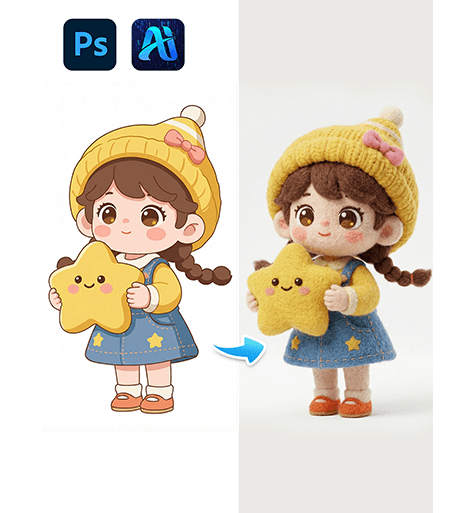
1. nano banana 2D to 3D felt effect workflow
(1)Simple process for nano banana 2D to 3D felt effect
① Upload a 2D cartoon character image
② Enter prompt
③ Click generate to get nano banana 2D to 3D felt effect
(2)Realistic 3D felt transformation
① Convert flat image into 3D volume
② Add soft felt texture and fiber details
③ Generate natural lighting and shadows
(3)Efficient creation for nano banana 2D to 3D felt effect
① No 3D modeling required
② No complex software needed
③ Fast and stable generation
2. How to create nano banana 2D to 3D felt effect
(1)Prepare your image
① A clear 2D cartoon character
② Prefer simple background
(2)Open PsAide nano banana
(3)Upload image
① Upload the 2D character
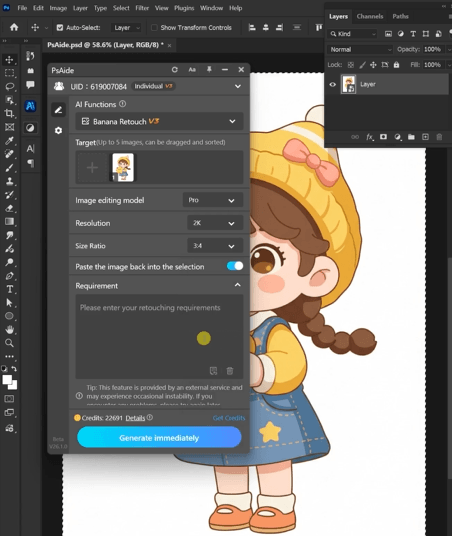
(4)Enter prompt for nano banana 2D to 3D felt effect
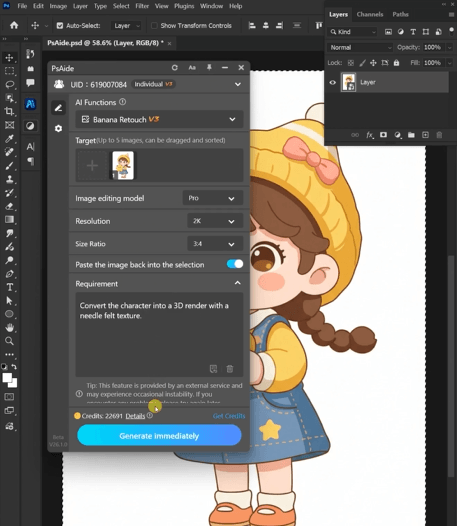
Recommended prompt:
Comvert the character into a 3D render with aneedle felt texture.
(5)Generate nano banana 2D to 3D felt effect
Click generate to get the final 3D felt image
3. Tips for better nano banana 2D to 3D felt effect
(1)Choose the right image
① Clear outlines work best
② Avoid cluttered backgrounds
(2)Optimize prompt for nano banana 2D to 3D felt effect
① Add keywords like “felt texture”, “soft wool”, “3D depth”
② Emphasize lighting and softness
③ Adjust prompt for better results
(3)Maintain character consistency
① Keep proportions unchanged
② Avoid over-modifying structure
4. Use cases of nano banana 2D to 3D felt effect
(1)Content creation
① Social media visuals
② Cute character upgrades
(2)Design applications
① IP character styling
② Creative branding visuals
(3)E-commerce
① Decorative images
② Product-style visuals
5. Why choose nano banana for 2D to 3D felt effect
(1)No professional skills required
(2)One-click nano banana 2D to 3D felt effect
(3)Fast generation speed
(4)Suitable for batch content creation
6.Conclusion
With PsAide nano banana, creating a realistic nano banana 2D to 3D felt effect is simple and efficient. Just upload a 2D image and enter a prompt to instantly generate a soft, 3D felt-style result, perfect for creators and designers.

Download Link: https://psaide.com/?sfrom=ZfhxUK
Invitation Code: ZfhxUK

