
Table of Contents
Scarves add softness and motion to fashion imagery, but manually replacing them often results in flat textures or unnatural draping. With nano banana in PsAide, creators can transfer scarf products directly onto model scene photos while preserving fabric flow, neck posture, and lighting harmony.
By using a red mask workflow combined with AI fabric analysis, nano banana ensures scarves blend naturally with clothing layers and environmental light.
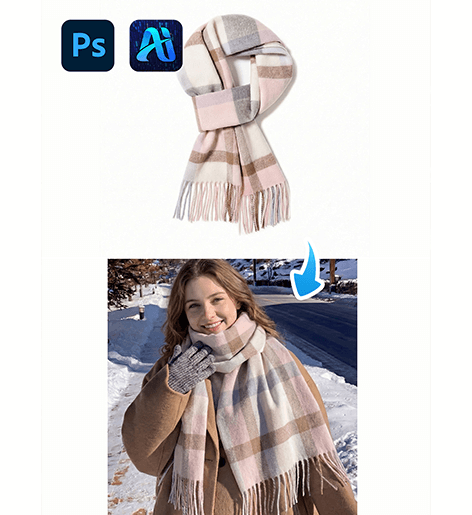
1. nano banana Benefits for Scarf Replacement
(1)Challenges in Manual Scarf Editing
Traditional editing frequently causes stiff fabric appearance or mismatched folds.
(2)Why nano banana Produces Softer Results
nano banana analyzes fabric curvature, neck angles, and surrounding clothing textures to generate realistic draping.
2. nano banana Red Mask Scarf Workflow
(1)Paint the Original Scarf Area Red
① Open the scene image.
② Paint the existing scarf red.
③ Avoid covering hair or background areas.
This step clearly signals the replacement zone for nano banana.
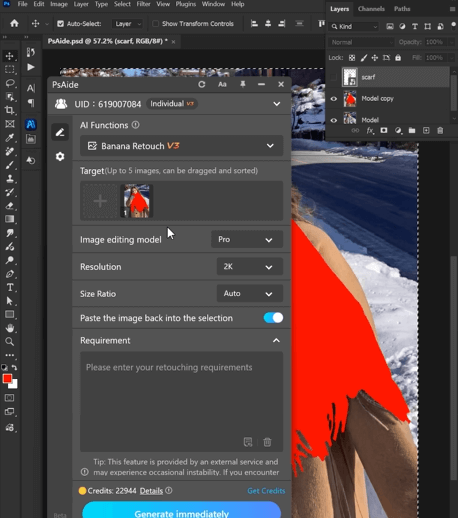
(2)Upload Scene Image and Scarf Product Image
① Upload the red-masked scene image.
② Upload the scarf product image with clear texture details.
③ Maintain balanced resolution.
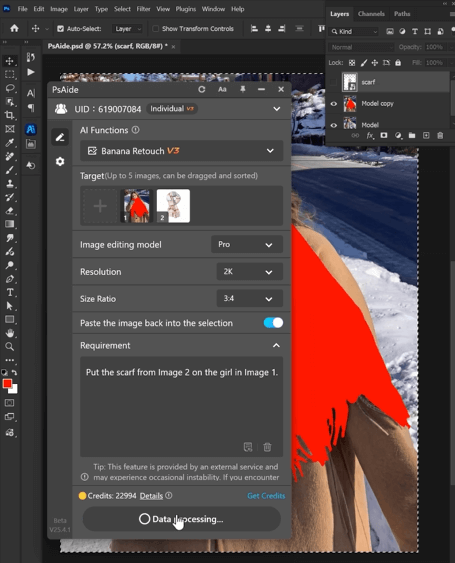
(3)Enter a Detailed Prompt
① Describe scarf material, length, and style.
② Mention soft folds and natural shadows.
③ Keep instructions direct and descriptive.
(4)Click Generate
① Click Generate in nano banana.
② Inspect fabric flow and neck alignment.
③ Regenerate if subtle refinements are required.
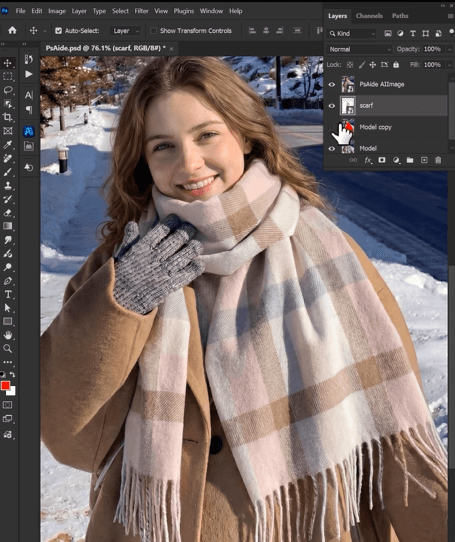
3. Fabric Flow and Lighting Accuracy
(1)Natural Draping
nano banana adapts scarf curvature to match body posture.
(2)Soft Shadow Integration
Highlights and folds remain gentle and realistic.
4. Practical Applications
(1)Winter Fashion Campaigns
Produce multiple scarf styles from a single base image.
(2)Lifestyle Branding
Quickly generate cozy accessory variations.
5. Summary
With red mask guidance and AI fabric intelligence, nano banana delivers efficient and natural scarf replacement, enabling creators to scale accessory visuals without reshooting.

Download Link: https://psaide.com/?sfrom=ZfhxUK
Invitation Code: ZfhxUK

