
Table of Contents
Changing a model’s outfit usually requires complex masking and manual editing. With nano banana, you can easily complete a realistic nano banana outfit replacement in seconds.
Using nano banana, simply upload a model image, mark the jacket area, enter a prompt, and generate a natural and high-quality nano banana outfit replacement instantly.
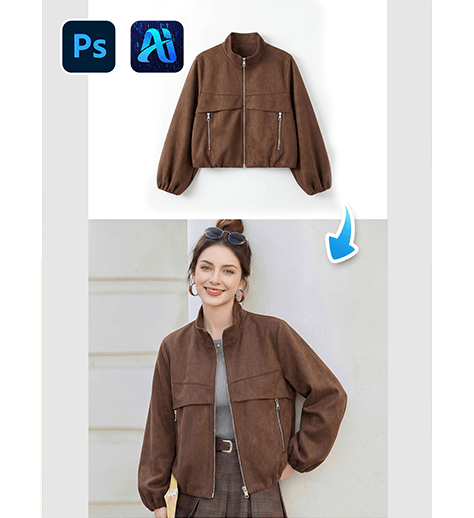
1. nano banana outfit replacement workflow
(1)Simple process with nano banana
① Upload a model image
② Mark the jacket area
③ Enter prompt and generate nano banana outfit replacement
(2)Realistic results using nano banana
① Automatically replaces the jacket
② Preserves body posture and proportions
③ Matches lighting and shadows naturally
(3)Efficient workflow with nano banana
① No manual masking skills needed
② No complex editing required
③ Fast nano banana generation
2. How to use nano banana for jacket replacement
(1)Prepare your image
① Use a clear model photo
② Ensure the jacket area is visible
(2)Open nano banana
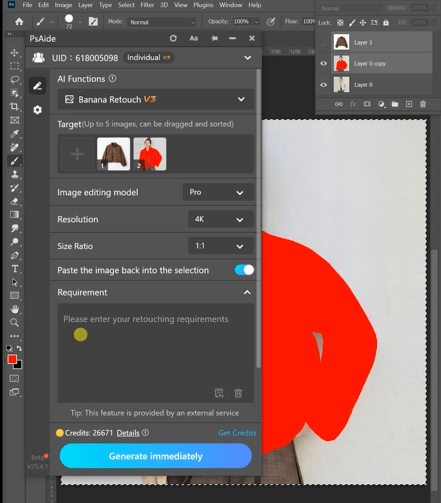
(3)Upload image
① Upload the model photo
(4)Mark area (key step)
① Use a brush to mark the jacket area
(5)Enter prompt in nano banana
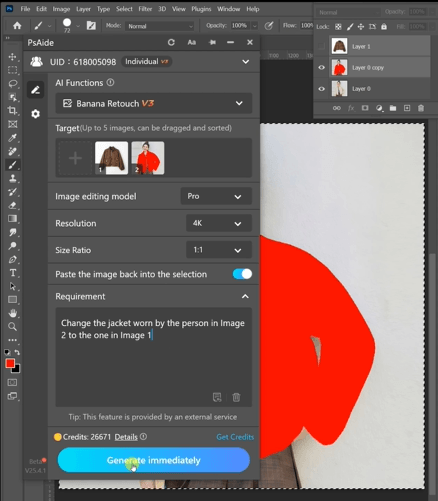
Recommended prompt:
Change the jacket worn by the person in Image2 to the one in Image 1
(6)Generate nano banana outfit replacement
Click generate to get the final image
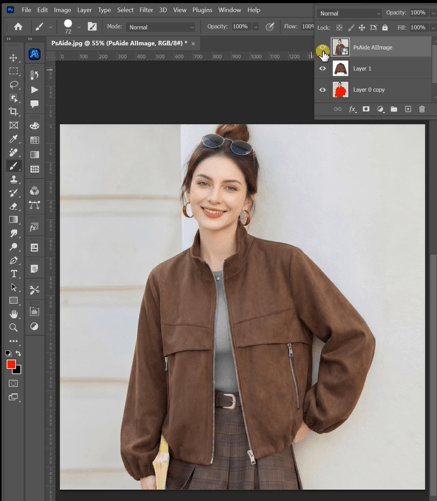
3. Tips to improve nano banana outfit replacement
(1)Accurate masking
① Cover the full jacket area
② Avoid marking skin or background
(2)Optimize prompt in nano banana
① Add keywords like “realistic fabric” and “natural fit”
② Specify jacket styles such as leather or denim
③ Test different prompts in nano banana
(3)Maintain realism
① Keep original pose
② Avoid overly complex designs
4. Use cases of nano banana outfit replacement
(1)E-commerce
① Clothing product display
② Fast SKU generation
(2)Content creation
① Social media outfit edits
② Before and after visuals
(3)Fashion design
① Style testing
② Virtual try-on visuals
5. Why choose nano banana
(1)No professional skills required
(2)One-click nano banana outfit replacement
(3)Fast and efficient workflow
(4)Suitable for batch editing
Conclusion
With nano banana, replacing a model’s jacket becomes simple and efficient. Just upload, mark, enter a prompt, and generate a realistic outfit instantly.

Download Link: https://psaide.com/?sfrom=ZfhxUK
Invitation Code: ZfhxUK

