Table of Contents
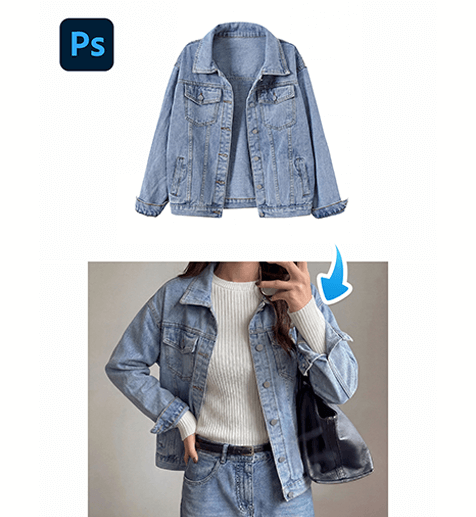
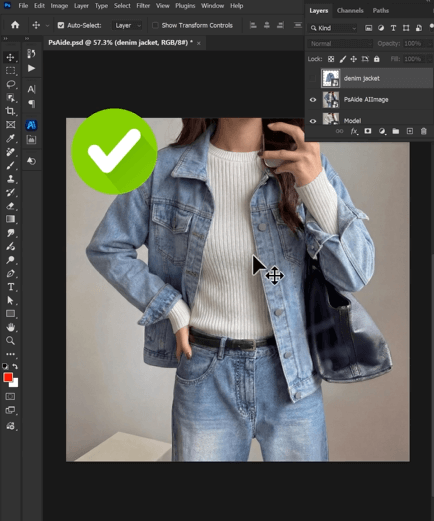
Creating model images with different clothing often requires reshooting or complex Photoshop editing. With nano banana, you can quickly change a model’s jacket by uploading a model image and a product image.
This guide shows how to use nano banana to generate a model wearing a new jacket in just a few simple steps.
1. Nano Banana Jacket Transfer Steps
Follow these steps to change a model’s jacket using nano banana.
(1)Prepare the model image
Choose a model photo where the upper body is clearly visible.
For better results with nano banana, the image should have:
① Clear clothing area
② Natural lighting
③ A simple background
These conditions help nano banana generate more realistic clothing results.
(2)Upload the model image and jacket product image
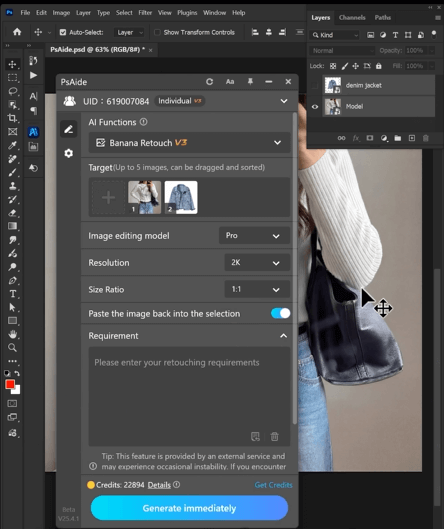
Open the nano banana feature in the PSAide plugin, then upload:
① The model image
② The jacket product image
For best results with nano banana, the jacket image should clearly show the full clothing shape.
(3)Enter the prompt
Use a prompt to guide nano banana, for example:
Dress the model from image 1 in the denim jacket from image 2.

This helps nano banana generate a natural clothing replacement.
(4)Generate the final image
Click Generate and wait a few seconds.
Nano banana will produce a realistic model image wearing the new jacket.
2、Conclusion
Using nano banana makes it easy to generate clothing model images without photoshoots. By uploading the model image and product image, entering a prompt, and generating the result, nano banana can quickly create realistic jacket model photos for e-commerce and marketing.

Download Link: https://psaide.com/?sfrom=ZfhxUK
Invitation Code: ZfhxUK