
Table of Contents
1. Nano Banana Simple Wrinkle Removal for Clothing Images
(1)Why Traditional Photoshop Wrinkle Removal Is Inefficient
Removing clothing wrinkles manually in Photoshop often requires multiple tools, layers, and advanced experience. For fashion images, especially e-commerce product photos, maintaining fabric texture and natural lighting while fixing wrinkles is time-consuming. Without nano banana–level automation, manual workflows easily lead to over-smoothing, distorted shapes, or inconsistent results.
(2)Common Pain Points in Manual Editing
① Excessive time spent on repeated retouching steps
② Difficulty preserving fabric texture and volume
③ Inconsistent results across different clothing types
These issues make traditional methods unsuitable for large-scale workflows, where nano banana solutions perform significantly better.
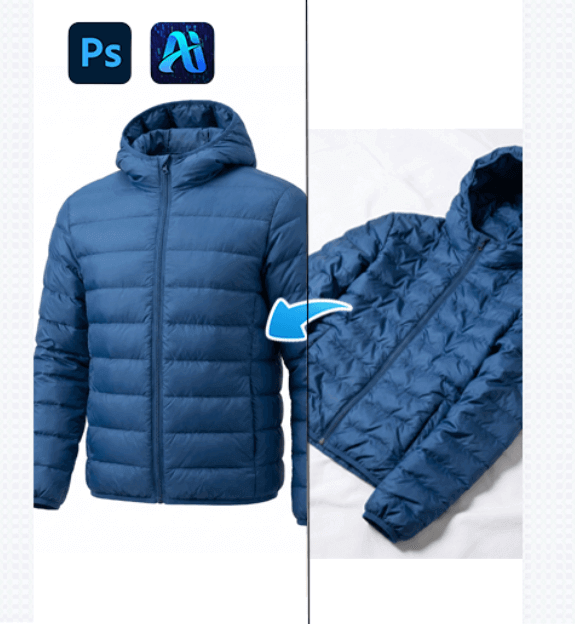
2. Nano Banana Pro Workflow with PsAide
(1)How Nano Banana Works in PsAide
Nano banana enables PsAide to intelligently analyze clothing wrinkles, fabric structure, and lighting distribution. Instead of flattening garments, nano banana reconstructs natural fabric flow and restores realistic shapes while removing wrinkles efficiently.
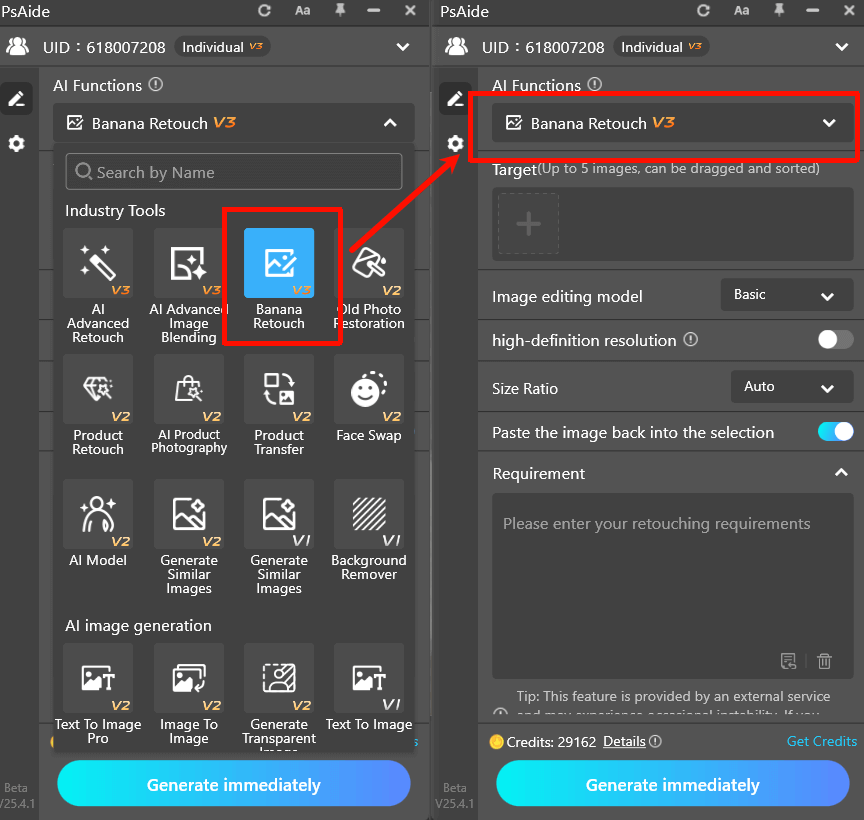
(2)Simple Step-by-Step Nano Banana Operation
① Open the Clothing Image
Load the image into Photoshop and activate PsAide.
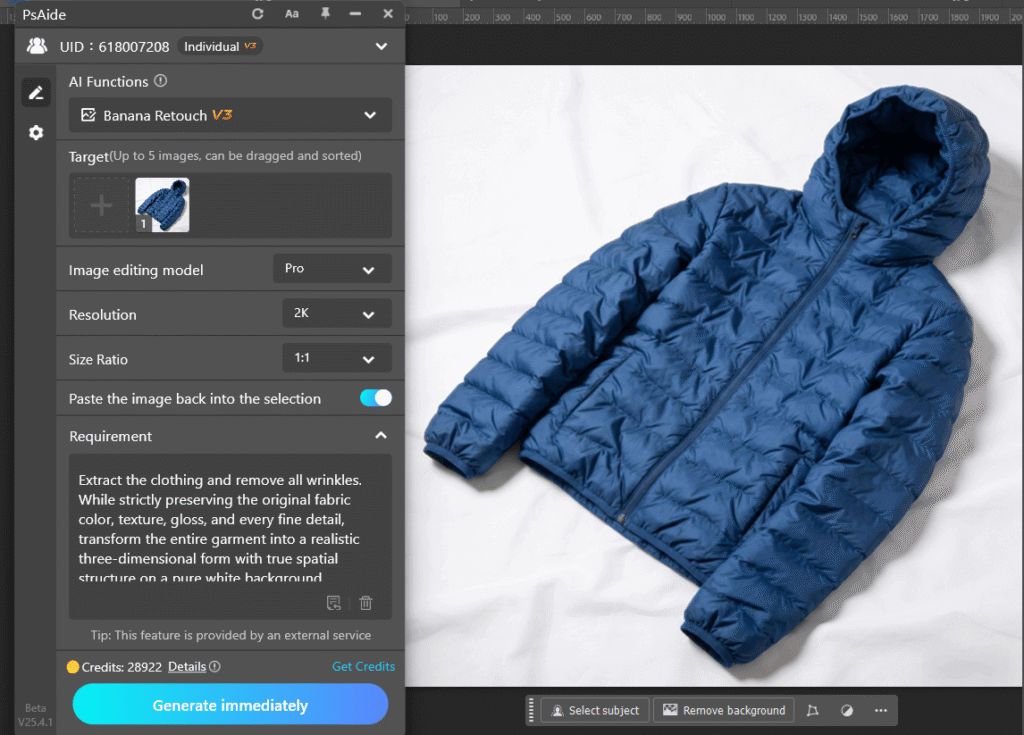
② Enter a Nano Banana Prompt
Example:
Extract the clothing and remove all wrinkles. While strictly preserving the original fabric color, texture, gloss, and every fine detail, transform the entire garment into a realistic three-dimensional form with true spatial structure on a pure white background.
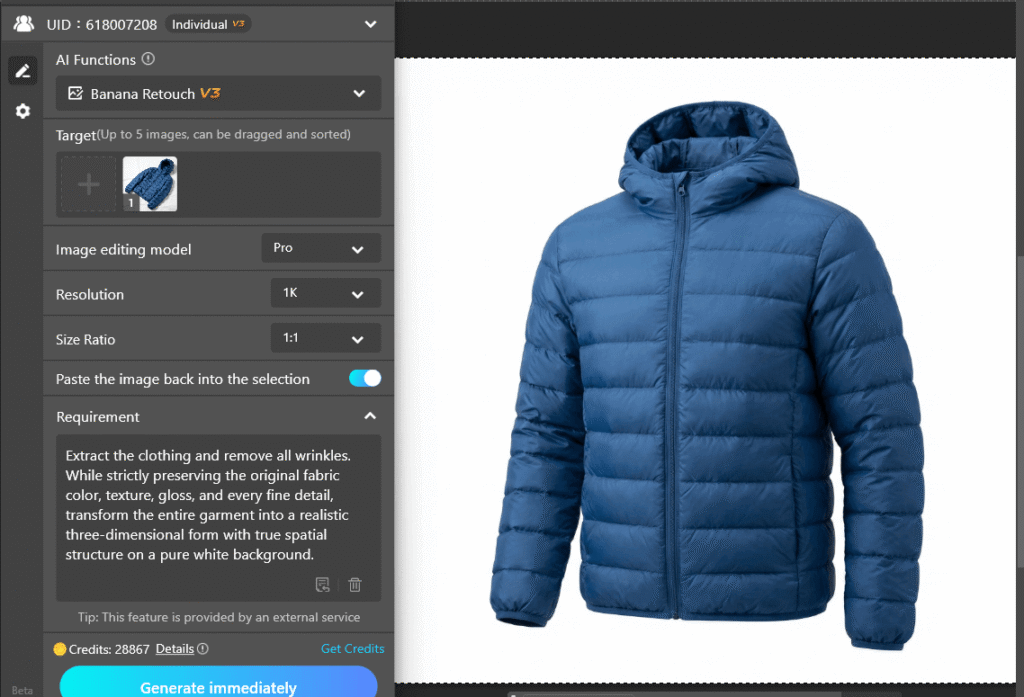
③ Generate the Result
PsAide applies nano banana processing to smooth wrinkles, optimize garment shape, and maintain realistic depth.
④ Optional Fine-Tuning
Minor prompt adjustments can further refine results without complex manual editing.
With nano banana, the entire wrinkle removal process becomes fast, repeatable, and beginner-friendly.
3. Nano Banana Advantages for Different Clothing Types
(1)Adaptable to Various Fabrics
Nano banana works effectively on knitwear, coats, dresses, and structured garments by adjusting wrinkle correction logic based on fabric characteristics.
(2)Improved Shape and Structure
① Automatically restores garment contours
② Avoids flattening caused by over-editing
③ Maintains realistic folds and volume
Nano banana ensures clothing images remain natural and visually appealing.
4. Why Nano Banana Is Ideal for E-commerce Image Editing
(1)High Efficiency
Nano banana reduces hours of manual Photoshop work to seconds, making it suitable for high-volume product image processing.
(2)Consistent Visual Quality
By standardizing wrinkle removal, nano banana delivers consistent results across entire product catalogs.
(3)Better Commercial Appeal
Clean, wrinkle-free clothing images created with nano banana enhance professionalism and increase buyer confidence.
4.Conclusion
For e-commerce sellers, designers, and photographers, nano banana is an efficient and reliable approach to producing clean, professional clothing images at scale.

Download Link: https://psaide.com/?sfrom=ZfhxUK
Invitation Code: ZfhxUK

